

A 3D drawing pen can be wonderfully immediate: press a button, guide a strand of melted plastic through the air, and a flat sketch becomes a small structure. The catch is that the wrong pen can make the first project frustrating, especially when temperature, flow speed, safety, and templates are not well matched to the person using it. Our guide to the Best 3D drawing pen choices separates genuine filament pens from reusable stencil books and novelty puff-art markers.
The strongest options here range from a child-focused, no-hot-parts kit to adjustable pens that suit more deliberate model making. Several entries are accessories rather than complete pens, so check the description carefully before ordering.
The 3Doodler Start+ Essentials is our top pick for children, while the MYNT3D Professional is the better choice for precise adult projects. The rest of the list covers beginner-friendly adjustable pens, stencil kits, and heat-expanded art markers.
Comparison table
| # | Product | Award | Filament or medium | Key feature | Best for |
|---|---|---|---|---|---|
| 1 | 3Doodler Start+ Essentials | Best for kids | 3Doodler Start plastics | No hot parts | Children aged 6 and up |
| 2 | SCRIB3D P1 | Best beginner control | PLA and ABS | Stepless speed slider | Families and first-time users |
| 3 | MYNT3D Professional Pen | Best for precision | PLA compatible | 140 to 230°C adjustment | Experienced makers |
| 4 | SCRIB3D Advanced Pen | Best guided kit | PLA | LCD and 8 speeds | Structured projects |
| 5 | EunoiaLabs 3D Pen Kit | Best stencil accessory | Compatible with 3D pens | 65 templates | Guided tracing |
| 6 | Popcorn Pens Bubble Art Set | Best novelty art set | Heat-expanded ink | 12 pens | Cards and crafts |
| 7 | CKMOREL Spiral Template Book | Best flat-lay templates | Compatible with 3D pens | Spiral binding | Repeated tracing |
| 8 | SCRIB3D Start+ Essentials | Best family activity kit | PLA and ABS | 30 feet of filament | Family crafting |
| 9 | FKMEE Topacme Relief Pens | Best puffy surface art | Heat-expanded ink | Six neon colors | Relief art |
| 10 | Dayker Template Book | Best compact stencil set | Compatible with 3D pens | 40 designs | Beginners and gifts |
1. 3Doodler Start+ Essentials: Best for Kids

Pros
- No hot parts for children aged 6 and up
- Includes 72 mixed-color Start+ plastic strands
- Comes with a DoodlePad, Doodlemat, and activity guide
- USB-C charging and a safety standby mode
Cons
- Works only with 3Doodler Start plastics
- Less suitable for adult precision work
- The kit is focused on guided play rather than open-ended material choice
Best for: parents who want a supervised, screen-free 3D art activity for a young child.
The main reason to choose the 3Doodler Start+ Essentials is not a more elaborate control system. It is the safety design. The pen has no hot parts, and both the nozzle and plastic can be touched, which removes the most worrying feature of conventional heated filament pens for younger users. That makes it much easier for a child to focus on drawing instead of waiting for an adult to intervene every time the pen needs to be moved.
This is also the most complete child-oriented package in the group. It includes 72 strands of mixed-color Start+ plastic, a DoodlePad, a Doodlemat, a USB-C cable, and an activity guide. The manufacturer describes the charging system as 50 percent faster than the earlier experience, though the data does not specify a charging time. The added standby mode is a sensible safety detail for a project that may be interrupted by snack breaks, questions, or a child simply wandering away.
The trade-off is the closed material system. Unlike the SCRIB3D P1 and the MYNT3D pens, this model is designed around its own Start plastics rather than ordinary PLA and ABS. That limitation is deliberate, but it means a child who eventually wants to experiment with standard materials will outgrow it sooner. It is also not the choice for someone who wants to control exact extrusion temperature or create rigid, highly detailed structures.
The pen itself weighs 0.67 pounds and comes in a kit measuring 9.06 by 6.02 by 2.56 inches. Those figures matter less than the rounded, child-focused design and the included activity material, but they help explain why this is a kit to set up at a table rather than toss into a small travel pouch. For other creative activities that do not involve heated filament, a drawing setup that starts with simpler hand control may suit a very young child better. For a child aged 6 or older who specifically wants to build in three dimensions, this is the safest and clearest starting point.
2. SCRIB3D P1: Best Beginner Control

Pros
- Stepless speed control for slow outlines and faster fill work
- Supports PLA and ABS with adjustable temperature ranges
- Includes three colors and 30 feet of PLA
- Ceramic nozzle and two-minute auto-sleep function
Cons
- Requires a two to three minute warm-up
- Heated nozzle needs adult supervision around children
- The manual controls take some practice
Best for: a beginner who wants a conventional filament pen with room to improve.
The SCRIB3D P1 is the most approachable conventional pen here. Its stepless speed slider is more useful than a handful of fixed modes because it lets the user slow the material for a small corner, then increase the flow for a broader fill without changing tools. That makes the learning curve gentler than it can be with a simple start and stop button.
The included three colors and 30 feet of PLA mean a new user can begin immediately rather than assemble a separate material order. PLA is generally a straightforward material for first projects, and the P1 can also be adjusted for ABS. The listed PLA range is 160 to 210°C, while ABS is listed at 210 to 235°C. Those ranges are not just numbers to memorize: they determine how easily the plastic flows and how much heat the pen requires, so material selection should follow the pen settings rather than guesswork.
The loading procedure is reasonably clear. A red light indicates warm-up, which takes about two to three minutes, and the forward control feeds the strand. Holding or double-clicking the forward button produces continuous flow, while holding reverse retracts the filament at the end. The ceramic nozzle, anti-clogging features, and two-minute auto-sleep function are welcome details for beginners who are still learning when to stop the feed.
Compared with the MYNT3D Super, the P1 offers a similar slim, adjustable concept but gives its temperature ranges more explicitly. Compared with the SCRIB3D Advanced, it lacks the LCD display and eight defined speed options, yet the slider feels less intimidating for a first project. It weighs about 0.8 pounds, so it is not as light as the MYNT3D Super at about 0.49 pounds. Skip it if a child needs a no-hot-parts device, or if an experienced maker wants one-degree temperature adjustments. For everyone else, it is a strong conventional starting point, especially when the goal is to learn how flow speed changes a line.
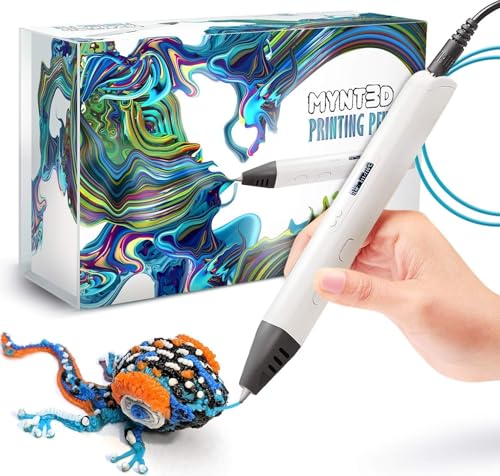
3. MYNT3D Professional Pen: Best for Precision
Pros
- Temperature adjusts in one-degree increments
- Wide 140 to 230°C operating range
- OLED display makes the selected heat visible
- Adjustable feed helps control line thickness
Cons
- More complicated than a child-focused pen
- Heavier than the MYNT3D Super
- The included filament is limited to three colors
Best for: artists and makers who want close control over heat and material flow.
The MYNT3D Professional Pen is the one to choose when a 3D line needs to be repeatable rather than merely fun. Its large OLED display shows the material temperature, and the temperature can be adjusted in one-degree increments from 140 to 230°C. That level of control is unusual among beginner-focused pens and gives an experienced user a practical way to tune the behavior of a material without relying only on the feel of the extrusion.
The adjustable feed matters just as much. Temperature controls how readily the plastic melts, but feed speed determines how much material arrives at the nozzle while the pen is moving. A slower feed can help with a fine outline, while a faster setting can fill a panel more quickly. The pen does not turn 3D drawing into a precision manufacturing process, but the combination of visible temperature and adjustable flow makes it better suited to deliberate structures than the 3Doodler Start+.
The kit includes three colors of PLA, an AC adapter, and a slim ergonomic pen. The product weighs about 0.75 pounds and measures 7.99 inches in length, 5.2 inches in width, and 2.6 inches in height according to the supplied product information. It is still compact enough for a craft table, although the wired AC adapter makes it less portable than a charging-based setup.
There is a clear reason not to buy it. A young child who just wants to draw will gain little from one-degree adjustments and may find the display and controls distracting. The SCRIB3D Advanced is a friendlier guided alternative because it includes a stencil book, project guide, and 50 feet of PLA, while the MYNT3D Professional wins when heat tuning is the priority. If your projects extend beyond doodles into small parts and layered forms, the difference between guided drawing and more controlled digital creation is useful context. This is the pen for the maker who is ready to manage settings rather than simply press forward.
4. SCRIB3D Advanced Pen: Best Guided Kit

Pros
- LCD screen shows heat settings
- Eight speed options make flow easier to repeat
- Includes five colors and about 50 feet of PLA
- Ergonomic soft-touch surface
Cons
- Warm-up takes about two to three minutes
- Less fine-grained than the MYNT3D Professional
- Heated operation is not appropriate for unsupervised young children
Best for: beginners who want a more structured route into accurate 3D models.
The SCRIB3D Advanced Pen is a good middle ground between a basic starter pen and a specialist control tool. Its LCD screen puts heat information in view, while eight speed options give the user repeatable settings for different kinds of lines. That is easier to understand than an entirely free-flow slider when following a project guide, though it is not as exact as the one-degree adjustment system on the MYNT3D Professional.
The kit is particularly well equipped for someone who does not yet have a project plan. It includes five colors of PLA, listed as about 15 meters or 50 feet, along with a power adapter, step-by-step manual, and stencil guide. That material supply supports more ambitious first attempts than a short sample bundle. The loading controls also include forward and reverse functions, so a user can feed the filament, stop it cleanly, and retract it when changing colors or finishing a section.
Comfort is another reason it stands out. The pen has a curved ergonomic shape and soft-touch surface, details that become more meaningful during a long tracing session than during a quick novelty project. Its listed weight is about 0.73 pounds, close to the MYNT3D Professional, and the product is roughly 7.8 inches wide by 4.1 inches long and 2.5 inches high according to the supplied dimensions. Those measurements suggest a substantial pen rather than a tiny marker.
The weakness is that the control system occupies an in-between position. The eight speed settings are more structured than the P1's stepless slider but less exact than the MYNT3D Professional's one-degree temperature adjustments. A child should use it only with appropriate supervision because it is a heated filament tool, while the 3Doodler Start+ is designed around no hot parts. Choose this one when project guidance, included PLA, and comfortable handling matter more than the finest possible tuning.
5. EunoiaLabs 3D Pen Kit: Best Stencil Accessory

Pros
- Includes 65 patterns across 42 pages
- Silicone mat has grippy and smooth sides
- Mat is intended for repeated reuse
- Includes PVC mat and four heat-resistant finger sleeves
Cons
- Does not include a 3D pen
- Does not include filament
- The listed projects are aimed at ages 12 and up through adults
Best for: someone who already owns a 3D pen and wants more structured projects.
The EunoiaLabs 3D Pen Kit is not a pen, and that distinction is important. It is a companion set built around a 42-page stencil book, a silicone mat, a PVC mat, and four heat-resistant finger sleeves. For someone opening a box expecting a complete drawing pen, it would be the wrong purchase. For an existing pen owner who has run out of ideas, it may be the most useful accessory in this list.
The book contains 65 patterns covering animals, architecture, cartoons, and other subjects. A stencil changes the task from inventing a shape and keeping its proportions consistent to tracing lines, allowing them to cool, and assembling the pieces. That is a better way to learn basic 3D pen habits, especially how much filament to use on a line and how long a piece needs before it can be lifted.
The silicone mat is the strongest part of the set. One side is described as gripping firmly for tracing, while the other is intended to glide more smoothly. Finished pieces are meant to pop off cleanly, and the mat is described as heat resistant across repeated uses. The supplied size is 10 by 6.7 inches, giving the user a defined work area without taking over a craft table.
The obvious limitation is that the set cannot replace the SCRIB3D P1 or MYNT3D Super. It supplies no heating mechanism, plastic, or power adapter. The stated audience is ages 12 to adults, so families buying for younger children may prefer the activity materials bundled with 3Doodler Start+. Choose EunoiaLabs when the pen is already in the drawer and the missing ingredient is a reusable surface plus a large set of templates. For people who want to move from tracing into freehand work, a more traditional tool for building confidence with line control can complement it.
6. Popcorn Pens Bubble Art Set: Best Novelty Art Set

Pros
- Twelve-piece set for colorful craft projects
- Fine tips support small lines and details
- Lines expand when heated or dried
- Works on paper for cards, schoolwork, and crafts
Cons
- Not a 3D printing pen
- Needs a hair dryer or heater
- Expansion makes exact dimensions difficult to control
Best for: children’s craft sessions involving raised, puffy drawings rather than plastic models.
The Popcorn Pens Bubble Art Set belongs in this roundup only as a different interpretation of 3D drawing. These are not heated filament pens, and they cannot create freestanding plastic frames like the MYNT3D or SCRIB3D models. They are drawing pens with special ink that expands after drying or exposure to heat, producing raised, playful lines on paper.
That distinction makes the set easier to use for ordinary craft projects. The listed uses include coloring, stamping, schoolwork, greeting cards, and Christmas cards. A child can draw a design on paper, then use a hair dryer or heater to expand the lines. The fine tips are intended for detail, although the expansion itself means the final line will not remain as exact as the original mark.
The set is described as a 12-piece multicolor pack, but the supplied product information does not provide individual ink colors or a precise drying time. That makes it difficult to plan a carefully measured relief design. The heating step also needs an adult to handle the equipment, particularly when a young child is involved.
Compared with the FKMEE Topacme set, Popcorn Pens are the simpler craft-oriented option, while FKMEE is described as six neon colors in two boxes and emphasizes use on different surfaces. Neither replaces a true 3D printing pen. Choose Popcorn Pens for cards, paper art, and quick tactile effects, not for assembling a model or learning extrusion control.
7. CKMOREL Spiral Template Book: Best Flat-Lay Templates

Pros
- Spiral binding lets pages lie flat
- Includes 40 patterns
- Comes with two transparent PVC template sheets
- Compact and easy to carry
Cons
- Does not include a pen or filament
- Fewer patterns than the EunoiaLabs kit
- A template book cannot teach temperature control by itself
Best for: left-handed users and beginners who need a stable tracing surface.
The CKMOREL Spiral Template Book solves a small but real problem: a bound book that will not stay open is awkward when one hand holds a 3D pen. The spiral binding allows the pages to lie flat, and the design is explicitly described as suitable for left-handed users who do not want to work against a side binding. That practical detail gives it a distinct role among the accessory choices.
The book includes 40 patterns covering animals, transportation, buildings, food, and other subjects. It also includes two transparent PVC sheets, so the user can trace over the design and then remove and assemble cooled sections. The transparent layer is useful because it keeps the printed page protected while providing a repeatable surface for plastic lines.
The stated template size is approximately 9.84 by 6.92 inches, and the item weighs about 0.24 pounds. That makes it easy to carry for a family trip or classroom activity. The compact format does mean the drawing area is not especially large, so bigger models will require joining several sections.
CKMOREL is more convenient to use flat than Dayker because of the spiral binding, while EunoiaLabs offers a larger pattern count and a silicone mat. None of these books includes the pen itself, so pair this with a compatible heated model. Choose CKMOREL when page handling is the deciding factor, especially for a left-handed user who wants the stencil to stay open without clips.
8. SCRIB3D Start+ Essentials: Best Family Activity Kit
Pros
- Includes three colors and 30 feet of PLA
- Stepless speed slider supports careful tracing
- Adjustable settings for PLA and ABS
- Auto-sleep and anti-clogging features
Cons
- The product name can be confused with the 3Doodler Start+ set
- Warm-up takes about two to three minutes
- Heated operation requires care around children
Best for: families who want a conventional 3D pen with enough included material for shared projects.
The SCRIB3D Start+ Essentials entry is the SCRIB3D P1 kit listed separately in the product data, not the 3Doodler Start+ child-safe pen. Its practical advantage is the way it supports more than one type of project. The stepless speed slider can be eased down for an outline, then moved faster for infill, which is useful when siblings or adults are working at different levels.
The included three colors and 30 feet of PLA give a family enough material to try several small designs before deciding what kind of refill system they prefer. The pen also supports ABS, with the listed temperature ranges of 160 to 210°C for PLA and 210 to 235°C for ABS. That flexibility is useful for learning that different plastics do not behave exactly the same way, but it also means users need to pay attention to the selected material.
Operation is straightforward once the warm-up is complete. The product information says the red light signals a two to three minute heating period. Forward control feeds the filament, while reverse retracts it after a project. The two-minute auto-sleep feature is reassuring for a busy household, and the ceramic nozzle and anti-clogging design address common frustrations without making the pen child-safe in the same way as the 3Doodler.
This kit is a better choice than the 3Doodler Start+ for older users who want PLA and ABS flexibility, but it is a worse choice for an unsupervised six-year-old because the nozzle heats up. Its listed weight is about 0.8 pounds, which feels substantial during long sessions but still manageable at a desk. If your family wants conventional filament control and can provide supervision, this is the SCRIB3D package to keep in mind. For a completely different kind of small-scale fabrication, how a machine turns digital designs into physical objects explains the larger step beyond pen-based drawing.
9. FKMEE Topacme Relief Pens: Best Puffy Surface Art

Pros
- Six neon colors for raised art
- Thin tips are suited to detailed lines
- Ink can be cleaned from skin and many washable fabrics
- Designed for paper and other surfaces
Cons
- Not a filament-based 3D pen
- Heat expansion is difficult to measure precisely
- The instructions mention heating for at least two minutes
Best for: scrapbook pages, classroom projects, and colorful raised artwork.
The FKMEE Topacme Relief Pens make raised art through expanding ink rather than melted plastic. That gives them a different feel from every actual 3D printing pen in the list. Draw on paper or another suitable surface, apply heat, and the line becomes fluffy and dimensional. The result is closer to a textured craft effect than a small engineered object.
The product emphasizes six neon colors, thin tips, and the ability to combine colors into a relief design. The fine tip should help with outlines and details before the ink expands. The listed cleaning claim is also practical for classroom use: the ink can be cleaned from skin and from many washable clothes and painted walls. That does not remove the need to protect surfaces, but it makes an accidental mark less alarming than a permanent craft stain.
Heat is the main variable. The instructions say to use a hair dryer or heater, and another instruction mentions heating for at least two minutes. Since the supplied information does not specify a precise temperature or expansion height, users should expect an organic, puffy finish rather than a measured ridge. A responsible adult should handle the heat source.
The FKMEE set is more colorful and surface-oriented than Popcorn Pens, but it is no more suitable for building a freestanding model. It also cannot be used with the EunoiaLabs or CKMOREL stencil books in the same way as a plastic extrusion pen. Choose it when the desired result is tactile neon artwork on paper, cards, or craft surfaces. If you want actual plastic structures, move up to the SCRIB3D P1 or MYNT3D Super instead.
10. Dayker Template Book: Best Compact Stencil Set

Pros
- Includes 40 original designs
- Reusable heat-resistant clear plate
- Two anti-scald finger covers are included
- Tracing and assembly process is easy to follow
Cons
- Pen and filament are not included
- Fewer designs than the EunoiaLabs book
- The supplied clear plate is the main reusable component
Best for: a beginner who wants a small, self-contained introduction to stencil projects.
The Dayker Template Book is a straightforward way to give a new 3D pen user a project before they start drawing random loops. It includes 40 designs involving architecture, animals, and other subjects, with a process built around tracing each pattern at a one-to-one scale, cooling the pieces, and assembling them. That sequence helps turn a frustrating first session into a set of small, finishable tasks.
The kit includes a reusable heat-resistant clear plate and two anti-scald finger covers. Those accessories are useful when working with a conventional hot-nozzle pen, though they do not make the pen itself safe to touch. Dayker also specifies thickened paper and heat-resistant transparent material, which should make the stencil more practical for repeated sessions than an ordinary printed page.
Its listed dimensions are about 10.04 by 6.89 inches, and the item weighs approximately 0.33 pounds. That is a portable format for a craft box or travel activity. The book is supplied in pink, but the color does not affect how the templates work. What matters is that the clear plate gives the user somewhere to trace while keeping the paper pattern protected.
EunoiaLabs is the better pick for the largest selection and a silicone mat, while CKMOREL is the better pick when spiral binding and flat pages matter. Dayker makes sense when 40 designs are enough and the clear plate plus finger covers are more important than a larger accessory bundle. Remember that this is a companion, not a complete pen kit. Pair it with a heated model and supervise the assembly stage.

How to choose best 3d drawing pen
The right choice depends first on whether you want a true heated filament pen, a child-safe learning tool, or a raised-ink craft set.
Safety and age suitability
Conventional 3D pens heat plastic at temperatures high enough to require careful handling. The SCRIB3D P1 lists PLA operation from 160 to 210°C, and its ABS range reaches 235°C. Those are not suitable for unsupervised young children. The 3Doodler Start+ is the exception here, with no hot parts and a stated design for children aged 6 and up.
Finger covers and a heat-resistant mat can help with handling projects, but they do not change the temperature at the nozzle. For a child, choose the pen based on the safety design first, not the number of included colors.
Temperature control
Temperature control determines how a filament behaves at the nozzle. A narrow adjustment range can be adequate for a single material, while broader control helps an experienced user experiment with different flow characteristics. The MYNT3D Professional stands out with one-degree adjustments from 140 to 230°C and an OLED display.
The P1 supports PLA and ABS with separate listed ranges, while the SCRIB3D Advanced shows heat information on an LCD. If a project is mostly simple outlines, a display may be less important than an easy speed control. If the aim is consistent material behavior, visible and adjustable temperature becomes more useful.
A good first pen should make it easy to control the line, not merely make the plastic come out.
Feed speed and line control
Speed controls how quickly filament moves through the pen. A stepless slider, as used by the SCRIB3D P1 and MYNT3D Super, gives the hand a continuous range between slow detail work and faster filling. The SCRIB3D Advanced uses eight speed options, which are easier to repeat from one project to the next.
No setting can compensate for moving the pen too quickly or too slowly for the chosen material. Beginners generally benefit from a forgiving control, while experienced users may prefer the precision of adjustable feed and temperature together.
Filament compatibility
The 3Doodler Start+ uses its own Start plastics, so it is a focused child-learning system rather than an open material platform. The P1 is listed as compatible with PLA and ABS, and the MYNT3D Super also supports ABS and PLA with 1.75mm filament. That compatibility gives older users more room to experiment, but it also introduces hotter operating settings and more decisions.
Check the material requirement before buying refills. A stencil book is broadly compatible with 3D pens, but it does not supply filament. The same is true of the EunoiaLabs, CKMOREL, and Dayker accessories.
Templates and work surfaces
A stencil is more than a source of pictures. It gives a beginner a known shape to trace, a repeatable size, and a way to practice joining cooled components. EunoiaLabs offers 65 patterns across 42 pages, while CKMOREL and Dayker each offer 40 patterns with transparent tracing components.
A reusable silicone mat is useful because cooled plastic should lift away more cleanly than it would from an unprotected table. Spiral binding is helpful when the book must remain open during tracing. If the user already owns a pen, an accessory bundle may improve the experience more than another pen with similar controls.

Frequently asked questions
Are 3D drawing pens safe for children?
Only some are designed with young children in mind. The 3Doodler Start+ has no hot parts and is listed for children aged 6 and up, while the other filament pens in this roundup use heated nozzles and need adult supervision. Finger covers and mats can help with project handling, but they do not remove the need for care around the nozzle.
What is the difference between a 3D pen and a popcorn pen?
A true 3D pen extrudes heated plastic filament, allowing the user to draw lines that can be joined into a structure. Popcorn and relief pens use ink that expands when heated or dried, creating a raised surface effect on paper. They are suitable for cards and crafts, but they cannot make the same freestanding plastic models.
Which filament works with these 3D pens?
The SCRIB3D P1 is listed for PLA and ABS, and the MYNT3D Super is described as compatible with 1.75mm ABS and PLA. The SCRIB3D Advanced kit includes PLA. The 3Doodler Start+ is designed for 3Doodler Start plastics, so users should check compatibility before using another material.
Do the stencil books include a pen?
No. The EunoiaLabs, CKMOREL, and Dayker products are accessories for an existing 3D pen. They provide patterns, transparent sheets, mats, or finger covers, but the pen and filament must be supplied separately.
Is a temperature display important?
It is helpful when you want repeatable control over how a material flows. The MYNT3D Professional shows temperature on an OLED display and allows one-degree adjustments, while the SCRIB3D Advanced uses an LCD display. For simple beginner projects, easy feed-speed control may matter more than detailed temperature tuning.
Which 3D pen is easiest for a beginner?
The 3Doodler Start+ is the easiest choice for a young child because it avoids hot parts and includes guided activity materials. For an older beginner who wants ordinary PLA and ABS compatibility, the SCRIB3D P1 has a stepless speed slider and a clear loading process. The SCRIB3D Advanced is a better fit when a display, project guide, and larger PLA bundle are priorities.
Can a 3D pen make a complete model?
Yes, a filament pen can make a model by tracing flat sections, letting them cool, and joining those parts. Templates make the process easier because the shapes and proportions are already planned. The result depends heavily on line control, cooling time, and how carefully the pieces are assembled.

The bottom line
The 3Doodler Start+ Essentials is the Best 3D drawing pen choice for children because its no-hot-parts design changes the supervision equation, and its 72 strands, activity guide, DoodlePad, and Doodlemat make the first session easy to start. For older children and adults, the SCRIB3D P1 is the more flexible beginner pen, with a stepless speed slider, PLA and ABS support, and enough included PLA for repeated practice.
Choose the MYNT3D Professional Pen when accurate temperature adjustment and an OLED display matter more than simplicity. Choose the SCRIB3D Advanced when you want a guided project kit with eight speed settings and about 50 feet of PLA. The EunoiaLabs, CKMOREL, and Dayker books are useful additions, but none is a complete pen, while the Popcorn and FKMEE products are raised-ink craft tools rather than filament printers.
If you are undecided, choose the 3Doodler for a young child, the SCRIB3D P1 for a general-purpose first pen, and the MYNT3D Professional for detailed adult projects.
As an Amazon Associate we earn from qualifying purchases.