

A gaming setup can feel unfinished even when the console or PC is doing everything right. Loose controllers, a headset tossed beside the keyboard, weak desk lighting, and too few useful keys all get in the way during a session.
The best gaming accessories fix those small irritations without requiring a complete desk rebuild. This list covers practical upgrades across lighting, input, audio, storage, and phone organization, with a clear eye on compatibility and the compromises behind each pick.
The Logitech G502 Hero is our top pick for its precise sensor, programmable controls, and adjustable weight, while the rest of the lineup covers streamers, console players, collectors, and tidy desk setups.
Comparison table
| # | Product | Award | Key feature | Compatibility | Best for |
|---|---|---|---|---|---|
| 1 | Logitech G502 Hero | Best overall | 25, 600 DPI sensor, 11 buttons | PC | Customizable PC control |
| 2 | VSDINSIDE Macro Keypad | Best for streamers | 18 programmable keys | Windows, macOS | Streaming shortcuts |
| 3 | Redragon K585 | Best one-hand keypad | 42-key layout, 7 macro keys | PC | MMO and MOBA players |
| 4 | BENGOO G9000 | Best wired headset | 40mm drivers, noise-isolating mic | PlayStation, Xbox, PC, Switch and more | Cross-platform chat |
| 5 | Ledagic Light Bars | Best ambient lighting | Two 12.8-inch bars, app control | USB-powered setups | Desk and TV lighting |
| 6 | KDD RGB Headset Stand | Best headset organizer | 360-degree rotation, 9 light modes | Headsets and controllers | Organized gaming desks |
| 7 | KontrolFreek Precision Rings | Best aim-control add-on | Six rings, three resistance levels | PS4, PS5, Xbox, Switch Pro and Scuf | Thumbstick control |
| 8 | UPERGO Walnut Stand | Best wooden organizer | Headset holder, controller dock, tray | Most over-ear headsets | Refined desk storage |
| 9 | Call of Duty Monkeybomb | Best collectible stand | 8.5-inch licensed figure | Controllers and mobile devices | Call of Duty fans |
| 10 | VELENTI Gamer Chair Stand | Best phone holder | Holds devices up to 19 cm tall | Smartphones and Kindles | Notification viewing |
1. Logitech G502 Hero: Best Overall
Pros
- Very high-resolution HERO sensor
- 11 programmable buttons
- Adjustable balance with five removable weights
- Dual-mode scroll wheel
- Mechanical button tensioning
Cons
- Wired design limits desk placement
- Button-heavy shape is not ideal for every grip
- LIGHTSYNC customization requires Logitech software
Best for: PC players who want one mouse that can adapt to shooters, strategy games, and everyday work.
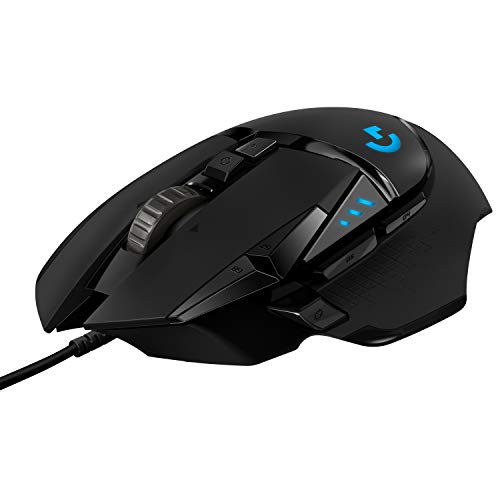
The G502 Hero is the pick that makes the most immediate sense for a broad range of PC players. It has the familiar shape of a conventional gaming mouse, but the thumb rest, extra controls, and configurable balance give it far more personality than a basic two-button design. The wired connection is visible on the desk, yet it also means there is no battery to charge during a long session.
Its HERO sensor can track at up to 25, 600 DPI, with no smoothing, filtering, or acceleration listed in the product details. Most players will never use the upper end of that range. The more important point is that the sensor has plenty of headroom, so sensitivity can be set exactly where you want it without the mouse feeling like it is imposing a preset limit.
The 11 programmable buttons are the G502 Hero's strongest practical advantage. They let you move commands, abilities, push-to-talk, or application shortcuts closer to your thumb and fingers. The dual-mode scroll wheel can switch between a notched feel and a faster free-spinning mode, which is useful when the same mouse has to handle game menus, documents, and long web pages. Five 3.6-gram weights let you change its balance rather than accepting a fixed feel.
Compared with the Redragon K585, the G502 Hero is less specialized but much more versatile. The K585 gives one-handed players a dedicated cluster of keys, while the Logitech keeps full mouse control and adds shortcuts around it. Players who want a lighter minimalist mouse should skip this one, and those who dislike cables should look elsewhere. The G502 Hero is still the one we'd keep for a PC setup that needs one dependable, adaptable pointing device. Readers comparing other input options can also see how different button layouts change everyday gaming control.
2. VSDINSIDE Macro Keypad: Best for Streamers

Pros
- 18 programmable keys
- 15 LCD visual keys show custom images or animations
- Supports multi-step macros
- Works with OBS, Streamlabs, YouTube, and common desktop software
- USB-C connection
Cons
- Linux does not have native plug-and-play support
- More useful for creators than ordinary players
- Software setup is part of the experience
Best for: streamers and creators who need visible one-touch controls for scenes, media, and desktop tasks.
The VSDINSIDE macro keypad is built around a simple idea: important commands should be visible and close at hand. Instead of memorizing an array of keyboard shortcuts, you can assign actions to the keypad's LCD keys and use images or animations to identify them. That makes it particularly useful when a stream involves frequent scene changes, audio adjustments, and application switching.
There are 18 programmable keys in total, split between 15 LCD visual keys and three physical buttons. The pad can launch files and web pages, enter text, control media, and switch OBS scenes with a single tap. Its multi-step macro support is the reason to choose it over an ordinary shortcut pad. One press can run commands in a chosen order or at the same time, which has clear uses in streaming and editing workflows.
The surrounding RGB light ring is adjustable and includes an automatic color cycle mode. The device works with Windows 11 and newer and macOS 11.0 and newer, connecting over USB-C. Its compact body measures 4.6 by 4.1 inches and weighs 0.66 pounds, so it should not consume much desk space. Built-in plugins for a clock, calendar, weather, stopwatch, and reminders broaden its use outside gaming.
The limitation is focus. A player who only needs a few extra game commands will probably find the Redragon K585 more natural because it behaves like a compact keypad. The VSDINSIDE is the stronger tool for a creator managing software, while its lack of native Linux plug-and-play support narrows the audience. If your setup includes regular broadcasts or editing, this is one of the more capable best gaming accessories picks here. For a broader setup plan, the useful additions that belong around a gaming PC are worth considering.
3. Redragon K585: Best One-Hand Keypad

Pros
- 42-key one-handed layout
- Seven onboard macro keys
- Four profiles support up to 28 macro assignments
- Hot-swappable 3-pin and 5-pin switch support
- Detachable wrist rest and USB pass-through
Cons
- Wired connection
- Software is needed for deeper customization
- Takes more room than a small macro pad
Best for: PC players who want dedicated left-hand controls for MMOs, MOBAs, and other key-heavy games.
The K585 is not trying to replace a full keyboard. It occupies the left side of the desk and gives the gaming hand a focused set of keys for movement, abilities, and repeated commands. That makes more sense than stretching across a full board when the game only needs a specific group of controls.
Its 42-key layout includes seven macro keys. Across four profiles, those keys can hold up to 28 macro assignments, giving MMO and MOBA players room for ability rotations and alternate control schemes. The onboard profile approach is more practical than rebuilding bindings every time a different game demands a new arrangement.
The switch sockets are a notable advantage. The K585 accepts many 3-pin or 5-pin switches without soldering, so the feel can be adjusted to match the main keyboard. A detachable wrist rest changes the footprint when the extra support is not wanted. The USB pass-through can also connect a mouse or headset, helping keep a crowded desk slightly more orderly. RGB lighting offers five modes and up to 16.8 million colors, though that is secondary to the keypad's layout.
The VSDINSIDE is more visually informative and better for streaming commands, but the K585 feels more game-specific. It is also a better fit than the Logitech G502 Hero for someone who wants a bank of physical keys rather than extra mouse buttons. Skip it if you mainly play games with simple controls or if your desk has no room for a second input surface. For anyone building around a keyboard-heavy PC game, the K585 is the dedicated tool to choose. The broader question of which keys deserve a dedicated gaming shortcut can help before you commit to this layout.
4. BENGOO G9000: Best Wired Headset

Pros
- 40mm neodymium drivers
- Noise-isolating microphone
- Works across many consoles and mobile devices
- Over-ear memory-style ear cushions
- Inline volume and microphone controls
Cons
- Old Xbox One controllers need a separate adapter
- 49-inch cable can limit placement
- LED lighting adds atmosphere rather than useful illumination
Best for: players who move between consoles, PC, and mobile devices and need one wired headset with a flexible microphone.
The G9000 is a straightforward wired headset with unusually broad platform claims. It supports PlayStation 4 and 5, Xbox consoles, PC, Nintendo 3DS, laptops, tablets, phones, and other listed devices. That flexibility matters in a household where the headset moves from a console controller to a computer rather than staying attached to one machine.
Its 40mm magnetic neodymium drivers are designed to produce a broad game sound field, and the product description highlights positioning precision and ambient noise isolation. Those claims should be read as the feature set, not as a replacement for a dedicated audio system. The practical appeal is that game audio, voice chat, a flexible boom mic, and a mute control live in one uncomplicated wired package.
The over-ear cushions use a breathable protein material, while the headband uses a multi-point design intended to spread pressure. The 49-inch braided USB cable includes a rotary volume controller and a one-button microphone mute. LED lights on the earcups add the expected gaming look, but they do not change the headset's sound or communication quality.
The BENGOO is a more sensible choice than adding a separate stand or decorative figure when the immediate problem is voice chat. It does not offer the freedom of a wireless model, and old Xbox One controllers need a Microsoft adapter that is not included. Players who want to compare microphone placement, fit, and platform support should also look at the headset features that matter during team chat. Choose the G9000 when broad wired compatibility matters more than a cable-free desk.
5. Ledagic Light Bars: Best Ambient Lighting

Pros
- Two 12.8-inch light bars
- RGB and white lighting modes
- App, remote, and inline controls
- Audio syncing
- Dimmable from 1 percent to full brightness
Cons
- Requires a USB power source
- Many lighting modes may take time to sort through
- Adds atmosphere rather than improving game controls
Best for: players who want adjustable color and white illumination around a TV, monitor, or console.
The Ledagic set changes the mood of a gaming area without demanding a permanent lighting installation. It includes two light bars, each listed at 12.8 inches, and the USB-powered design lets them draw power from a TV, monitor, laptop, PC, power bank, or charger. That makes placement relatively flexible around a desk or entertainment center.
The interesting part is the combination of RGB and white light. RGB mode offers 16 million colors and more than 64 patterns, including chasing, running, strobe, gradient, and breathing-style effects. White mode can be used as brighter task illumination when the room needs more than colored accent light. Brightness is adjustable from 1 percent to full brightness, so the bars do not have to run at maximum intensity.
A built-in high-sensitivity music sensor can react to music, film, and game audio. The LotusLamp X app handles colors, scenes, timers, and brightness, while the included 24-button remote provides a more traditional control method. There is also a button on the USB power lead for basic operation. The bars can turn on and off with the connected TV or PC when powered through its USB port.
Compared with the KDD stand, the Ledagic set changes the whole room rather than one section of the desk. It is less useful if the goal is cable organization or headset storage, and the power lead still needs a sensible route. Players who want a more restrained office look may prefer white illumination and fewer effects. For a console setup, though, these are among the most visible best gaming accessories because they improve the space before the game even starts.
6. KDD RGB Headset Stand: Best Headset Organizer

Pros
- Holds a headset and multiple controllers
- 360-degree rotating headphone stand
- Detachable controller hook
- Nine RGB light modes
- Rubber feet and cable organization
Cons
- Plastic construction is less refined than the UPERGO
- RGB lighting requires power
- Occupies vertical desk space
Best for: players who want one compact station for a headset, controllers, and a charging or audio cable.
The KDD stand addresses the familiar end-of-session mess: headset on the desk, controller beside it, and a cable falling behind the monitor. Its stand can hold one headphone and two controllers at the same time, or up to four game controllers according to the product details. That gives it a more useful role than a simple headphone hook.
The headphone section rotates 360 degrees, which helps when the stand is placed at the edge of a desk or needs to point away from the monitor. A detachable controller hook makes the unit easier to move, while built-in cable organizers keep a headset lead from spilling across the surface. Assembly is described as a three-part process that takes about 30 seconds.
Nine RGB modes include fast flashing, breathing, and individual colors such as red, green, blue, purple, light blue, yellow, and white. A memory mode can retain a preferred color, and a long press turns the light off. Four rubber pads under the base help prevent sliding and protect the desk, while soft rubber on the hook is intended to reduce scratches.
The UPERGO Walnut Stand is a better-looking piece of furniture and offers a storage tray, but the KDD is more flexible when several controllers need a home. It is also a stronger organizational choice than the Monkeybomb if function matters more than character display. Skip it if you use a wireless headset and keep no controllers on the desk. For a multi-device gaming station, this is the tidy, practical pick.
7. KontrolFreek Precision Rings: Best Aim-Control Add-On

Pros
- Six rings in soft, medium, and hard resistance
- Supports several major controller families
- Adds resistance to stock thumbsticks
- Moisture-wicking material
- Reusable construction
Cons
- Changes thumbstick feel rather than adding a new control
- Requires experimentation with resistance levels
- Not a complete solution for poor controller ergonomics
Best for: console shooters who want more resistance and control from their existing thumbsticks.
Precision Rings are a small upgrade with a very specific purpose. They fit around controller thumbsticks and add resistance, which can help reduce over-correction when aiming. The result is not a new sensitivity setting or a replacement stick. It is a change in the physical feel under the thumb.
The set includes six rings in soft, medium, and hard strengths. That range is important because the right resistance depends on how quickly you move the stick and how much force feels comfortable. A soft ring can add a little cushion, while a harder ring can make small adjustments feel more deliberate. Players may need to try more than one before settling on a preferred feel.
KontrolFreek says the material resists hand and finger oils, wicks moisture, dampens sound, and recovers its shape after compression. The rings are compatible with PS4, PS5, Xbox One, Xbox Series X, Switch Pro, and Scuf controllers as listed. They can also be used with performance thumbsticks for practice and muscle-memory work.
This is a more focused accessory than the Logitech G502 Hero or Redragon K585. Those products change the input hardware around the game, while Precision Rings refine one part of a controller you already own. Players who dislike added resistance should skip them, and no ring can correct an uncomfortable controller shape. For someone who consistently overshoots targets, the three resistance levels make this a sensible experiment.
8. UPERGO Walnut Stand: Best Wooden Organizer

Pros
- Solid walnut construction
- Holds a headset and controller
- Built-in storage tray
- Weighted anti-slip base
- Fits most over-ear headsets
Cons
- Larger footprint than a basic headset hook
- No lighting or electronic features
- Wooden finish may not suit an RGB-heavy setup
Best for: players who want desk organization that looks at home beside office equipment as well as gaming hardware.
The UPERGO stand is the quiet alternative to RGB desk gear. Its solid walnut construction, curved headphone cradle, and weighted base give it a furniture-like presence. It is designed to hold both an over-ear headset and a controller, so the main benefit is a clear landing place for the equipment that otherwise gets left beside the keyboard.
The base doubles as a storage tray for small items such as earpads, charging cables, and SD cards. That is a meaningful detail for a compact desk because it turns unused space under the stand into a place for the accessories that usually disappear. Anti-slip silicone pads help keep the stand in position and protect the desk surface.
The dimensions are approximately 8.27 inches wide, 4.72 inches long, and 6.3 inches high. The broad arc is intended to accommodate bulky gaming headsets as well as office headphones, and the product specifies adjustable clearance. Assembly uses three parts that snap together without extra tools and is described as taking under two minutes.
The KDD RGB Headset Stand is more capable if several controllers need to be held, and its rotating arm suits a desk where access changes often. The UPERGO is the more composed choice for a single headset, one controller, and a few small extras. Avoid it if your setup depends on integrated lighting or if every inch of desk depth is already occupied. It suits the buyer who wants gaming storage without making the desk look like a showroom.
9. Call of Duty Monkeybomb: Best Collectible Stand

Pros
- Officially licensed Call of Duty design
- 8.5-inch Monkey Bomb figure
- Holds controllers and phones
- Heavy-duty PVC construction
- Works with several device types
Cons
- Character design will not suit every setup
- Takes up more desk area than a simple stand
- Decorative appeal is central to the purchase
Best for: Call of Duty fans who want a functional controller holder with a recognizable display piece.
The Monkeybomb is the accessory to buy when desk organization should also show some personality. It is an officially licensed Call of Duty figure rendered at 8.5 inches tall, with a base designed to hold a controller, phone, remote, or eBook reader. Unlike the UPERGO, it is meant to be noticed.
Its heavy-duty PVC construction and sturdy base are intended to keep devices from tipping. The listed compatibility includes PlayStation 5 DualSense controllers, Xbox Series S and X controllers, iPhones, Android phones, TV remotes, and eBook readers. That makes it more versatile than the character branding initially suggests.
The figure's footprint is about 5.43 by 5.71 inches, and its listed weight is 1.25 pounds. Those dimensions make it stable, but they also mean it needs a deliberate spot on the desk. A controller placed in the holder should be easy to reach, while a phone or remote can sit visibly rather than disappearing under a keyboard.
The KDD and UPERGO are more neutral and better suited to users who want maximum storage efficiency. The Monkeybomb wins only if the Call of Duty identity is part of the appeal. Players who prefer a clean, understated workspace should skip it. For collectors and fans, though, it combines a real job with a display piece more successfully than a purely decorative figure.
10. VELENTI Gamer Chair Stand: Best Phone Holder

Pros
- Gaming-chair design adds character
- Holds phones and Kindles up to 19 cm tall
- Keeps notifications visible
- Lightweight desktop footprint
- Simple, non-electronic design
Cons
- Holds one device
- No charging feature
- Less useful if the phone stays out of sight during play
Best for: gamers who want a small stand that keeps a phone or compact e-reader upright beside the screen.
The VELENTI stand is a small, focused piece of desk gear. Its gamer-chair shape gives it more character than a generic slab of plastic, while the practical purpose is simple: keep a phone upright and visible instead of flat on the desk. That can be useful for notifications, a second reference screen, or a phone used alongside a game.
It holds smartphones and Kindles up to 19 cm tall. The product describes the construction as sturdy and intended for long-term use, though there are no electronic charging features or adjustment measurements listed. It weighs about 0.18 pounds, so it should be easy to move when the desk changes from gaming to work.
The compact design is also its main limitation. It holds one device, does not organize controllers or headphones, and cannot replace the broader storage provided by the KDD or UPERGO. The Monkeybomb can also hold a phone, but it is much larger and more decorative. VELENTI is the cleaner fit for someone who wants a phone stand without turning it into the focal point of the setup.
Skip this pick if your phone is always face down or stored away while gaming. Choose it if checking notifications without reaching across the desk is the small annoyance you want to remove. It is a modest accessory, but its purpose is clear and its 19 cm height limit gives buyers a useful compatibility check.

How to choose best gaming accessories
The right accessory should solve a specific problem in your setup rather than simply add another glowing object to the desk.
Compatibility
Start with the device the accessory must connect to or hold. The BENGOO G9000 lists support for PlayStation, Xbox, PC, Switch-related devices, and mobile hardware, but older Xbox One controllers need an extra adapter. The KontrolFreek rings cover several controller families, while the VSDINSIDE keypad is designed for newer Windows and macOS systems.
Controls and customization
Extra keys are useful only when they are placed where your hand can reach them naturally. A mouse such as the G502 Hero offers 11 programmable buttons, the Redragon K585 concentrates controls in one hand with seven macro keys, and the VSDINSIDE uses 18 programmable keys for software and streaming commands. Choose according to the actions you repeat most often.
Desk footprint
Measure the available surface before adding a stand or light. The Monkeybomb and UPERGO need a dedicated area, while the VELENTI is a smaller single-device holder. A rotating headset stand can be easier to access on a crowded desk, but a low wooden stand may fit better beneath a monitor shelf.
The best desk accessory is the one that removes a repeated annoyance without creating a new cable, button, or object to manage.
Lighting control
Lighting should be judged by control as much as by color. Ledagic offers app, remote, inline, audio-sync, white-light, and dimming controls, while the KDD has nine RGB modes that mainly serve as desk decoration. If the room needs usable illumination, adjustable white light matters more than the number of color effects.
Build and support
Headset and controller stands need a stable base and surfaces that will not scratch hardware. UPERGO uses solid walnut with anti-slip silicone pads, while KDD uses rubber feet and a protective rubber hook. For keypads, hot-swappable switch support and a detachable wrist rest matter more than lighting when long sessions are the priority.

Frequently asked questions
Which gaming accessory should I buy first?
Start with the item that fixes the most frequent annoyance. The Logitech G502 Hero is the most broadly useful PC upgrade, while the BENGOO G9000 makes more sense when voice chat and game audio are the problem. Console players who already like their controller may get more from the KontrolFreek Precision Rings.
Are these accessories compatible with consoles?
Some are, and some are PC-focused. The BENGOO headset supports PlayStation, Xbox, and several other platforms, while the KontrolFreek rings are designed for PS4, PS5, Xbox, Switch Pro, and Scuf controllers. The Logitech mouse, Redragon keypad, and VSDINSIDE macro pad are primarily intended for computer setups.
Is the VSDINSIDE keypad useful without streaming?
Yes, though streaming is its clearest use. Its keys can launch applications, open files and web pages, enter text, control media, and run multi-step commands. The Redragon K585 is a better fit if the main goal is game movement and ability control rather than desktop automation.
Do RGB lights improve gaming performance?
RGB lighting itself does not improve aim, sound, or frame rate. The Ledagic bars can provide adjustable white illumination, which may make a room more comfortable, while their color and audio-sync modes are mainly atmospheric. The KDD's lighting serves the same decorative role around a headset stand.
What is the difference between a headset stand and a controller stand?
A headset stand supports the headband and keeps the earcups off the desk, while a controller stand is shaped to cradle a gamepad. The KDD combines both functions and can hold several controllers. UPERGO pairs one headset holder with one controller dock and a storage tray.
Will Precision Rings work with every controller?
The product lists compatibility with PS4, PS5, Xbox One, Xbox Series X, Switch Pro, and Scuf controllers. Fit can still vary with thumbstick shape and the amount of available clearance. The six included rings in soft, medium, and hard resistance give users several ways to adjust the feel.

The bottom line
The Best gaming accessories in this list depend on the problem you are trying to solve, but the Logitech G502 Hero is the strongest all-purpose pick for PC players. Its 25, 600 DPI HERO sensor, 11 programmable buttons, adjustable weights, and dual-mode scroll wheel make it useful across genres and ordinary desktop work.
Streamers should choose the VSDINSIDE macro keypad for its visual LCD keys and multi-step commands, while the BENGOO G9000 is the sensible cross-platform audio pick. For a cleaner physical setup, the KDD handles more controllers than the UPERGO, and the UPERGO is the better choice when a walnut finish and hidden storage matter more than RGB.
If you are undecided, buy the accessory that removes the annoyance you notice every session, not the one with the most features.
As an Amazon Associate we earn from qualifying purchases.