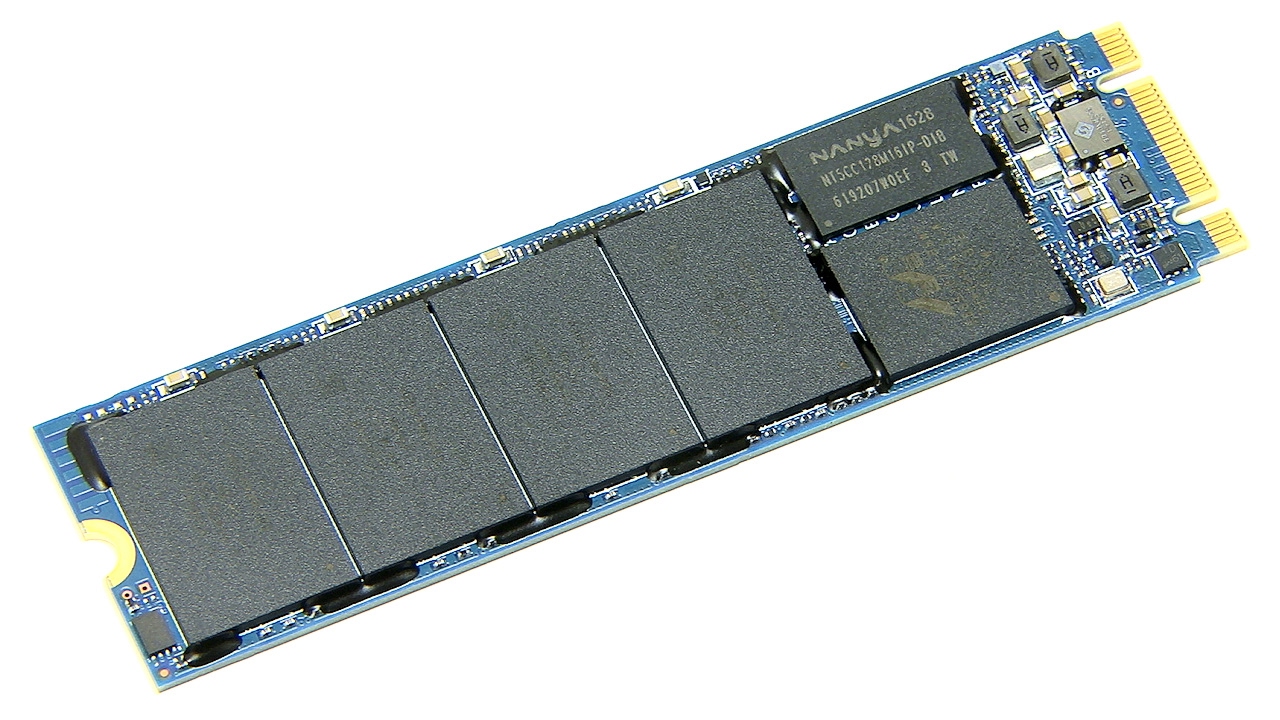

An M.2 SSD can make an old computer feel new, but the fastest drive on the shelf is not automatically the right upgrade. A laptop may need low power draw, a PlayStation 5 needs the right physical fit and cooling, and a desktop with a PCIe 3.0 slot cannot use PCIe 4.0 or PCIe 5.0 speeds to their full potential.
This Best best m 2 ssd roundup covers compact 2280 NVMe drives from everyday storage models to high-end PCIe 5.0 hardware. We considered capacity, interface, advertised sequential speed, software support, cooling details, and the practical compromises behind each pick.
Samsung 990 PRO 2TB is our top pick, with the Samsung 9100 PRO 2TB, WD_Black SN7100 2TB, and Kingston NV3 1TB covering the most useful alternatives.
Comparison table
| # | Product | Award | Interface | Capacity | Advertised read speed | Best for |
|---|---|---|---|---|---|---|
| 1 | Samsung 990 PRO 2TB | Best overall | PCIe 4.0 | 2TB | Up to 7, 450 MB/s | High-performance desktops and gaming PCs |
| 2 | Samsung 9100 PRO 2TB | Best PCIe 5.0 | PCIe 5.0 x4 | 2TB | Up to 14, 700 MB/s | New high-end systems |
| 3 | WD_Black SN7100 2TB | Best for laptops | PCIe 4.0 | 2TB | Up to 7, 250 MB/s | Laptops and handheld gaming devices |
| 4 | SIX X7400 1TB | Best PS5-ready bundle | PCIe 4.0 x4 | 1TB | Up to 7, 350 MB/s | PS5 expansion and gaming |
| 5 | Kingston NV3 1TB | Best easy upgrade | PCIe 4.0 x4 | 1TB | Up to 6, 000 MB/s | General-purpose upgrades |
| 6 | Samsung 990 PRO 1TB | Best compact performance | PCIe 4.0 | 1TB | Up to 7, 450 MB/s | Fast systems with moderate storage needs |
| 7 | WD_BLACK SN850X 2TB | Best gaming specialist | PCIe 4.0 | 2TB | Up to 7, 300 MB/s | Gaming PCs |
| 8 | Bestoss 2TB | Best all-rounder | PCIe 4.0 x4 | 2TB | Up to 5, 000 MB/s | Everyday computing and NAS use |
| 9 | Silicon Power A60 2TB | Best Gen3 capacity | PCIe 3.0 x4 | 2TB | Up to 2, 200 MB/s | PCIe 3.0 desktops |
| 10 | WD Green SN350 2TB | Best basic storage | PCIe 3.0 | 2TB | Up to 3, 200 MB/s | Everyday storage expansion |
1. Samsung 990 PRO 2TB: Best Overall

Pros
- Excellent PCIe 4.0 performance
- Large 2TB capacity
- Strong random performance for demanding workloads
- Samsung Magician software provides monitoring and updates
Cons
- Needs a compatible PCIe 4.0 system to show its full potential
- No bundled heatsink is listed
Best for: anyone building a fast desktop, gaming PC, or creative workstation around PCIe 4.0.
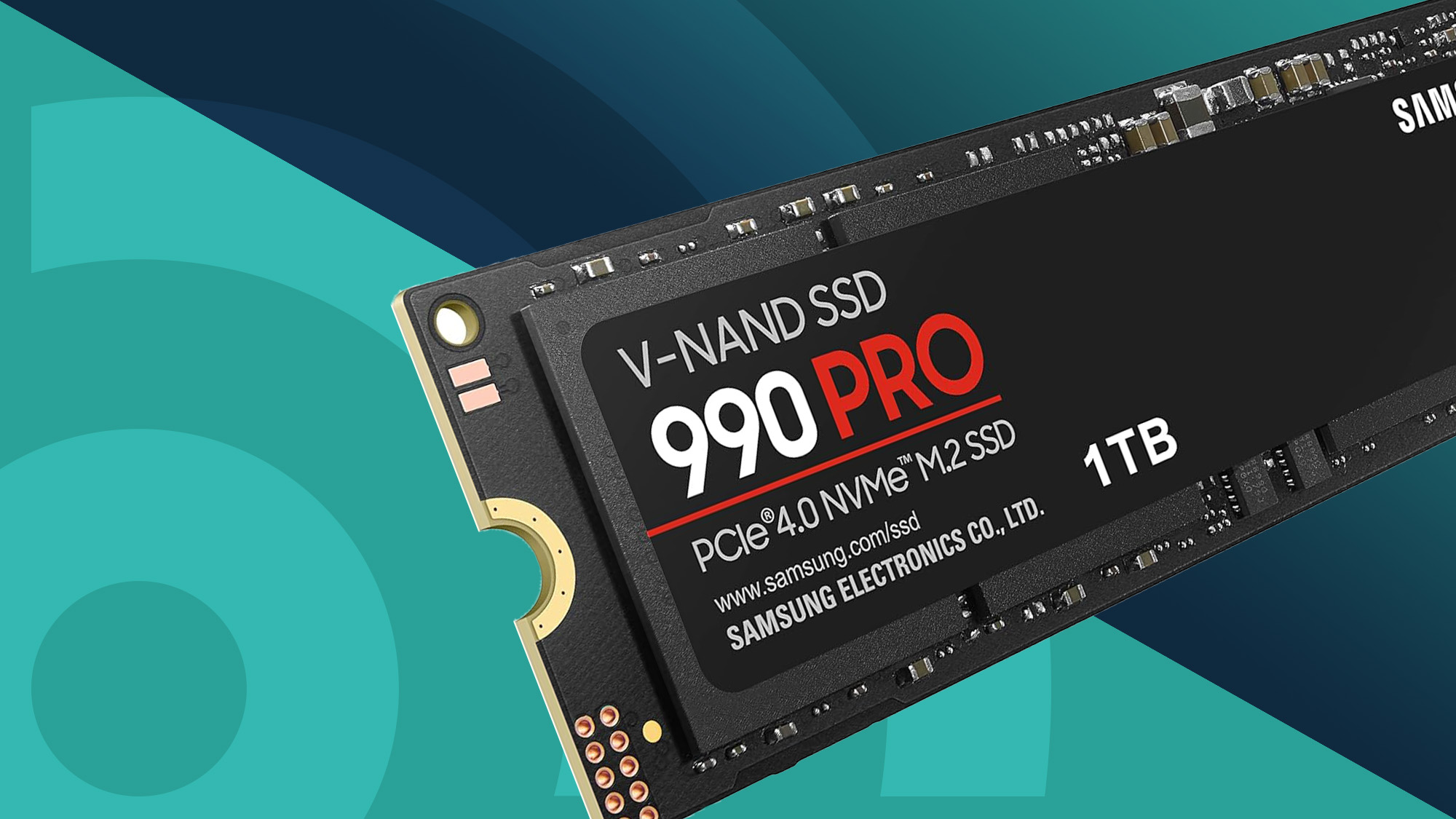
The Samsung 990 PRO 2TB is the drive we would put in a new PCIe 4.0 system without overthinking the decision. It has the rare combination of high sequential speed, strong random performance, useful capacity, and mature drive-management software. It feels like a performance part rather than a compromise component, yet it remains a standard M.2 2280 drive that fits the mounting layout used by many desktops and laptops.
Samsung rates this model for sequential reads of up to 7, 450 MB/s and writes of up to 6, 900 MB/s. Those figures matter most when moving large video files, installing big games, or working with sizable project folders. The more important everyday advantage is its random performance. Samsung says the drive reaches up to 1, 400K random read IOPS and 1, 550K random write IOPS, which helps with the small, scattered operations that make an operating system feel responsive.
The drive uses PCIe 4.0 and is designed for the M.2 2280 format. Samsung also describes improved performance per watt compared with the 980 PRO, along with a nickel-coated controller for thermal control. Samsung Magician adds health monitoring, optimization tools, data protection features, and firmware updates. That software support is a real advantage over lesser-known drives, especially for a primary boot drive that you expect to keep for years.
The Samsung 9100 PRO 2TB is much faster on paper, but it needs a PCIe 5.0 platform and is harder to justify for ordinary gaming or office work. The WD_Black SN7100 2TB is a strong rival for laptops and handhelds, while the 990 PRO 2TB makes more sense when storage headroom matters. Its weakness is simple: a PCIe 3.0 or older system will leave much of its performance unused. Choose it for a current PCIe 4.0 machine, not as a blind replacement for every M.2 drive.
2. Samsung 9100 PRO 2TB: Best PCIe 5.0

Pros
- Exceptional advertised sequential performance
- PCIe 5.0 x4 interface
- High random read and write figures
- Thermal control and Magician software
Cons
- Requires a PCIe 5.0-compatible platform for its headline speed
- Excess capability for many everyday computers
Best for: creators, engineers, and enthusiasts with a modern PCIe 5.0 desktop.
The Samsung 9100 PRO 2TB is the specialist in this group. Its reason for existing is not subtle: it is built for systems that can use PCIe 5.0 x4, and its advertised sequential read speed reaches 14, 700 MB/s. Samsung lists write speed of up to 13, 400 MB/s, putting it in a different class from the PCIe 4.0 drives here when the workload involves sustained movement of very large files.
It also has serious random performance, with advertised random read and write figures of up to 1, 850K and 2, 600K IOPS. That can help demanding creative applications, AI workloads, heavy multitasking, and large development projects. It will not make every application twice as fast, since software often waits on processing or network activity, but the storage ceiling is substantially higher than the Samsung 990 PRO 2TB.
Samsung says the 9100 PRO uses a 5nm controller and offers improved power efficiency over the 990 PRO. The product also includes thermal-management features and compatibility across laptops and desktop PCs that provide the required PCIe 5.0 connection. Magician software handles firmware updates, drive-health monitoring, and additional management functions.
The drawback is platform dependence. Install it in a PCIe 4.0 slot and it cannot demonstrate the advertised Gen5 performance, making the Samsung 990 PRO 2TB the more sensible match for that system. It is also more drive than a typical game library or office workload needs. Buy the 9100 PRO 2TB when your motherboard, processor, and workload are already built around PCIe 5.0. For everyone else, the lower-generation choices are easier to use.
3. WD_Black SN7100 2TB: Best for Laptops

Pros
- High PCIe 4.0 read and write speeds
- TLC 3D NAND
- Designed with laptops and handheld devices in mind
- WD_BLACK Dashboard support
Cons
- Full speed requires PCIe 4.0
- The listing says it has been replaced by a newer generation
Best for: a laptop or handheld gaming device that needs a fast 2TB M.2 upgrade.
The WD_Black SN7100 2TB is a particularly appealing fit for a portable computer. It combines a slim M.2 2280 design with the high throughput expected from a modern Gen4 drive, and the product is explicitly aimed at laptops and handheld gaming devices. That focus matters because portable systems have tighter thermal and power constraints than a roomy desktop.
Its advertised read speed is up to 7, 250 MB/s, with write speed up to 6, 900 MB/s for the 2TB model. The drive uses PCIe Gen4 and TLC 3D NAND. Those specifications make it well suited to large game installations, fast application launches, media work, and moving large files. The 2TB capacity also gives a laptop more breathing room than the 1TB models in this list.
The SN7100 is only 0.044 inches high according to the supplied dimensions, and its listed weight is 0.012 pounds. That compact profile is useful in a laptop or handheld where clearance can be a bigger concern than raw benchmark performance. Windows users can also use the downloadable WD_BLACK Dashboard to check drive status and optimize the drive.
It has a practical limitation that should not be ignored: the listing says this product has been replaced by a newer generation. That does not erase the published specifications, but it does make availability and long-term model support worth checking before purchase. The Samsung 990 PRO 2TB is the stronger all-purpose desktop recommendation, while this drive is more compelling for portable hardware. Skip it if your machine only provides PCIe 3.0 or if you specifically want the newest product generation.
4. SIX X7400 1TB: Best PS5-Ready Bundle

Pros
- PCIe 4.0 x4 interface
- Advertised read speed up to 7, 350 MB/s
- Listed for PS5, laptops, and desktops
- Heatsink and installation accessories included
Cons
- 1TB capacity is smaller than the leading 2TB picks
- The product needs a compatible PCIe 4.0 slot for its top speed
Best for: a PS5 or gaming PC owner who wants a drive with cooling and installation hardware included.
The SIX X7400 1TB stands out because the package is aimed at a specific installation problem. It is listed for PS5 storage expansion, laptops, and desktops, and it includes a heatsink, screw, and screwdrivers. That makes it less of a bare component purchase and more of an upgrade kit for someone who wants the required small parts in the box.
The drive uses PCIe Gen4 x4 and has an advertised read speed of up to 7, 350 MB/s. That puts it close to the Samsung 990 PRO 1TB and WD_BLACK SN850X 2TB in sequential read claims. The practical benefit is quicker game loading, faster boot times, and shorter waits when moving large files, provided the host system supports PCIe 4.0.
The 1TB capacity is enough for a focused game library or a system drive with applications, but it is not as roomy as the 2TB models. The included heatsink is useful for a PS5 expansion installation, where sustained gaming workloads can make thermal management important. SIX also lists a five-year limited warranty, which is longer than the three-year terms listed for some other drives here.
The Samsung 990 PRO 2TB is the more rounded choice for a high-end desktop, and the Kingston NV3 1TB has broader appeal as a general upgrade. The SIX X7400 makes its case through compatibility positioning and included hardware. Confirm the clearance and installation requirements of your device before buying, especially if it already has a motherboard heatsink or a tight laptop cover.
For users comparing internal game storage with external options, the question of how fast a game drive needs to be for console expansion can prevent an awkward mismatch.
5. Kingston NV3 1TB: Best Easy Upgrade

Pros
- PCIe 4.0 x4 connection
- Small M.2 2280 format
- Acronis cloning software included
- Five-year limited warranty
Cons
- 1TB capacity limits large libraries
- Write speed is lower than its advertised read speed
Best for: replacing an older system drive with a straightforward PCIe 4.0 upgrade.
The Kingston NV3 1TB is the least complicated recommendation in this roundup. It is a standard M.2 2280 NVMe drive, uses a PCIe 4.0 x4 interface, and includes Acronis cloning software. That last detail is useful for an upgrade because cloning an existing system can be less disruptive than reinstalling an operating system and every application.
Kingston lists sequential read speed of up to 6, 000 MB/s and write speed of up to 4, 000 MB/s. Those numbers are comfortably ahead of older SATA SSDs and Gen3 NVMe drives for large transfers, while the PCIe 4.0 connection gives newer desktops and laptops room to operate. Everyday startup and application loading will also benefit from the move away from a hard drive, though the visible difference between several fast NVMe drives may be smaller.
The 1TB size is a sensible system-drive capacity for many users, but it asks more discipline from people with large games, video files, or photo libraries. Its dimensions identify it as the familiar 2280 form factor, so it should be considered only for systems that have a compatible M.2 NVMe slot. Kingston lists a five-year limited warranty, adding useful support for an upgrade intended to stay in service.
The SIX X7400 1TB has a higher advertised read speed and is better suited to a PS5-focused installation because it includes a heatsink. The Kingston is the cleaner choice when cloning a laptop or desktop drive is the priority. It is not the pick for someone who regularly writes huge datasets or needs 2TB of headroom, but it is a strong fit for a normal system upgrade.
6. Samsung 990 PRO 1TB: Best Compact Performance

Pros
- Up to 7, 450 MB/s sequential read speed
- Strong random performance
- Thermal control from Samsung's nickel-coated controller
- Magician software support
Cons
- 1TB capacity can fill quickly
- Full speed requires PCIe 4.0
Best for: a fast boot drive or gaming system that does not need 2TB of storage.
The Samsung 990 PRO 1TB has the same performance identity as the 2TB version, but it makes more sense when the system drive does not need to hold a large media collection or extensive game library. It is small, fast, and supported by Samsung's software tools, making it easy to monitor drive health and install firmware updates.
Samsung rates it for sequential reads up to 7, 450 MB/s and writes up to 6, 900 MB/s. The company also lists random read and write performance up to 1, 400K and 1, 550K IOPS. Those figures help explain why this drive belongs in a performance desktop or laptop rather than being treated as a simple capacity replacement.
Its slim M.2 2280 format and listed 0.09-inch height suit many desktops and laptops that meet the PCI-SIG D8 standard. Samsung also describes smart thermal control through its nickel-coated controller. That does not remove the need to check the host system's heatsink or ventilation, but it is a useful part of the drive's design for sustained work.
The 2TB Samsung 990 PRO is easier to recommend for a gaming library, and the Kingston NV3 1TB is a more straightforward choice when cloning support matters. This 1TB version wins when speed is the priority and storage needs are controlled. Skip it for a media workstation that will be close to full, since capacity pressure can undermine the convenience of a fast system drive.
7. WD_BLACK SN850X 2TB: Best Gaming Specialist

Pros
- High PCIe 4.0 read speed
- 2TB capacity for a large game library
- TLC 3D NAND
- Built for gaming PCs and workstations
Cons
- Full performance depends on PCIe 4.0 hardware
- The listing says it has been replaced by a newer generation
Best for: a gaming PC that needs a large, fast internal game drive.
The WD_BLACK SN850X 2TB is a familiar kind of gaming upgrade: a high-speed PCIe 4.0 drive with enough room to keep a substantial selection of games installed. Its advertised read speed reaches 7, 300 MB/s, and the listed write speed reaches 6, 300 MB/s. Those figures put it close to the Samsung 990 PRO 2TB, although the two products emphasize different identities.
The drive uses the M.2 2280 format and TLC 3D NAND. That combination suits a gaming desktop or workstation that needs fast access to large installations and project files. For a gaming PC, the 2TB capacity is more useful than a small speed advantage because modern game installs can consume a great deal of space.
Compared with the WD_Black SN7100 2TB, the SN850X is positioned more directly at desktop gaming and workstation use, while the SN7100 is designed with laptops and handheld devices in mind. The Samsung 990 PRO 2TB remains our broader recommendation because its random-performance claims and software support are more fully described. The SN850X is the better fit for a buyer who wants a gaming-focused WD_BLACK drive and does not need portable-system positioning.
There is a notable caveat in the supplied listing: it says this product has been replaced by a newer generation. That can affect the long-term availability of this exact model. It is also important to check the motherboard slot and any existing heatsink before installation. For a gaming PC with PCIe 4.0 and room for a standard 2280 drive, this remains a capable choice.
A drive inside a PC is not the same as a portable game library. If you are deciding between internal expansion and a device you can carry between systems, the trade-off between portable speed and rugged convenience is the useful distinction.
8. Bestoss 2TB: Best All-Rounder

Pros
- 2TB capacity
- TLC NAND with dynamic SLC cache
- Graphene-copper cooling solution
- Compatible with PCIe 3.0 and PCIe 4.0 systems
- Three-year limited warranty
Cons
- Advertised speed is below the fastest Gen4 drives
- Brand and software support are less established than Samsung's
Best for: mixed office, creative, entertainment, and mainstream gaming use.
The Bestoss 2TB is aimed at people who want one drive to handle many ordinary jobs. Its feature list names office work, home entertainment, creative work, video editing, and mainstream gaming, and the 2TB capacity gives those activities room to coexist. It is not chasing the highest number in this group, but it offers a broad set of hardware features.
Bestoss lists sequential read and write speeds of up to 5, 000 MB/s and 4, 800 MB/s. It uses PCIe Gen4 x4, TLC NAND, and dynamic SLC cache technology. The result should be a noticeable step up from a hard drive or older storage device, while the cache can help short bursts of writes feel quick. Sustained workloads should still be judged by the drive's more modest speed ceiling rather than by the headline read number alone.
The graphene-copper cooling solution is intended to help the drive stay cool during demanding use, including PS5 expansion. The drive also supports PCIe 3.0 and PCIe 4.0 systems, although Bestoss says the maximum speed requires PCIe 4.0. It is a standard M.2 2280 device and is described as compatible with laptops, desktops, and NAS devices.
The Samsung 990 PRO 2TB is faster and has a deeper software ecosystem, while the Bestoss offers a more general compatibility story and an explicit three-year limited warranty with lifetime technical support. The weakness is the lack of the detailed management and performance track record available from the larger brands in this list. Choose it when capacity and broad daily use matter more than benchmark leadership. Buyers who need extensive firmware tools or a heavily documented professional workflow should look higher in the ranking.
9. Silicon Power A60 2TB: Best Gen3 Capacity

Pros
- 2TB capacity
- PCIe Gen3 x4 interface
- Advertised 1, 200 TBW
- US technical support is listed
Cons
- Much slower than the PCIe 4.0 and PCIe 5.0 drives here
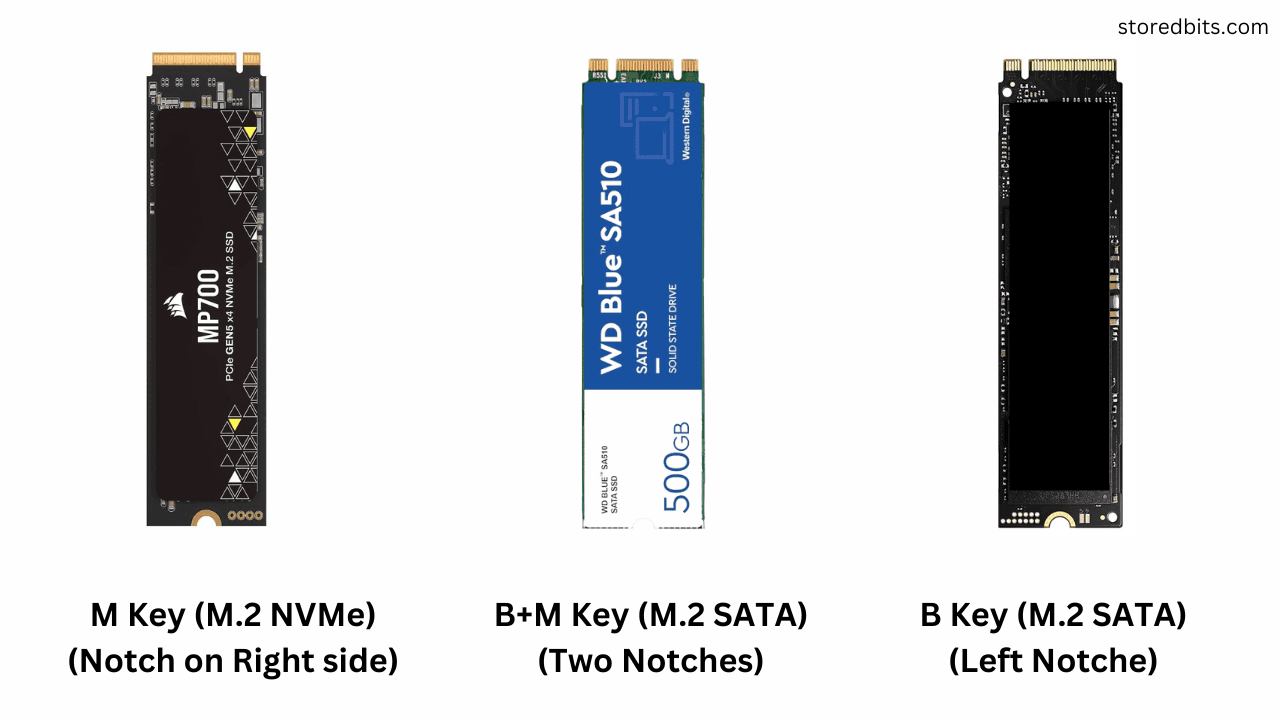
- Requires an M key-only M.2 connector
Best for: a PCIe 3.0 desktop that needs substantial internal capacity.
The Silicon Power A60 2TB makes sense when the computer itself is the limiting factor. It uses PCIe Gen3 x4 rather than Gen4 or Gen5, so it is not trying to compete with the Samsung 9100 PRO 2TB or 990 PRO models on throughput. Its appeal is the combination of a familiar 2280 form factor, a large 2TB capacity, and compatibility with a system that does not provide a newer interface.
Its advertised sequential read speed is up to 2, 200 MB/s, with writes up to 1, 600 MB/s. That is slower than the other NVMe drives in this list, but still a meaningful class above a mechanical hard drive. For game storage, applications, documents, and general desktop work, the drive can provide the quick response associated with NVMe without requiring a newer motherboard.
Silicon Power lists a rated endurance of 1, 200 TBW. The warranty terms are tied to whichever comes first, the warranty period or the TBW limit, so buyers with heavy write workloads should read those terms carefully. The product also requires an M.2 connector with only an M key. A B notch on the system connector can prevent installation, making a motherboard check essential.
The WD Green SN350 2TB offers a higher advertised read speed, but the Silicon Power provides clearer endurance information and a larger emphasis on technical support. Neither belongs in a new PCIe 5.0 performance build. Pick the A60 when you have a PCIe 3.0 system, need 2TB, and can confirm the connector keying. If you are shopping for an external drive instead, the performance limits of storage over a USB connection matter more than the internal PCIe specification.
10. WD Green SN350 2TB: Best Basic Storage

Pros
- 2TB capacity
- Standard M.2 2280 form factor
- Advertised read speed up to 3, 200 MB/s
- WD Dashboard health monitoring
- Three-year limited warranty
Cons
- PCIe Gen3 performance trails the newer drives
- Not aimed at high-end sustained workloads
Best for: everyday storage expansion in a compatible PCIe 3.0 computer.
The WD Green SN350 2TB is the plainspoken option in this roundup. It is designed for daily computing rather than benchmark chasing, and its 2TB capacity makes it useful as a secondary drive for documents, games, applications, and media. The standard M.2 2280 shape is easy to recognize, but the computer still needs an NVMe-capable M.2 slot.
WD lists a PCIe Gen3 connection and sequential read speed up to 3, 200 MB/s. That is enough to make a system feel far more responsive than one using a mechanical hard drive, particularly when opening applications or loading large files. It cannot match the Samsung 990 PRO 2TB, and a PCIe 4.0 system will leave newer drives with much more headroom, but the SN350 is not pretending to be a premium performance component.
The drive is described as shock-resistant against accidental bumps and drops, and WD provides a downloadable SSD Dashboard for monitoring health and usage. A three-year limited warranty is also listed. Those support features make it easier to keep an eye on a secondary drive, although they do not turn a basic Gen3 model into a workstation-class drive.
The Silicon Power A60 2TB is the more interesting Gen3 alternative because its endurance figure is specified, while the WD Green offers the higher advertised read speed. Choose the SN350 for ordinary storage and a simple support experience. Skip it for high-volume video work, demanding scratch-disk use, or a new system where a PCIe 4.0 drive can be used properly.
How to choose best m 2 ssd
The right Best best m 2 ssd depends less on one impressive speed figure than on the computer, workload, capacity, and cooling available around it.
PCIe generation
PCIe 3.0, PCIe 4.0, and PCIe 5.0 drives use the same general M.2 concept but offer very different bandwidth ceilings. A PCIe 5.0 drive such as the Samsung 9100 PRO 2TB needs a compatible Gen5 connection to show its headline performance. A PCIe 4.0 drive can work in some older systems, but it will operate within the limits of the host slot.
Check the motherboard or laptop manual before choosing. An M.2 slot is not enough by itself, since some slots support SATA storage, some support NVMe, and some share lanes with other ports.
Match the SSD to the slot first, then compare speed figures.
Sequential speed
Sequential read and write figures describe large, orderly transfers. They matter when moving video files, copying disk images, installing large games, or working with sizeable project folders. The Samsung 9100 PRO 2TB has the highest advertised sequential speeds here, while the Silicon Power A60 2TB and WD Green SN350 2TB are designed around PCIe 3.0 limits.
Sequential speed is less decisive for opening a web browser or launching a small application. Those tasks often depend more on random access, software behavior, and the rest of the computer.
Random performance
Random read and write performance describes smaller operations scattered across the drive. It is important for operating system responsiveness, application launches, multitasking, and some gaming workloads. Samsung publishes particularly high random-performance figures for the 990 PRO and 9100 PRO families.
Do not assume that the drive with the highest sequential read number will always feel fastest. A system drive handles many small requests, so random performance and controller behavior deserve attention.
Capacity
Choose capacity around the files and applications that must stay installed, not just the operating system. A 1TB drive such as the Kingston NV3 1TB or Samsung 990 PRO 1TB can work well as a boot drive, but large game libraries and creative projects will consume that space quickly.
The 2TB choices provide more room for games, video, photos, and scratch files. They also reduce the need to move data between drives. Leave free space available rather than planning to run the drive at its absolute limit.
Cooling and physical clearance
Fast NVMe drives can generate heat during sustained transfers. A heatsink is included with the SIX X7400 1TB, while other drives may depend on a motherboard cover or a separately supplied cooling solution. Check the laptop's internal clearance before installing a drive with an added heatsink.
The M.2 2280 label describes the drive's length and width class, not every detail of system compatibility. Confirm the slot type, keying, screw position, and cooling arrangement before opening the computer.
Frequently asked questions
Is an M.2 SSD the same as an NVMe SSD?
No. M.2 describes the physical card format, while NVMe describes the storage protocol used by most performance M.2 drives. Some M.2 slots and drives use SATA instead, so the computer and SSD must support the same connection and protocol.
Can a PCIe 4.0 SSD work in a PCIe 3.0 system?
A compatible PCIe 4.0 NVMe drive can often operate in a PCIe 3.0 slot, but its speed will be limited by the older interface. The Bestoss 2TB explicitly lists support for PCIe 3.0 and PCIe 4.0, while the host system still determines the actual result.
Is the Samsung 9100 PRO 2TB suitable for every desktop?
No. It is designed for PCIe 5.0 x4 systems, and its advertised performance requires that newer connection. In a PCIe 4.0 system, the Samsung 990 PRO 2TB is a more natural match.
Do M.2 SSDs need heatsinks?
Not every M.2 SSD needs an added heatsink, but cooling can matter during sustained transfers and demanding gaming workloads. Check whether the motherboard includes an M.2 cover, and confirm that any aftermarket heatsink will fit under the laptop or console cover.
Is 1TB enough for a gaming PC?
It can be enough for the operating system, applications, and a selected game library. Large modern games can fill 1TB quickly, so a 2TB drive such as the WD_BLACK SN850X 2TB or Samsung 990 PRO 2TB is more comfortable for users who keep many installations available.
Can these drives be used in a PS5?
The SIX X7400 1TB is specifically listed for PS5 storage expansion, and the Bestoss 2TB also mentions PS5 expansion. Compatibility still depends on physical clearance, cooling, and the console's installation requirements, so verify those details before fitting any drive.
The bottom line
The Best best m 2 ssd for most PCIe 4.0 desktops and gaming PCs is the Samsung 990 PRO 2TB. It balances high sequential and random performance, useful capacity, thermal control, and strong software support. The Samsung 9100 PRO 2TB is the specialist pick for a PCIe 5.0 workstation or enthusiast build that can use its much higher bandwidth.
For portable computers, the WD_Black SN7100 2TB is the better-shaped recommendation, while the Kingston NV3 1TB keeps a normal system upgrade simple with cloning software and a five-year limited warranty. The SIX X7400 1TB is the most direct choice for a PS5-oriented bundle with a heatsink and installation accessories.
If you are undecided, check the slot's PCIe generation and available clearance first, then choose the largest capacity that fits the way you actually store files and games.
As an Amazon Associate we earn from qualifying purchases.