

A full desktop tower is often more hardware than a home office needs, but a weak little box can make browser tabs, video calls, and file transfers frustrating. The right mini computer keeps the desk clear while still offering enough processor power, memory, storage, and display support for the way you work.
Our Best mini computers guide focuses on nine compact Windows machines with very different strengths. Some are built for basic office tasks, while others offer triple-display output, expandable storage, fast networking, or enough AMD performance for demanding multitasking.
The GMKtec M5 Ultra is our top pick, with the KAMRUI Pinova P2 close behind for most home and office users. The list also includes simpler dual-display PCs and a high-powered compact system for gaming and creative work.
Comparison table
| # | Product | Award | Processor | Memory and storage | Display support | Best for |
|---|---|---|---|---|---|---|
| 1 | GMKtec M5 Ultra | Best overall | Ryzen 7 7730U | 32GB DDR4, 512GB PCIe SSD | Triple 4K | Demanding work and gaming |
| 2 | KAMRUI Pinova P2 | Best for multitasking | Ryzen 7 7330U | 16GB LPDDR4X, 256GB SSD | Triple 4K | Home and office multitasking |
| 3 | ACEMAGIC K1 7330U | Best quiet workstation | Ryzen 7 7330U | 16GB DDR4, 256GB SSD | Triple 4K | Quiet desks and travel |
| 4 | KAMRUI Pinova P1 | Best office configuration | Ryzen R2544 | 16GB DDR4, 256GB SSD | Triple 4K | Office productivity |
| 5 | ACEMAGIC K1 R2544 | Best expandable compact PC | Ryzen R2544 | 8GB DDR4, 256GB SSD | Triple 4K | Users planning upgrades |
| 6 | KAMRUI AK1PLUS | Best dual-screen office PC | Celeron N5095 | 16GB LPDDR4X, 256GB SSD | Dual 4K | Everyday office work |
| 7 | GMKtec G3S N95 256GB | Best server-friendly option | Intel N95 | 8GB DDR4, 256GB M.2 SSD | Dual 4K | Home servers and media |
| 8 | GMKtec G3S N95 8GB | Best simple N95 setup | Intel N95 | 8GB DDR4, 256GB M.2 SSD | Dual 4K | Basic desktop tasks |
| 9 | Bmax B1 Plus | Best ultra-compact PC | Celeron J3355 | 6GB LPDDR3, 128GB eMMC | Dual 4K | Very small workspaces |
1. GMKtec M5 Ultra: Best Overall

Pros
- Ryzen 7 performance with 32GB of memory
- Triple 4K display support
- Dual 2.5GbE network ports
- WiFi 6E and USB-C connectivity
- Expandable memory and storage
Cons
- Larger and more involved than the basic models here
- Gaming performance is still limited by integrated graphics
- One-year warranty
Best for: demanding office work, light gaming, creative applications, and multi-monitor setups.
The M5 Ultra is the one that feels least like a compromise. Its Ryzen 7 7730U has eight cores and 16 threads, with a boost speed up to 4.5GHz in the performance mode available through BIOS settings. That gives it considerably more headroom than the four-core Ryzen systems in this list when a workload involves many applications, large spreadsheets, code, or heavier creative software.
The 32GB of dual-channel DDR4 memory is just as important as the processor. It gives browser-heavy work, virtual machines, photo tools, and office applications room to stay open together. GMKtec says the memory can expand to 64GB, and the 512GB PCIe 3.0 SSD can be expanded through the dual storage slots up to a stated 4TB. Those are meaningful options for a computer intended to stay useful for years rather than just handle light daily tasks.
Graphics come from an integrated Radeon GPU with eight graphics cores running at up to 2000MHz. This is not a substitute for a desktop gaming graphics card, but it is the strongest graphics platform in this group and is suited to light gaming, 4K video work, and demanding desktop visuals. HDMI 2.0, DisplayPort, and USB-C give it triple 4K display support, while the USB-C port also handles power delivery, DisplayPort, and data.
The M5 Ultra also makes sense for network-heavy work. Two 2.5GbE ports can serve a fast wired network, a server setup, or separate network roles, and WiFi 6E adds the newer 6GHz band where the surrounding network supports it. The weakness is that this is more computer than a simple browsing station needs, and the compact chassis still relies on active cooling under sustained work. Choose it if you want the most capable machine here. For light office work, the quieter and simpler ACEMAGIC K1 7330U is easier to justify.
2. KAMRUI Pinova P2: Best for Multitasking

Pros
- Eight-thread Ryzen 7 processor
- Triple 4K output
- Two storage expansion slots
- Quiet cooling design
- 10Gbps USB-C with DisplayPort
Cons
- Only 256GB is installed initially
- Not as powerful as the M5 Ultra
- Wireless specifications are less detailed than the M5 Ultra
Best for: users who want a small office PC with three displays and strong multitasking ability.
The Pinova P2 gets the central mini computer brief right: it is small enough to mount behind a monitor, but its processor does not feel restricted to email and documents. The Ryzen 7 7330U has four cores and eight threads, an upper speed of 4.3GHz, and 8MB of L3 cache. That combination makes it a much more capable multitasking PC than the Celeron and N95 systems lower in this list.
Its 16GB of LPDDR4X memory is a sensible starting point for office work, browser tabs, video calls, and light content creation. Storage begins with a 256GB M.2 SSD, but the P2 has two expansion slots, one M.2 2280 SATA or NVMe PCIe 3.0 slot and one M.2 2280 SATA slot. KAMRUI states that total storage can reach 4TB with added drives. That flexibility matters if the machine will hold media, project files, or backups.
The display arrangement is unusually strong for such a small PC. HDMI 2.0, DisplayPort 1.4, and USB-C with DisplayPort Alt Mode can drive three 4K displays at 60Hz simultaneously. The USB-C port also supports 10Gbps data transfer, so it is useful for fast external storage as well as a third monitor. Gigabit Ethernet, WiFi, Bluetooth, and two USB 3.2 Gen 2 Type-A ports round out the useful connections.
Compared with the ACEMAGIC K1 7330U, the P2 has a similar class of processor and memory but presents its expansion layout more clearly. The M5 Ultra is faster for sustained demanding work and offers stronger networking, while the P2 is easier to place behind a monitor at about 5.05 by 5.05 by 1.73 inches. Its main limitation is the modest installed SSD. If that is acceptable, this is one of the most balanced choices for a three-screen home office.
3. ACEMAGIC K1 7330U: Best Quiet Workstation

Pros
- Strong four-core, eight-thread performance
- Very small 5 by 5 inch chassis
- Triple 4K display support
- Built-in power supply
- Storage expansion up to 4TB
Cons
- WiFi 5 and Bluetooth 4.2 are older standards
- 256GB storage fills quickly with media
- Integrated graphics are not intended for serious gaming
Best for: a quiet, compact workstation with several displays and broad USB connectivity.
The ACEMAGIC K1 7330U is appealing because it takes up almost no visual space. Its chassis measures about 5 by 5 by 1.6 inches and weighs roughly 1.1 pounds, and the included VESA mount can put it behind a monitor or on a wall. The built-in power supply also keeps the desk cleaner than a design that depends on a separate external adapter.
The Ryzen 7 7330U brings four cores and eight threads, with a base speed of 2.3GHz and a maximum of 4.3GHz. In practice, that is the right level for office multitasking, research, remote work, media playback, and light creation tasks. The 16GB of DDR4 memory prevents ordinary multitasking from feeling cramped, while the 256GB M.2 2280 SSD provides quick starts and application loading.
ACEMAGIC includes six USB 3.2 Type-A ports, USB-C with 10Gbps data and DisplayPort 1.4, HDMI 2.0, and DisplayPort 1.4. The three video outputs can run three 4K screens, which is useful for spreadsheets, dashboards, timelines, and reference material. The integrated Radeon graphics also support 4K video playback, though buyers looking for modern high-detail gaming should move up to a system with a discrete GPU.
The cooling system is designed to stay quiet at light loads and remain fairly restrained under heavier use. That is a useful trait in a bedroom, recording space, or focused home office. The weakness is its older WiFi 5 and Bluetooth 4.2, so the M5 Ultra has a clear advantage for newer wireless networks. This K1 is the better fit for someone who wants a small, quiet workstation and does not need the newest wireless standards.
4. KAMRUI Pinova P1: Best Office Configuration

Pros
- 16GB memory for office multitasking
- Triple 4K display support
- Gigabit Ethernet and dual-band WiFi
- VESA mounting
- Wake-on-LAN and server-friendly options
Cons
- Older Ryzen R2544 platform
- 256GB installed storage
- Chassis is thicker than the smallest picks
Best for: business desks, remote offices, and users who want three screens without a tower.
The Pinova P1 is aimed squarely at practical office use. Its Ryzen R2544 processor has four cores and eight threads and reaches up to 3.7GHz. That gives it enough simultaneous processing for documents, meetings, browser research, accounting applications, and the sort of multi-window workflow that makes a small PC worthwhile.
It comes with 16GB of DDR4 memory and a 256GB M.2 SSD. The memory is a better fit for heavy multitasking than the 8GB configurations from GMKtec and ACEMAGIC, and the extra M.2 slot allows storage expansion up to a stated 4TB. That makes the P1 more suitable for a small local file library or a lightweight NAS role than its compact appearance suggests.
The Radeon graphics can drive three 4K displays through HDMI, DisplayPort 1.4, and Type-C. Three screens are useful for stock dashboards, accounting work, front-desk systems, and live production layouts, though the processor is not meant for demanding video production or modern games. Gigabit Ethernet, dual-band WiFi, Bluetooth, and support for Wake-on-LAN, PXE boot, RTC wake, and automatic power-on give it a useful business orientation.
At about 5.05 by 5.05 by 2 inches, the P1 is still easy to hide behind a monitor, but it is not as slim as the ACEMAGIC K1 7330U. The newer Pinova P2 is the stronger technical choice, while the P1 remains a good fit for offices that value 16GB of memory, three displays, and management features more than the newest processor generation.
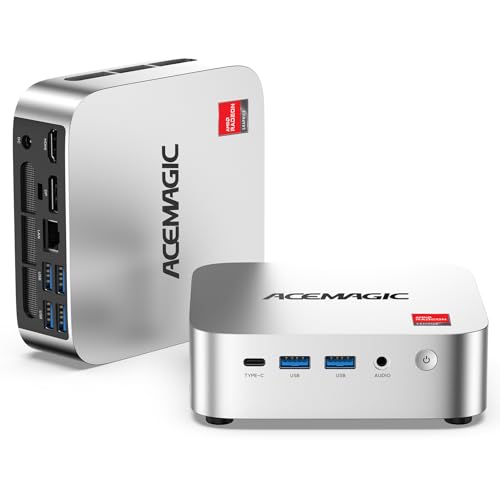
5. ACEMAGIC K1 R2544: Best Expandable Compact PC
Pros
- Expandable memory up to 32GB
- Storage expansion up to 4TB
- USB-C supports data, display, and power delivery
- Triple 4K output
- Compact 5-inch chassis
Cons
- Comes with 8GB of memory
- WiFi 5 and Bluetooth 4.2
- R2544 is behind the newer Ryzen 7330U
Best for: users who want a compact PC that can grow through memory and storage upgrades.
The K1 R2544 has an unusual position in this group. It starts with only 8GB of DDR4 memory, but its two SO-DIMM slots support expansion up to 32GB. That makes it more interesting for an owner who is comfortable upgrading than for someone who wants the strongest configuration immediately.
The Ryzen R2544 has four cores and eight threads, with a boost speed up to 3.7GHz. Its integrated Radeon graphics have eight graphics cores and a maximum graphics speed of 1300MHz. This is a capable platform for browser work, office applications, media playback, emulators, and light content creation. The 256GB M.2 SSD keeps the operating system responsive, and storage can expand up to 4TB according to the listed specifications.
Connectivity is one of the K1's strongest points. It has six USB 3.2 ports, including a USB-C Gen 2 port rated for 10Gbps data transfer. That Type-C connection also supports DisplayPort 1.4 and power delivery. Alongside HDMI 2.0 and DisplayPort 1.4, it can run three 4K displays, while Gigabit Ethernet, WiFi 5, and Bluetooth 4.2 cover ordinary network and accessory duties.
The cooling system uses a fan, an aluminum thermal profile, and dual air outlets for extended workloads. The computer is about 5 inches long and 2 inches tall, with a listed weight of 1.39 pounds. Compared with the Pinova P1, the K1 R2544 gives you a clearer memory upgrade path and a particularly flexible USB-C port. Skip it if you do not want to upgrade the initial 8GB configuration. Choose it if expansion matters more than having the latest Ryzen chip on day one.
6. KAMRUI AK1PLUS: Best Dual-Screen Office PC

Pros
- 16GB LPDDR4X memory
- Dual 4K output at 60Hz
- Supports two additional storage drives
- Quiet cooling
- Wake-on-LAN and automatic power-on
Cons
- Celeron processor is slower than the AMD picks
- No triple-display output
- Limited to four USB 3.2 ports
Best for: email, documents, video meetings, and a two-monitor office setup.
The AK1PLUS is the sensible office machine for buyers who do not need AMD-level multitasking power. Its Intel Celeron N5095 has four cores and four threads and reaches up to 2.9GHz. That is enough for web browsing, online classes, documents, conferencing, email, and ordinary media playback, but it is not the processor to choose for sustained creative work.
The 16GB of LPDDR4X memory helps it stay comfortable with many browser tabs and office applications open. Its 256GB M.2 2280 SSD handles the operating system and applications, while the internal design supports an M.2 SATA or NVMe drive plus a 2.5-inch SATA SSD or hard drive. KAMRUI states that the combined storage capacity can reach 4TB, which gives this small box a useful role as a local media or file machine.
Two HDMI 2.0 ports support two 4K displays at 60Hz. That is the practical limit for many desks, and the arrangement keeps spreadsheets, email, and a video call visible without constant window switching. The port selection also includes four USB 3.2 connections, Gigabit Ethernet, and a 3.5mm audio jack. WiFi and Bluetooth cover wireless peripherals, while Wake-on-LAN, RTC wake, and automatic power-on suit kiosks and remote-management setups.
The AK1PLUS measures about 5.04 by 5.04 by 2.05 inches and uses a cooling design intended to keep noise low. The GMKtec G3S N95 models offer a newer processor and similar dual-display capability, so they are better choices for heavier multitasking. The AK1PLUS makes more sense when 16GB memory and dual-drive expansion matter more than peak processor performance.
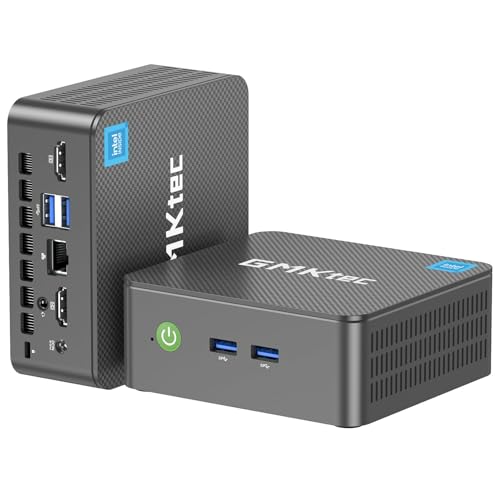
7. GMKtec G3S N95 256GB: Best Server-Friendly Option
Pros
- 12th-generation Intel N95 processor
- Dual 4K display support
- WiFi 5, Bluetooth 5.0, and Gigabit Ethernet
- Wake-on-LAN and PXE boot
- AV1 decoding
Cons
- 8GB of memory limits heavier multitasking
- No triple-display output
- Less powerful than the AMD systems
Best for: routine office work, home entertainment, and compact server projects.
The G3S N95 256GB is a straightforward small desktop with a newer low-power Intel platform. Its N95 processor has four cores, four threads, 6MB of cache, and a burst speed up to 3.4GHz. It is well suited to documents, browser work, streaming, and basic office software, but the four-thread design leaves less room for demanding multitasking than the Ryzen options above.
The installed 8GB of DDR4 memory is adequate for a focused desktop workload. The 256GB M.2 2242 SSD provides quick booting and application loading, though users with large media libraries or many applications will need external or additional storage. The system supports 4K video playback and AV1 decoding, which makes it more capable as a compact media box than its size implies.
Two HDMI 2.0 ports can drive two 4K displays at 60Hz. USB 3.2, Gigabit Ethernet, WiFi 5, Bluetooth 5.0, and a 3.5mm audio jack provide the connections most home and office setups require. Wake-on-LAN, PXE boot, and RTC wake are especially useful if you are building a small server, monitoring system, or remotely managed workstation.
The G3S is a better fit than the KAMRUI AK1PLUS when you want the newer N95 platform and Bluetooth 5.0. It does not offer the AMD machines' triple-screen flexibility or eight-thread processing, and the 8GB memory ceiling in the supplied configuration can become noticeable. Pick it for a tidy dual-screen setup or a small always-ready utility computer.
8. GMKtec G3S N95 8GB: Best Simple N95 Setup

Pros
- Intel N95 reaches 3.4GHz
- 256GB M.2 SSD
- Dual 4K display output
- AV1 decoding
- One-year limited warranty
Cons
- Only 8GB of RAM
- Dual-display limit
- Not intended for demanding creative work
Best for: a basic dual-monitor desktop for browsing, documents, streaming, and home administration.
This second G3S configuration is very close to the previous model, so the distinction is modest. It uses the same Intel N95 processor with four cores, four threads, 6MB of cache, and a burst frequency up to 3.4GHz. For ordinary home computing, the result should be similar: fast startup, responsive browser work, and enough ability for office applications and streaming.
The configuration includes 8GB of DDR4 memory and a 256GB M.2 2242 SSD. Those capacities are enough for a focused desktop, but they leave less breathing room than the 16GB AMD machines. If your normal routine involves many browser tabs, large spreadsheets, and video conferencing at the same time, the KAMRUI AK1PLUS is a safer fit.
Dual HDMI 2.0 outputs support two 4K displays at 60Hz, and Intel UHD Graphics also supports 4K playback and AV1 decoding. USB 3.2, Gigabit Ethernet, WiFi 5, Bluetooth 5.0, and a 3.5mm audio connection make it easy to use with common desk equipment. It is a clean arrangement for a home administrator, student, or small office.
The two G3S listings have overlapping specifications, so the choice should come down to the exact configuration and listing details at the time of purchase. Neither should be mistaken for a gaming or workstation replacement. This model belongs on a short list for someone who wants a simple N95 PC with two 4K outputs and does not need triple-screen support.
9. Bmax B1 Plus: Best Ultra-Compact PC

Pros
- Extremely small and light
- Dual 4K HDMI output
- Dual-band WiFi and Bluetooth 5.0
- Two M.2 expansion slots
- VESA mounting and one-click restore
Cons
- Older Celeron J3355 processor
- Only 6GB of memory
- 128GB eMMC storage is limited
Best for: very small desks, signage, light office work, and compact media setups.
The B1 Plus wins on physical size. It measures about 4.25 by 4.13 by 1.42 inches and weighs roughly 0.49 pounds, so it can disappear behind a monitor or fit into a crowded desk setup. The included VESA bracket makes that small footprint even more useful.
Its Intel Celeron J3355 reaches up to 2.5GHz and is intended for browsing, document editing, streaming, and light office tasks. The 6GB of LPDDR3 memory is the main constraint. It can handle a focused workload, but it is not a strong choice for extensive multitasking, large spreadsheets, or demanding software.
The B1 Plus includes 128GB of onboard eMMC storage and a dual M.2 design with SATA and NVMe support. The listed expansion options include drives up to 2TB, which is a welcome way to add room without replacing the original storage. Dual HDMI ports support 4K output at 60Hz, and dual-band WiFi, Bluetooth 5.0, Gigabit Ethernet, and a smart silent cooling system keep it practical for a basic desk or media station.
The one-click restore feature through the F9 key is useful for shared computers and installations that need easy recovery. Still, the GMKtec G3S N95 8GB is much better suited to sustained everyday computing, and the Bmax's 6GB memory makes its limits easier to reach. Choose the B1 Plus when absolute compactness matters more than processing headroom.

How to choose best mini computers
The right mini computer is determined less by its footprint than by the workload, display setup, and upgrade path you expect to use.
Processor performance
Processor cores and threads matter when several applications run together. The four-core, eight-thread Ryzen R2544 and Ryzen 7330U systems are better for multitasking than the four-core, four-thread Intel N95 and Celeron N5095 machines. The eight-core Ryzen 7 7730U in the GMKtec M5 Ultra is the clear step up for demanding work.
Memory capacity
Memory affects how comfortably a mini computer handles browser tabs, meetings, documents, and creative applications at the same time. 8GB is suitable for a focused basic workload, while 16GB is a stronger starting point for an office PC. The M5 Ultra's 32GB is the most comfortable configuration here, and the ACEMAGIC K1 R2544 has useful upgrade potential up to 32GB.
For a computer that will stay on your desk for years, memory headroom matters more than a tiny difference in boost speed.
Display outputs
Check both the number and type of video outputs. HDMI 2.0, DisplayPort 1.4, and USB-C with DisplayPort Alt Mode allow the AMD models to support three 4K screens. The N95 and Celeron systems generally support two 4K displays, which is enough for many offices but less flexible for wide multi-window workflows.
Storage and expansion
A 256GB SSD is comfortable for Windows and applications but can fill quickly with photos, games, and video. The KAMRUI Pinova P2, KAMRUI AK1PLUS, and ACEMAGIC K1 models offer meaningful expansion options. The Bmax B1 Plus has particularly unusual storage flexibility for its size, though its original 128GB eMMC storage is limited.
Networking and ports
Gigabit Ethernet is sufficient for many homes and offices, while the M5 Ultra's dual 2.5GbE ports suit fast networks and server roles. WiFi 6E is the newest wireless option in this group. Count USB ports carefully if you use wired storage, printers, webcams, and input devices without a hub.
For a broader look at compact desktop trade-offs, the differences between small desktop formats can help clarify which type of machine fits your space. Linux users should also consider the hardware choices that make a small computer easier to run with Linux, especially when choosing wireless and display hardware. If gaming is the priority, the graphics limits of compact gaming systems deserve attention before you buy.
Frequently asked questions
Can a mini computer replace a desktop tower?
Yes, for office work, web browsing, streaming, administration, and many home tasks. The GMKtec M5 Ultra can handle much heavier workloads, but mini computers with integrated graphics are not direct replacements for tower PCs with powerful discrete graphics cards.
How many monitors can these mini computers support?
The AMD Ryzen systems in this guide support up to three 4K displays through combinations of HDMI, DisplayPort, and USB-C. The GMKtec G3S models, KAMRUI AK1PLUS, and Bmax B1 Plus support two 4K displays.
Is 8GB of RAM enough for a mini computer?
It is enough for browsing, documents, streaming, and focused office work. Choose 16GB if you regularly keep many browser tabs, meetings, spreadsheets, and creative applications open together.
Can these mini computers run Linux?
The listings identify Linux or Ubuntu support for the Bmax B1 Plus, while several other models include server features such as Wake-on-LAN and PXE boot. Check the specific wireless, graphics, and sleep support for your preferred distribution before installing it.
Are mini computers suitable for gaming?
The GMKtec M5 Ultra is the strongest gaming candidate because its Ryzen 7 processor and Radeon graphics are the most capable in this group. It remains an integrated-graphics system, so it is better suited to lighter games than demanding new releases at high settings.
Can mini computers be mounted behind a monitor?
Several models include or support a VESA mount, including the ACEMAGIC K1 7330U, KAMRUI Pinova P2, KAMRUI Pinova P1, and Bmax B1 Plus. Confirm that your monitor has compatible VESA mounting holes and enough clearance for the PC and cables.
The bottom line
The Best mini computers pick is the GMKtec M5 Ultra because its Ryzen 7 7730U, 32GB of memory, triple 4K support, expandable storage, and dual 2.5GbE ports give it the widest range of uses. It is the right choice for demanding office work, light gaming, creative applications, and users who want room to grow.
For a quieter and simpler home office, the KAMRUI Pinova P2 is the more focused recommendation. It combines a strong Ryzen 7330U, 16GB of memory, triple-display output, and useful storage expansion in a compact chassis. The ACEMAGIC K1 7330U is another excellent option when a small, quiet workstation matters most.
If you are undecided, choose the M5 Ultra for performance headroom, or the Pinova P2 for a compact three-screen office setup.
As an Amazon Associate we earn from qualifying purchases.