

A full desktop tower can consume half a desk for work that mostly happens in a browser, office apps, video calls and streaming. The challenge is finding a mini computer that stays responsive without giving up useful ports, upgrade room or enough graphics power for more demanding work.
Our Best mini PC picks range from basic Intel systems for everyday tasks to Ryzen machines capable of light gaming, content creation and multi-display workflows. The GEEKOM A6 is our top pick, with a strong processor, upgradeable memory, fast storage and unusually broad display support.
Comparison table
| # | Product | Award | Processor | Memory and storage | Display support | Best for |
|---|---|---|---|---|---|---|
| 1 | GEEKOM A6 | Best overall | Ryzen 7 6800H | 16GB DDR5, 1TB PCIe 4.0 SSD | Up to four 4K displays | Heavy multitasking |
| 2 | GMKtec M6 Ultra | Best for gaming | Ryzen 5 7640HS | 32GB DDR5, 1TB SSD | Triple display, including 8K via USB4 | Light gaming and creative work |
| 3 | BOSGAME P6 | Best for power users | Ryzen 9 6900HX | 24GB LPDDR5X, 1TB PCIe 4.0 SSD | Three 4K displays | Developers and creators |
| 4 | GMKtec M5 Ultra | Best connected workstation | Ryzen 7 7730U | 32GB DDR4, 512GB SSD | Three 4K displays | Networking and office work |
| 5 | KAMRUI Pinova P2 | Best compact multi-display PC | Ryzen 7 7330U | 16GB LPDDR4X, 256GB SSD | Three 4K displays | Small desks |
| 6 | GEEKOM A5 | Best expandable home office PC | Ryzen 5 7430U | 16GB DDR4, 1TB NVMe SSD | Up to four 4K displays | Long-term office use |
| 7 | ACEMAGIC Ryzen 7330U | Best built-in power supply | Ryzen 7 7330U | 16GB DDR4, 256GB SSD | Three 4K displays | Neat workstations |
| 8 | KAMRUI E3B | Best for esports gaming | Ryzen 7 7730U | 16GB LPDDR4, 1TB NVMe SSD | Triple 4K displays | Casual PC gaming |
| 9 | KAMRUI AK1PLUS | Best basic office PC | Celeron N5095 | 16GB LPDDR4X, 256GB SSD | Dual 4K displays | Browsing and office apps |
| 10 | GMKtec G3S | Best simple media PC | Intel N95 | 8GB DDR4, 256GB SSD | Dual 4K displays | Streaming and light tasks |
1. GEEKOM A6: Best Overall

Pros
- Ryzen 7 6800H has six Zen 3+ cores and a 45W design
- Upgradeable dual-slot DDR5 memory
- 1TB PCIe 4.0 storage included
- Up to four 4K displays
- Aluminum chassis and quiet cooling design
Cons
- Larger and heavier than the smallest mini PCs
- Integrated graphics are not a substitute for a dedicated gaming GPU
- USB4 and multiple displays may be more than a basic office needs
Best for: people who want a compact desktop for demanding multitasking, development and creative work.
The GEEKOM A6 is the mini PC we would keep for a mixed workload. It feels designed for someone who has outgrown a basic office box but does not want a tower. The Ryzen 7 6800H runs at a 45W TDP, giving it more sustained headroom than the 15W class processors used in several smaller office-oriented models here. GEEKOM also specifies cooling that stays under 35dB, which suits a desk where a constantly audible fan would become irritating.
The configuration is well judged. Its 16GB of DDR5 memory uses two slots and can be expanded to 64GB, while the 1TB PCIe 4.0 NVMe SSD gives applications and large files room to breathe. That combination matters more than a headline processor name when a workload involves large spreadsheets, many browser tabs, coding tools or several office applications at once. The fast SSD also keeps everyday startup and file handling snappy.
Graphics are handled by Radeon 680M, an RDNA 2 integrated GPU. It is a meaningful step beyond the Vega graphics in the KAMRUI E3B and the GEEKOM A5, particularly for light creative work and casual gaming, though it remains integrated graphics. The A6 can drive up to four 4K displays through USB4, dual HDMI and USB 3.2 connections. Its 2.5Gbps Ethernet, Wi-Fi 6E and Bluetooth 5.2 make it a strong fit for fast local storage and busy home networks.
The weakness is simple: this is more computer than a browser-and-email user needs, and the compact chassis is not as easy to hide as the 5-inch boxes lower down this list. It also cannot replace a dedicated graphics card for serious modern games. Still, compared with the GMKtec M6 Ultra, the A6 has a particularly balanced office and workstation profile, plus a clear memory upgrade path. For anyone comparing how Linux support changes a mini desktop choice, the A6 also offers Linux compatibility according to its listing.
2. GMKtec M6 Ultra: Best for Gaming
Pros
- Six-core, 12-thread Ryzen 5 7640HS
- Radeon 760M graphics with eight compute units
- 32GB dual-channel DDR5 memory
- Expandable memory and dual storage slots
- 2.5Gbps networking and USB4
Cons
- Integrated graphics limit demanding games
- Listed SSD is PCIe 3.0 despite support for faster expansion
- 45W to 60W boost design can raise cooling demands
Best for: casual gamers and creators who want stronger graphics than a typical office mini PC.
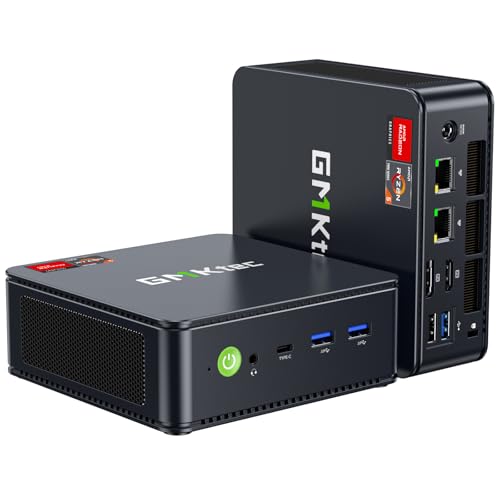
The GMKtec M6 Ultra takes a more performance-first approach than the A6. Its Ryzen 5 7640HS has six Zen 4 cores, 12 threads, a 4.3GHz base speed and boost speeds up to 5.0GHz. The higher-power design is useful when an application needs sustained CPU performance, and it gives this machine a convincing edge for compiling, encoding and other workloads that benefit from newer processor architecture.
It arrives with 32GB of dual-channel DDR5 memory, installed as two 16GB modules, and supports expansion up to 128GB. The included 1TB M.2 2280 SSD is PCIe 3.0, but GMKtec says the system supports dual storage expansion with PCIe 4.0 drives up to 8TB. That makes the M6 Ultra unusually adaptable for a compact PC, especially if a large game library or media archive is part of the plan.
The Radeon 760M has eight compute units and 512 shaders running at up to 2, 600MHz. It is still not a discrete GPU, but it is a better starting point for moderate gaming than the Vega 8 graphics in the E3B. Hardware decoding and encoding for AV1, HEVC and AVC also make the system useful for video playback and creator workflows. Three-display output includes 4K at 60Hz through HDMI and DisplayPort, plus up to 8K at 60Hz through USB4.
Networking is another strength. The 2.5Gbps Ethernet connection is useful for a compatible network or fast local server, while Wi-Fi 6 and Bluetooth 5.2 cover wireless connections. The real drawback is that the higher performance envelope can make cooling more important than it is on the quieter, lower-power KAMRUI Pinova P2. Buyers who primarily play modern graphically intense games should consult the hardware trade-offs for gaming on a mini desktop before choosing an integrated GPU system.
3. BOSGAME P6: Best for Power Users

Pros
- Eight-core, 16-thread Ryzen 9 6900HX
- 24GB LPDDR5X memory
- 1TB PCIe 4.0 SSD
- Three 4K display outputs
- Dual Ethernet ports and Wi-Fi 6E
Cons
- Memory is onboard rather than user-upgradable
- Dual Ethernet is more useful for advanced setups than ordinary offices
- Radeon 680M is limited for demanding 3D gaming
Best for: developers, creators and home-lab users who need strong CPU performance in a small enclosure.
The BOSGAME P6 is a specialist pick with enough processor power to make a compact machine feel like a serious workstation. Its Ryzen 9 6900HX has eight cores and 16 threads, with boost speeds up to 4.9GHz. That makes it a natural fit for code builds, multitasking, light editing and running several less demanding virtual machines.
Its 24GB of onboard LPDDR5X memory runs at 4800MT/s. That is a generous starting configuration for office work and development, but onboard memory means the upgrade story is not as flexible as the GEEKOM A6 or GMKtec M6 Ultra. Storage is more accommodating: the 1TB M.2 NVMe PCIe 4.0 SSD is joined by support for an additional M.2 NVMe drive, with expansion up to 8TB according to the listing.
Radeon 680M graphics can run three 4K displays at 60Hz through HDMI, DisplayPort and USB-C. The P6 is capable of light gaming and the listing specifically positions it for esports titles, but the graphics ceiling should be clear. It is better suited to a multi-screen development environment or editing desk than a replacement for a desktop with a dedicated graphics card.
Connectivity gives the P6 a distinct identity. Two 1Gbps Ethernet ports support home servers, firewall projects and software-router setups, while Wi-Fi 6E and Bluetooth 5.3 provide newer wireless standards. Bluetooth 5.3 requires a current driver and otherwise defaults to Bluetooth 5.2, a small but important detail. Cooling is rated below 36dB, though power users should still expect more fan activity than with a basic office box. The GMKtec M5 Ultra offers faster 2.5Gbps networking, but the P6 counters with more CPU muscle and faster included storage.
4. GMKtec M5 Ultra: Best Connected Workstation

Pros
- Eight-core, 16-thread Ryzen 7 7730U
- 32GB dual-channel DDR4 memory
- Dual 2.5Gbps Ethernet ports
- Triple 4K display support
- Wi-Fi 6E and USB-C
Cons
- 512GB SSD is smaller than several rivals
- Vega graphics are behind the newer Radeon 680M and 760M
- One-year limited warranty
Best for: offices, home labs and users who need fast wired networking alongside multiple displays.
The GMKtec M5 Ultra makes the most sense when networking is central to the setup. The Ryzen 7 7730U provides eight cores and 16 threads, with a power-saving mode at 2.00GHz and a performance mode that reaches 4.50GHz through the BIOS. That gives the machine flexibility for quiet office work or heavier multitasking, though the Zen 3 generation is not as modern as the Ryzen 5 7640HS in the M6 Ultra.
Memory capacity is generous at 32GB of dual-channel DDR4, and the two modules can be expanded to 64GB. Storage starts at 512GB through an M.2 2280 PCIe 3.0 SSD, with support for dual drives and up to 4TB. The smaller starting drive is the main practical compromise here. It is enough for office applications and projects, but a large media collection or game library will need expansion sooner than on the 1TB systems.
Radeon integrated graphics can drive three 4K displays at 60Hz and support 4K video editing and playback. The M5 Ultra is not the gaming pick in this group, but the triple-screen output is helpful for spreadsheets, dashboards and monitoring tools. Ports include USB-C with power delivery, data and DisplayPort, HDMI 2.0, DisplayPort and four USB-A ports.
Two 2.5Gbps Ethernet ports are the headline feature. They suit a home server, firewall, lab or demanding wired network far better than the single Gigabit ports on the ACEMAGIC Ryzen 7330U and KAMRUI AK1PLUS. Wi-Fi 6E and Bluetooth 5.2 round out the connections. Choose the M5 Ultra when the network setup matters as much as the processor, and choose the A6 if upgradeable DDR5 memory and four-display support are more important.
5. KAMRUI Pinova P2: Best Compact Multi-Display PC

Pros
- Ryzen 7 7330U with four cores and eight threads
- Triple 4K output at 60Hz
- Two storage expansion slots
- VESA mount included
- Compact 5.05 by 5.05 by 1.73 inch design
Cons
- 256GB starting SSD is limited
- LPDDR4X memory is not presented as replaceable
- Integrated Vega graphics are not for demanding games
Best for: users who need three screens from a particularly small office computer.
The KAMRUI Pinova P2 is one of the easiest computers here to place behind a monitor or carry between rooms. Its case measures about 5.05 by 5.05 by 1.73 inches and weighs about 1.26 pounds. The included VESA mount lets it disappear behind a compatible display, which is useful when desk depth is limited.
The Ryzen 7 7330U has four cores and eight threads, with a maximum speed of 4.3GHz and 8MB of L3 cache. It is a sensible middle ground for browser-heavy work, office applications, coding and video calls. The 16GB of LPDDR4X memory keeps the configuration comfortable for everyday multitasking, while the 256GB M.2 SSD is quick for the operating system but leaves less room for large files.
Display connectivity is the P2's reason to exist. HDMI 2.0, DisplayPort 1.4 and a USB 3.2 Gen 2 Type-C port with DisplayPort Alt Mode can run three 4K displays at 60Hz. The Type-C port also supports 10Gbps data transfer. That combination is more useful for a compact workstation than a basic dual-monitor setup, particularly for a financial dashboard, control room or conference presentation.
Storage expansion helps offset the small included drive. The system has an M.2 2280 SATA or NVMe PCIe 3.0 slot and another M.2 2280 SATA slot, with support for up to 4TB total storage according to the listing. Cooling is described as quiet during light use and under load. The limitation is graphics performance, which trails the newer Radeon 680M in the GEEKOM A6. Pick the P2 for its size and display flexibility, not for 3D gaming.
6. GEEKOM A5: Best Expandable Home Office PC

Pros
- Ryzen 5 7430U for office multitasking
- Upgradeable DDR4 memory
- 1TB NVMe SSD and extra storage bays
- Up to four 4K displays
- Reinforced case with metal mid-frame
Cons
- Heavier than the smallest mini PCs
- Vega 7 graphics are not intended for demanding games
- No processor details beyond the Ryzen 5 7430U are provided
Best for: home offices that need storage and memory expansion over time.
The GEEKOM A5 is the practical office counterpart to the more powerful A6. Its Ryzen 5 7430U is aimed at general productivity, and the configuration includes 16GB of DDR4 memory plus a 1TB PCIe NVMe SSD. It will suit documents, web applications, video calls and moderate creative software without taking the space of a tower.
Expansion is the A5's strongest long-term feature. The dual-slot memory can be upgraded to 64GB, and the system supports an additional M.2 2242 drive plus a 2.5-inch drive bay. GEEKOM says total storage can reach 10TB with the relevant additions. That is a much more useful design for a growing photo archive or office file store than the fixed 256GB configurations in the KAMRUI AK1PLUS and ACEMAGIC Ryzen 7330U.
Radeon Vega 7 graphics support up to four 4K displays through two HDMI ports and two USB 3.2 Gen 2 Type-C ports. One of those USB-C connections can provide 8K visuals, according to the listing. This makes the A5 a capable multi-screen office computer, although it is not the right choice for modern graphics-heavy games.
The chassis combines a reinforced ABS and PC shell with a metal mid-frame, vibration-damping feet and a high-gain antenna. GEEKOM also lists a three-year limited warranty and Linux compatibility. The A5 is not as light as the Pinova P2 and does not offer the A6's newer Radeon 680M graphics, but its storage bays and upgradeable memory make it a better fit for an office that will accumulate files. Readers also comparing how a larger all-in-one changes workspace planning may find the A5 a more flexible alternative when an existing monitor is already available.
7. ACEMAGIC Ryzen 7330U: Best Built-In Power Supply

Pros
- Ryzen 7 7330U with four cores and eight threads
- Internal power supply reduces cable clutter
- Six USB 3.2 Type-A ports
- Triple 4K display support
- VESA mount and 5 by 5 by 1.6 inch chassis
Cons
- 256GB SSD fills quickly with large files
- Wi-Fi 5 and Bluetooth 4.2 are older standards
- Radeon integrated graphics are limited for gaming
Best for: compact office desks where a tidy power setup and plentiful USB ports matter.
The ACEMAGIC Ryzen 7330U stands out for putting the power supply inside the computer. That means one less external adapter taking up space, which is a small but meaningful improvement on a compact desk. The silver case measures about 5 by 5 by 1.6 inches and supports a VESA mount for installation behind a monitor or on a wall.
Its Ryzen 7 7330U has four cores, eight threads, a 2.3GHz base speed and boost speeds up to 4.3GHz. With 16GB of DDR4 memory, it is equipped for ordinary office multitasking, schoolwork, browsing and video calls. The 256GB M.2 2280 SSD will feel quick for basic use, but it is not a lot of working space for video, games or a large photo library.
ACEMAGIC gives this model an unusually generous selection of ports. There are six USB 3.2 Type-A ports, a 10Gbps USB-C port with DisplayPort 1.4, HDMI 2.0, DisplayPort 1.4, Gigabit Ethernet and a 3.5mm audio jack. HDMI, USB-C and DisplayPort can run three 4K screens. That is a compelling arrangement for peripherals and monitors, though wireless connectivity is older, with Wi-Fi 5 and Bluetooth 4.2.
The system supports adding an M.2 NVMe PCIe 3.0 or M.2 SATA SSD, with expansion up to 4TB according to the listing. Its cooling is described as quiet at light loads and fairly quiet under load. Compared with the KAMRUI Pinova P2, it gives up newer wireless standards and a slimmer body, but gains an internal power supply and more USB-A ports. It is best for a fixed desk where cable simplicity matters more than maximum graphics performance.
8. KAMRUI E3B: Best for Esports Gaming

Pros
- Eight-core, 16-thread Ryzen 7 7730U
- Vega 8 graphics for lighter games
- 1TB NVMe SSD
- Triple 4K display output
- Wi-Fi 6, Bluetooth 5.2 and six USB 3.2 ports
Cons
- Integrated graphics are not suited to demanding modern games
- Memory is listed as LPDDR4
- Gaming performance will vary by title and settings
Best for: esports players and casual gamers who also need a small general-purpose desktop.
The KAMRUI E3B is the gaming-oriented version of a conventional office mini PC. Its Ryzen 7 7730U has eight cores, 16 threads, 16MB of L3 cache and boost speeds up to 4.5GHz. That makes it useful for gaming with voice chat, browser guides and other background applications, as well as for editing and general multitasking.
The included 16GB of LPDDR4 memory and 1TB NVMe SSD are a better starting point for games than the 256GB drives in several office models. KAMRUI says storage can be expanded up to 4TB. The roomy SSD also helps if the machine is used as a media center or a family computer shared between work and entertainment.
Graphics come from Radeon Vega 8, with a listed clock speed up to 2, 000MHz. It is aimed at popular esports games such as League of Legends, CS:GO and DOTA 2 rather than new blockbuster releases at high settings. HDMI, DisplayPort and full-featured USB-C can drive three 4K displays, while six USB 3.2 ports leave room for a controller, keyboard, mouse, external audio and storage.
Wi-Fi 6, Gigabit Ethernet and Bluetooth 5.2 cover network and peripheral connections. The compact 5.05-inch square chassis weighs about 1.08 pounds and includes a VESA mount, making it easy to place near a TV or monitor. Compared with the GMKtec M6 Ultra, the E3B has older Vega graphics and a lower performance ceiling, but its eight-core processor and 1TB SSD make it a sensible light-gaming system. Skip it if the goal is demanding 3D gaming rather than esports and casual titles.
9. KAMRUI AK1PLUS: Best Basic Office PC

Pros
- 16GB LPDDR4X memory
- Dual 4K display support at 60Hz
- Four USB 3.2 ports
- Two storage expansion paths
- Small 5.04-inch square chassis
Cons
- Celeron N5095 is less powerful than the Ryzen systems here
- 256GB SSD is modest for media storage
- Not designed for serious gaming or creative workloads
Best for: browsing, email, video calls, office documents and simple media playback.
The KAMRUI AK1PLUS is a straightforward computer for straightforward work. Its Intel Celeron N5095 has four cores and four threads, with speeds up to 2.9GHz. It is intended for browsing, online classes, video conferencing, email and basic multitasking, not for heavy rendering or demanding games.
The 16GB of LPDDR4X memory is a helpful amount for a machine in this class, and the 256GB M.2 2280 SSD should keep startup and application loading responsive. Storage expansion is unusually good for an entry-level box. The system supports an M.2 SATA or NVMe SSD up to 2TB and an additional 2.5-inch SATA SSD or hard drive up to 2TB, allowing a much larger local archive.
Two HDMI 2.0 outputs can run 4K displays at 60Hz simultaneously. Intel UHD Graphics is adequate for spreadsheets, web pages, streaming and light photo editing, but it is far behind the Radeon 680M in the GEEKOM A6. Connectivity includes four USB 3.2 ports, Gigabit Ethernet and a 3.5mm audio jack, along with Wi-Fi and Bluetooth.
The AK1PLUS measures about 5.04 by 5.04 by 2.05 inches, so it remains easy to fit behind a monitor or on a shallow shelf. Auto Power On, RTC Wake and Wake-on-LAN also make it useful for kiosks, signage and simple remote-management setups. Choose it when the workload is modest and storage expansion matters. Anyone compiling code, editing video or running many heavy applications should move up to the KAMRUI Pinova P2 or GEEKOM A5.
10. GMKtec G3S: Best Simple Media PC
Pros
- Intel N95 reaches up to 3.4GHz
- Dual 4K display support
- AV1 decoding
- Wake-on-LAN and PXE boot support
- Gigabit Ethernet and Wi-Fi 5
Cons
- Only 8GB of DDR4 memory
- 256GB SSD limits local storage
- Less capable for multitasking than the Ryzen models
Best for: streaming, light office work, monitoring equipment and simple home servers.
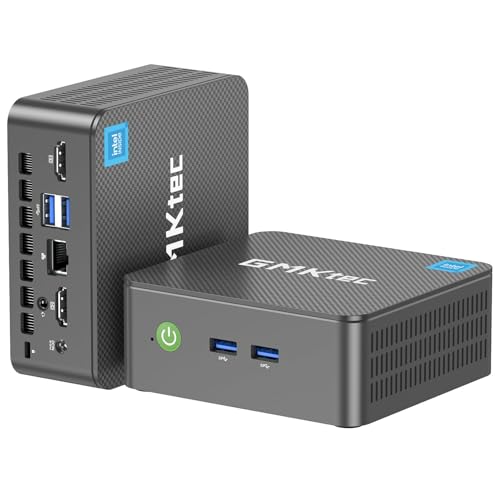
The GMKtec G3S is the smallest step up from a basic streaming box to a usable desktop. Its Intel N95 has four cores, four threads, 6MB of cache and burst speeds up to 3.4GHz. That is enough for routine office work, browser tabs, home entertainment and monitoring tasks, but it does not have the multitasking reserve of the Ryzen 7 systems above it.
The configuration includes 8GB of DDR4 memory and a 256GB M.2 2242 SSD. Those capacities are workable for a focused media or office machine, though they leave less room for multiple applications and local files. The SSD should make startup feel much faster than an older hard-drive desktop, but this is not the model to choose for a large software collection.
Intel graphics support 4K video playback and AV1 decoding, with two HDMI 2.0 ports capable of running dual 4K displays at 60Hz. A USB 3.2 port, additional USB connections, Gigabit Ethernet, Wi-Fi 5, Bluetooth 5.0 and a 3.5mm audio jack cover the essentials. For a television, projector or two-screen desk, the display support is more capable than the basic processor might suggest.
Wake-on-LAN, PXE boot and Auto Power On broaden its usefulness for monitoring equipment and simple server duties. The KAMRUI AK1PLUS is a better office pick because it has twice the memory and more flexible storage expansion, while the G3S makes sense when AV1 playback and a simple connected setup are the priority. It should be skipped for gaming, video editing or heavy multitasking.

How to choose the best mini pc
The right mini computer depends less on its size than on the processor, memory layout, graphics engine, storage options and ports inside that small case.
Processor performance
The processor determines how well a mini PC handles simultaneous tasks and sustained workloads. Four-core chips such as the Intel N95 and Celeron N5095 are suitable for browsing, documents and media playback, while eight-core Ryzen processors are better for compiling, editing and heavier multitasking.
Pay attention to the processor family as well as the Ryzen branding. The Ryzen 5 7640HS in the GMKtec M6 Ultra is newer than the Ryzen 7 7730U in the E3B, and its Zen 4 design gives it a stronger performance foundation despite the lower Ryzen tier.
Memory capacity and upgradeability
Memory affects how many browser tabs and applications can remain open without slowdowns. A mini PC with 16GB is a sensible starting point for office work, while 32GB is more comfortable for development, creative applications and virtual machines.
Upgradeability matters if the computer will have a long service life. The GEEKOM A6, GEEKOM A5 and GMKtec M6 Ultra use replaceable memory, while onboard LPDDR configurations such as the BOSGAME P6 and KAMRUI E3B offer less flexibility. Dual-channel memory is also preferable for integrated graphics.
Integrated graphics
Mini PCs generally use graphics built into the processor, so expectations need to match the hardware. Intel UHD graphics and Vega 7 or Vega 8 are fine for video playback, office work and lighter games. Radeon 680M and Radeon 760M provide a stronger platform for casual gaming and creative applications, but none of these machines replaces a desktop with a dedicated graphics card.
Integrated graphics can make a mini PC enjoyable for esports, but they do not turn it into a modern high-end gaming tower.
Storage and expansion
A 256GB SSD is enough for Windows, office applications and a few files, but it can fill quickly. A 512GB or 1TB SSD is more comfortable for games, photos and project files. PCIe 4.0 storage is faster than PCIe 3.0, though real-world gains depend on the workload.
Check whether the memory and storage are replaceable. The KAMRUI AK1PLUS supports both an M.2 drive and a 2.5-inch SATA drive, while the GEEKOM A5 adds an M.2 2242 slot and a 2.5-inch bay. Those options matter more than a thin specification sheet if the computer will become a media server.
Display and connectivity
Count the outputs before buying. Two HDMI ports are enough for a dual-screen desk, while USB-C with DisplayPort Alt Mode and a separate DisplayPort can support three or four screens. The KAMRUI Pinova P2 is especially capable for its size, with HDMI, DisplayPort and USB-C display output.
Networking also varies considerably. Gigabit Ethernet is sufficient for ordinary internet use, but the 2.5Gbps ports on the GMKtec systems and the dual Ethernet ports on the BOSGAME P6 are better for servers, local storage and advanced home networks. Wi-Fi 6E is preferable when a compatible router is available.
Frequently asked questions
Can a mini PC replace a desktop tower?
For office work, browsing, streaming and many development tasks, a mini PC can replace a tower comfortably. The main limitation is graphics expansion, since these systems use integrated graphics and compact cooling. Choose a full-size desktop if you need a dedicated graphics card or extensive internal hardware upgrades.
Are mini PCs good for gaming?
Some are suitable for esports and casual gaming. The KAMRUI E3B, GMKtec M6 Ultra and BOSGAME P6 have stronger integrated graphics than the Intel-based models, but demanding games may require reduced settings and resolution. A dedicated gaming desktop remains the better fit for new graphics-heavy releases.
How many monitors can these mini PCs support?
The number depends on the model and the available outputs. The KAMRUI AK1PLUS supports two 4K displays, while the Pinova P2, M5 Ultra, M6 Ultra and E3B support three. The GEEKOM A5 and A6 list support for up to four 4K displays.
Can mini PC storage be upgraded?
Several models support storage upgrades, but the exact options differ. The AK1PLUS supports an M.2 drive and a 2.5-inch SATA drive, while the GEEKOM A5 supports an additional M.2 2242 drive and a 2.5-inch bay. Check the specific listing before buying a replacement drive.
Is 16GB of memory enough for office work?
Yes. 16GB is suitable for documents, video calls, web applications and ordinary multitasking. Move to 32GB if you regularly use virtual machines, large creative projects, extensive browser sessions or development tools together.
Do mini PCs include an operating system?
The listings identify Windows configurations for the products in this roundup. The GEEKOM A6 and BOSGAME P6 specifically list Windows 11 Pro, while the ACEMAGIC model also specifies Windows 11 Pro. Check the current product listing for the exact operating system supplied with the configuration you select.
The bottom line
The GEEKOM A6 is the Best mini PC for most demanding home and office users because it combines the Ryzen 7 6800H, upgradeable DDR5 memory, a 1TB PCIe 4.0 SSD, four-display support and modern networking. The GMKtec M6 Ultra is the better choice for casual gaming and newer integrated graphics, while the BOSGAME P6 suits developers and home-lab users who need a strong eight-core processor.
For a smaller desk, the KAMRUI Pinova P2 offers an excellent mix of compact design, three-display output and storage expansion. The KAMRUI AK1PLUS and GMKtec G3S remain sensible for basic tasks, but their lower-power processors and smaller starting drives make their limits easier to reach.
If you are undecided, choose the GEEKOM A6 unless you specifically need gaming graphics, dual 2.5Gbps networking or the smallest possible office box.
As an Amazon Associate we earn from qualifying purchases.