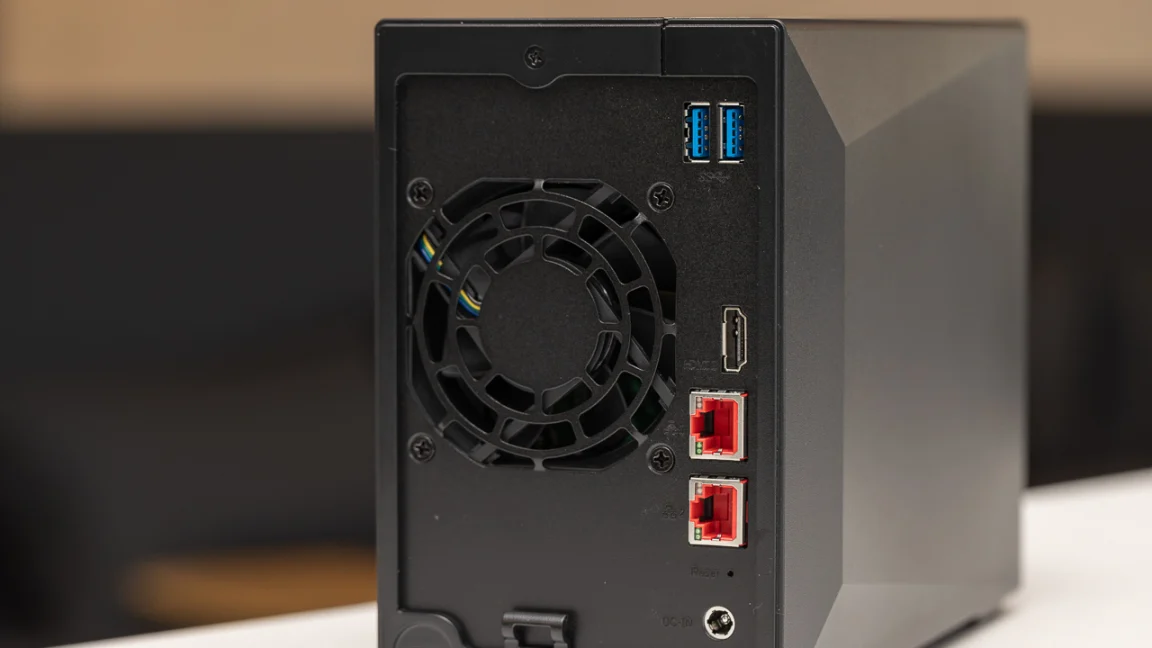

A home NAS has one job that cloud accounts and scattered external drives handle badly: keeping your files in one place while making them available to every phone, laptop, TV, and tablet in the house. The challenge is choosing the right amount of hardware. A simple photo backup box does not need the same processor as a NAS running Docker, virtual machines, media servers, and security cameras.
We compared 10 current home NAS options, from single-drive Buffalo appliances with storage included to powerful four-bay UGREEN systems built for demanding workloads. The Best NAS for Home for most people is the UGREEN NAS DXP2800, while the Synology DS225+ is the better fit for polished media management and long-term software support.
| # | Product | Award | Bays | Network | Best for |
|---|---|---|---|---|---|
| 1 | UGREEN DXP2800 | Best overall | 2 | Not specified | Advanced home storage and remote work |
| 2 | Synology DS225+ | Best for media | 2 | Up to 282 MB/s | Streaming, backups, and surveillance |
| 3 | UGREEN DH4300 Plus | Best four-bay starter | 4 | 2.5GbE | Large photo and video libraries |
| 4 | UGREEN DXP4800 GT | Best for creators | 4 | Dual 10GbE | Editing, Docker, and fast local transfers |
| 5 | UGREEN DXP4800 Plus | Best for advanced workloads | 4 | 10GbE | Virtual machines and self-hosting |
| 6 | UGREEN DH2300 | Best for beginners | 2 | 1GbE | Photos, files, and basic backups |
| 7 | Synology DS223 | Best for family backups | 2 | Not specified | Shared home files and cameras |
| 8 | Synology DS223j | Best compact Synology | 2 | Not specified | Simple private cloud storage |
| 9 | BUFFALO LinkStation 210 4TB | Best ready-to-use capacity | 1 | Not specified | Straightforward home backups |
| 10 | BUFFALO LinkStation 210 2TB | Best simple file server | 1 | Not specified | Basic network storage |
1. UGREEN DXP2800: Best Overall

Pros
- Designed for advanced home users and remote workers
- Supports up to 80TB of storage
- Apps work across computers, phones, browsers, and smart TVs
- AI photo organization can identify faces, scenes, objects, and locations
Cons
- Only two drive bays
- Storage drives are not included
- The listing does not specify the processor, memory, or network speed
Best for: households that want capable private storage without stepping into a server-style setup.
The UGREEN DXP2800 is the most balanced NAS in this group. It has enough room to become the central home archive, but it does not take on the scale or complexity of the four-bay systems. The two drive bays make sense for a household that wants mirrored storage for photos, documents, and device backups, while the software is aimed at people who want to get beyond a simple shared folder.
UGREEN says the enclosure supports up to 80TB, giving it more headroom than the DH2300's stated 64TB capacity. That difference matters if the NAS will hold several years of phone videos, a large music collection, and computer backups at the same time. The drives still have to be purchased separately, and the advertised maximum should not be confused with usable capacity after choosing a redundant storage layout.
The software side is where the DXP2800 separates itself from basic appliances. Its app supports Windows, macOS, Android, iOS, web browsers, and smart TVs, so a mixed-device household does not have to build its setup around one operating system. Automatic photo albums can recognize faces, scenes, objects, and locations, and the duplicate-removal feature should help keep years of phone backups from becoming a mess. A good NAS also depends on the network around it, so how your home network handles several wired devices is worth considering before choosing a storage box.
Compared with the Synology DS223, the DXP2800 offers a more expansive storage target and a stronger emphasis on AI-assisted photo management. The Synology models have a more established software environment, while the DXP2800 makes a persuasive case for users who want modern photo search and broad device access. It is also a more sensible starting point than the four-bay UGREEN models if you do not need Docker, virtual machines, or a large media server.
The main weakness is the missing detail around core hardware. The listing identifies the DXP2800 as an advanced home model but does not state its processor, memory, or network interface. That makes it harder to predict how far it can be pushed with simultaneous users and demanding applications. Skip it if you specifically need virtual machines or highly documented hardware behavior. For everyone else, this is the Best NAS for Home balance of capacity, accessibility, and manageable complexity.
2. Synology DS225+: Best for Media

Pros
- Built for private media streaming and photo backups
- Intel CPU supports hardware transcoding
- Transfer speeds are listed up to 282 MB/s
- Supports snapshots, RAID redundancy, and remote backup targets
- Can manage up to 30 IP cameras
Cons
- Two bays limit expansion
- Diskless design requires separate storage
- Hardware transcoding is most useful when your clients need it
Best for: households building a private media library with backups and surveillance in the same box.
The Synology DS225+ is the NAS to choose when the storage box is also meant to be a media server. Its pitch is not just a private folder for documents. It is designed to hold a personal library of movies, shows, music, and photos, then stream that content to devices around the home. The Intel processor and hardware transcoding support are important here because they can help the NAS convert media for a device that cannot play the original file directly.
Synology lists transfer speeds up to 282 MB/s. That figure is most relevant when moving large files over a fast wired connection, not when streaming a single movie over ordinary Wi-Fi. It does mean that a large photo library or video project can move onto the NAS quickly when the rest of the network supports the required throughput. The two bays also allow a redundant configuration, though usable capacity will depend on the drives and storage arrangement selected.
Backup is a strong part of the DS225+ design. It can send backups to cloud services, external drives, and another NAS, while snapshots provide another layer against accidental changes or file damage. That combination is more reassuring than treating RAID as a complete backup plan. RAID can help maintain access after a drive failure, but a separate backup destination is still important for deleted files, theft, or other problems affecting the whole unit.
The DS225+ is more media-focused than the UGREEN DXP2800 and more capable for demanding services than the Synology DS223. It also supports up to 30 IP cameras with AI detection, alerts, and remote monitoring, which gives it a useful second role in a connected home. If your priorities are mostly documents and family photos, the less specialized DS223 may be enough. If you want a private Netflix-style library, the DS225+ is the more convincing pick.
Its limitation is expansion. Two bays are practical for a home library, but they leave less flexibility than the four-bay DH4300 Plus or DXP4800 models. The unit is also diskless, so the storage plan needs to be decided separately. Choose the DS225+ if hardware transcoding, snapshots, and a broad backup ecosystem matter more than maximum drive count. It is the strongest Best NAS for Home choice for media-heavy households.
3. UGREEN DH4300 Plus: Best Four-Bay Starter

Pros
- Four bays provide room for a larger storage pool
- Supports up to 128TB
- 2.5GbE network port and 8GB LPDDR4X RAM
- Supports Docker and Plex through Docker
- 4K HDMI output and NFC-assisted setup
Cons
- Does not support virtual machines
- Wired Ethernet only
- Drives are not included
Best for: home users who want four bays and Docker without moving to the heaviest NAS hardware.
The UGREEN DH4300 Plus is the natural step up for anyone who already knows that two drive bays will feel restrictive. Four bays change the storage plan. You can reserve room for redundancy, add capacity over time, and keep a growing library of photos, video, and computer backups without replacing the entire enclosure. UGREEN lists support for up to 128TB, although the usable amount depends on the drives and RAID layout.
The hardware is unusually well specified for an entry-level four-bay model. It has 8GB of LPDDR4X RAM and a 2.5GbE network port, which gives it more breathing room for multiple apps and large transfers than the 1GbE DH2300. The company says a 1GB file can transfer in three seconds under suitable conditions. That is a best-case claim, so the router, switch, client device, drives, and file type all matter, but the faster port still gives this model a useful advantage over basic home NAS boxes.
Docker support broadens the DH4300 Plus beyond file storage. It can run Plex through Docker, and the software also handles photo classification, semantic search, people and object recognition, and duplicate removal. The 4K HDMI output is another unusual feature for this tier, especially for users who want the NAS connected directly to a display. It does not support virtual machines, so it is not the right platform for running complete operating systems or more demanding lab environments.
Compared with the DXP2800, this model wins on drive count, memory, and network speed. The DXP4800 GT wins when fast multi-user transfers, creator features, or virtual machines are central to the plan. The DH4300 Plus is more approachable than either, especially for a household that wants to grow into Docker rather than build a home server from day one. Its wired-only design is normal for a NAS, but it means the unit needs to live near a router, switch, or suitable Ethernet run.
The real weakness is the boundary between containers and virtual machines. Docker is useful, but it is not a substitute for running full virtualized systems. The advertised 128TB capacity is also based on a particular drive arrangement and should not be read as guaranteed usable space. If you want a large private archive, local media, and a few containerized services, the DH4300 Plus is the most accessible four-bay option here.
4. UGREEN DXP4800 GT: Best for Creators

Pros
- AMD Ryzen Embedded R2514 with four cores and eight threads
- 8GB DDR4 RAM expandable to 64GB
- Dual 10GbE ports
- SD card slot and multiple fast USB ports
- Supports Docker, virtual machines, and 4K HDMI
- Four bays plus NVMe expansion options
Cons
- Heavy at 14.57 pounds
- Pre-installed memory is non-ECC
- Plex requires manual Docker setup
Best for: photographers, video creators, and advanced home users moving large files across a fast network.
The UGREEN DXP4800 GT is a very different kind of home NAS from the Buffalo LinkStation models. It is built to be an active workstation companion, not just a network folder. The standout feature is the combination of a four-core, eight-thread AMD Ryzen Embedded R2514 processor and 8GB of DDR4 RAM. That gives it the foundation for backups, media processing, containers, and several users working at once.
Its networking is the most compelling part for creators. There are two 10GbE ports, with link aggregation capable of up to 20Gbps of aggregate bandwidth when compatible network equipment is used. The theoretical throughput is listed at about 2.5GB/s in that configuration. A home network needs matching switches, cabling, and client hardware to approach those figures, but the headroom is valuable for large video projects and simultaneous workstation backups.
UGREEN also includes a built-in SD card slot, USB-A and USB-C 10Gbps ports, USB 2.0, and 4K HDMI. A photographer can copy material from an SD card directly to the NAS without first routing it through a computer. The four drive bays support SATA drives up to 32TB each, while two of the same bays can support U.2 NVMe SSDs and two M.2 SSDs add further expansion. The listing states up to 144TB total capacity, though the exact usable amount depends on the installed drives and configuration.
This is the more creator-friendly choice over the DH4300 Plus because of the card slot, dual 10GbE, expandable memory, and broader virtualization support. The DXP4800 Plus has a more office-oriented Intel platform and also supports virtual machines, but the GT brings stronger creator workflow features. The Synology DS225+ remains easier to recommend for a polished media library, while the GT is more appealing when the NAS itself is part of the production workflow.
The hardware has two clear caveats. At 14.57 pounds, it is not a lightweight box to move around, and the pre-installed memory is non-ECC even though the system can be upgraded to compatible ECC RAM. Plex also requires manual setup through Docker. Skip this model if your needs end at automatic phone backups and shared folders. For users who need fast local storage, direct camera imports, and room to run services, it is the most capable creator platform in the roundup.
5. UGREEN DXP4800 Plus: Best for Advanced Workloads

Pros
- Intel Pentium Gold 8505 with five cores
- Supports Docker and virtual machines
- 10GbE and 10Gbps USB connections
- Supports up to 144TB
- Works across Windows, macOS, Linux, iOS, and Android
- AI photo organization and flexible permissions
Cons
- Large four-bay enclosure
- Diskless design
- Plex requires Docker and manual setup
Best for: advanced home labs, small offices, and users who want to host more than storage.
The UGREEN DXP4800 Plus is the model for people who see a NAS as a small server. Its Intel Pentium Gold 8505 processor has five cores, and the feature set includes both Docker and virtual machine support. That combination matters if you want to run a home automation service, a development environment, a media application, or several isolated services without dedicating another computer.
It also has the capacity and connectivity to support that ambition. The four-bay enclosure is listed for up to 144TB, and UGREEN says the 10GbE network port or 10Gbps USB ports can back up 1GB in less than a second under suitable conditions. As with every high-speed NAS claim, the client, switch, storage drives, and file size will determine real results. The important point is that this model is not constrained to the narrow pipe found on basic 1GbE appliances.
The DXP4800 Plus works with Windows, macOS, Linux, iOS, Android, and Google services, making it a flexible central hub for a mixed household or small office. AI photo albums can recognize faces, scenes, objects, and locations, while permission controls and encryption help separate personal files from shared work. The RAID options are useful for recovery after a drive failure, but they do not remove the need for a separate backup.
Compared with the DXP4800 GT, the Plus is the better fit for virtual machines and general-purpose server use, while the GT offers more explicit creator touches such as the SD card slot and dual 10GbE. The DH4300 Plus is a gentler introduction to Docker, but it cannot run virtual machines. The DXP4800 Plus therefore makes the most sense when you already know which services you intend to host.
Its weakness is not a missing feature so much as the amount of system you are buying into. A four-bay enclosure measuring about 10.14 inches long, 7.01 inches wide, and 7.01 inches high needs a deliberate home for it, and a virtual-machine setup takes more maintenance than ordinary backups. Buyers who only want family photo storage should choose the DXP2800 or Synology DS223 instead. This is a powerful Best NAS for Home pick for people willing to manage a more advanced system.
6. UGREEN DH2300: Best for Beginners

Pros
- Simple entry-level two-bay design
- Supports up to 64TB
- 4GB of onboard RAM
- Automatic backups across Windows, iOS, Android, and macOS
- AI photo tagging and duplicate detection
- RAID, two-factor authentication, and encrypted transfers
Cons
- Does not support Docker or virtual machines
- 1GbE network port
- Wired Ethernet only
- Storage drives are not included
Best for: first-time NAS owners who want private photo and file storage without server applications.
The UGREEN DH2300 is intentionally uncomplicated. It is a two-bay enclosure for people moving away from external drives or scattered cloud folders, and its best feature is that it does not ask a beginner to learn a server ecosystem immediately. The focus is personal entertainment, photo storage, and device backup rather than running a collection of services.
UGREEN lists support for up to 64TB and includes 4GB of onboard RAM. Its 1GbE port is enough for ordinary document access, phone backups, and photo browsing, though it will not match the faster transfers possible from the DXP4800 models. The company says transfers can reach 125MB/s in suitable conditions. That is a reasonable ceiling for a 1GbE connection, but actual speeds will vary with the drives, router, processor, and file size.
The DH2300 handles automatic backups across Windows, iOS, Android, and macOS. Its AI tools can tag faces, locations, text, and objects, then locate similar or duplicate photos. Those features make a meaningful difference once a household has years of phone images to sort. RAID modes, two-factor authentication, permission controls, and encrypted transfers add sensible protection, although RAID should still be paired with another backup destination for irreplaceable files.
The DXP2800 is the better choice for advanced home users because it supports a larger stated capacity and is positioned for remote work. The DH4300 Plus is more attractive if you already know you need Docker, 2.5GbE, or four bays. The DH2300 stays appealing because it keeps the purpose narrow. It is less intimidating than those systems and more capable for private photo management than a basic single-drive appliance.
The limits are firm. There is no Docker, no virtual machine support, no SAN Manager, and no Wi-Fi built in. Plex cannot run through Docker on this model. If you want a home lab or media server, skip it. If you want an approachable place for family photos, documents, and automatic backups, the DH2300 is the cleanest starting point.
7. Synology DS223: Best for Family Backups

Pros
- Centralizes files from computers, phones, and external drives
- Automated backups to multiple destinations
- File collaboration and version control
- Supports IP camera monitoring
- Two-year warranty and ongoing software updates
Cons
- Two bays limit future capacity
- Diskless design
- The listing does not specify processor or network speed
Best for: families and home offices that prioritize dependable backups, sharing, and straightforward administration.
The Synology DS223 is a sensible family NAS because it concentrates on the jobs most households actually need. It centralizes files from computers, phones, and external drives, then makes them available from one place. The two-bay enclosure is compact enough for a shelf or desk, and the software is aimed at sharing, syncing, and backup rather than turning the unit into a full server rack.
Automated backup protection is the main attraction. The DS223 can back up Macs, PCs, and mobile devices to more than one destination, including cloud services and external drives. That gives families a practical way to preserve photos and documents while keeping a second copy away from the main NAS. File collaboration and version control are also useful for a home office where several people edit shared documents.
Synology includes a surveillance function that can turn compatible IP cameras into a home monitoring setup with motion alerts, recording schedules, and remote viewing. This is a useful extension of the storage role, but it does not make the DS223 a dedicated security recorder. The two drive bays also provide a path to redundant storage, though the system remains diskless and needs drives selected separately.
The DS223 is more office and backup focused than the media-oriented DS225+. It is a safer recommendation for a household that does not need hardware transcoding, while the DS223j offers a lighter version of the same private-cloud concept. The UGREEN DXP2800 brings more prominent AI photo features, but the DS223 has the appeal of a mature platform and clear backup workflows. If you are also replacing an aging family computer, how much storage a shared home computer really needs can help determine whether the NAS should hold the main library or only serve as a backup.
The missing hardware details make performance harder to predict. The listing does not identify the processor or network speed, and two bays will eventually feel restrictive for a large video library. Pick the DS223 when automated backups, sharing, and surveillance matter more than media processing. It is a calm, practical choice for a family that wants fewer scattered files.
8. Synology DS223j: Best Compact Synology

Pros
- Compact two-bay diskless enclosure
- Private cloud access from anywhere
- Automated backups to several destinations
- Supports file sharing and syncing
- Can support home security cameras
- Two-year warranty and ongoing software updates
Cons
- No storage included
- Hardware details are limited in the listing
- Two bays provide less expansion than four-bay models
Best for: users who want Synology's private-cloud approach in a small, uncomplicated enclosure.
The Synology DS223j is the smallest-feeling option in the Synology group, both physically and in ambition. Its two-bay design is intended for private cloud access, file sharing, device backups, and basic home security. It is a good fit for someone who wants a familiar storage hub rather than a machine for media transcoding or virtualized services.
The core experience revolves around access and backup. Files can be reached and shared from anywhere, while automatic backups can send copies from Macs, PCs, and mobile devices to cloud services or external drives. That makes the DS223j useful as a central family archive, especially when several people use different devices. The system is diskless, so the storage plan and redundancy choice remain in the buyer's hands.
Synology also positions the DS223j for home security, with support for multiple IP cameras and remote viewing. That broadens its role without forcing the NAS to become a general-purpose server. The white enclosure measures about 8.9 inches high, 6.5 inches long, and 3.94 inches wide, so it should be easier to place than the larger four-bay UGREEN systems.
The DS223 offers a more office-oriented feature set, including file collaboration and version control, while the DS223j is the simpler private-cloud route. The UGREEN DH2300 offers more explicit AI photo tools and a stated transfer rate, but the DS223j benefits from Synology's knowledge center, support materials, and ongoing software updates. Users focused on streaming should move up to the DS225+, which is designed for media and hardware transcoding.
Its drawback is that the listing provides little information about the internal hardware or network performance. That makes it difficult to recommend for heavy simultaneous workloads. It also cannot match the storage growth of a four-bay unit. Choose the DS223j when compact dimensions, automatic backups, and a clear private-cloud purpose matter more than speed or advanced applications.
9. BUFFALO LinkStation 210 4TB: Best Ready-to-Use Capacity

Pros
- 4TB hard drive included
- Simple single-bay setup
- Automated computer backups
- Folder permissions for private sharing
- SSL encryption for file transfers
- Two-year warranty including the hard drive
Cons
- One drive bay provides no drive-level redundancy
- Older macOS compatibility is specified
- Less expandable than every two-bay and four-bay model here
Best for: households that want a preconfigured network backup drive with minimal setup.
The BUFFALO LinkStation 210 4TB is the most appliance-like NAS in this roundup. It arrives with a 4TB hard drive installed, so the buyer does not have to choose compatible disks, open the enclosure, or plan a storage array before getting started. Connect it to the router and it becomes a shared network location for computers and other devices.
Its strengths are practical rather than ambitious. Buffalo includes NAS Navigator management software and PC backup software, and the unit can automate backups from multiple computers. Folder access restrictions allow a household to share a central library without giving every user access to every document. SSL encryption protects file transfers, while the closed system reduces exposure to third-party applications.
The single bay is the key trade-off. There is no second internal drive to mirror the data, so a drive failure can make the NAS unavailable and put the stored files at risk. Buffalo's two-year warranty includes the hard drive, which is reassuring, but it is not a replacement for a separate copy of important photos and documents. This model should be treated as a convenient central backup destination, not the only place irreplaceable files live.
The 4TB model is a better fit than the 2TB LinkStation 210 when the NAS will hold several computers or a growing photo collection. Both are simpler than the Synology and UGREEN systems, but the two-bay models offer a much better path to redundancy and capacity expansion. The LinkStation's support for Windows and macOS is useful, though the listing specifically identifies macOS 15 and earlier for its current software guidance.
The main reason to skip it is the fixed single-drive architecture. It also lacks the media server, AI photo search, Docker, and camera features found elsewhere in the list. Choose the LinkStation 210 4TB if you want a ready-to-use home file server and already have another backup plan. It is the least demanding way to centralize files, but not the most flexible.
10. BUFFALO LinkStation 210 2TB: Best Simple File Server
Pros
- 2TB hard drive included
- Single-bay appliance needs little setup
- Automated backups for computers
- Shared folders with individual access restrictions
- SSL encryption and closed-system design
- Two-year warranty includes the drive
Cons
- One bay means no internal redundancy
- Limited expansion
- Current software compatibility is specified for macOS 15 and earlier
Best for: a small household that needs one shared network folder and basic automated backups.
The BUFFALO LinkStation 210 2TB is the simplest product here to understand. It includes a 2TB hard drive, connects to the router, and provides a shared place for files, photos, music, and videos. There is no storage planning exercise and no need to decide which drives to install. That straightforward approach can be a benefit for someone buying a NAS for the first time.
Buffalo supports automated computer backups through NAS Navigator and its included PC backup software. Folder permissions let users keep private material separate from shared family folders, and the unit can work as a personal cloud that is accessible from connected devices. The closed system is also designed to reduce vulnerabilities associated with third-party apps, while SSL encryption protects transfers.
The 2TB capacity is enough for a modest document archive and a smaller family photo collection, but it can disappear quickly when several computers and phones back up to it. The 4TB version uses the same single-bay concept and is the more suitable LinkStation when the library is already substantial. Neither model has a second bay, so neither can provide internal drive mirroring.
Compared with the Synology DS223j, the LinkStation is easier to start because the drive is already installed, but it does not offer the same expansion path or broader private-cloud platform. The UGREEN DH2300 is a better long-term choice for AI photo organization, RAID modes, and cross-platform backups, provided you are comfortable sourcing drives separately. The Buffalo remains attractive when a fixed, uncomplicated appliance is the priority.
The weak point is the lack of growth. Once the included drive fills, the solution is replacement or external backup rather than adding a second internal drive. The software guidance also calls out macOS 15 and earlier, so Mac users on newer software should check current compatibility before committing. Pick this model for basic centralized storage, not for media serving, virtualization, or a long-term home lab.
How to choose best nas for home
A NAS should be chosen around the files, devices, and applications it will handle, not just the number of bays on the front.
Drive bays and usable capacity
Two bays are enough for a family photo archive, device backups, and shared documents, especially when the drives are configured for redundancy. Four bays make more sense for video libraries, multiple users, surveillance footage, or a storage plan that needs room to grow.
Advertised maximum capacity is not the same as usable space. RAID layouts can protect against a drive failure, but they reduce available capacity, and every NAS in this roundup that is described as diskless requires separate storage drives. A single-bay model such as the Buffalo LinkStation 210 cannot provide internal drive mirroring.
Network speed
A 1GbE connection is adequate for documents, phone backups, music, and ordinary photo browsing. A 2.5GbE connection shortens large transfers, while 10GbE becomes useful for video work, multi-user backups, and frequent movement of large files.
The NAS is only one part of the connection. The router or switch, Ethernet cabling, client computer, and installed drives must all support the faster path. Wi-Fi can also become the bottleneck, even when the NAS has a very fast wired port.
Buy more bays for future storage, but buy faster networking only when the rest of the home network can use it.
Processor and memory
Basic file sharing and automatic backups do not need an especially powerful processor. Media transcoding, photo indexing, Docker containers, virtual machines, and surveillance analysis require more headroom.
The DS225+ is designed around an Intel CPU with hardware transcoding. The DXP4800 GT uses an AMD Ryzen Embedded R2514 with four cores and eight threads, 8GB of DDR4 RAM, and expansion up to 64GB. The DXP4800 Plus uses a five-core Intel Pentium Gold 8505 and supports Docker and virtual machines. By contrast, the DH2300 does not support Docker or virtual machines, which is a limitation worth accepting only if those applications are outside the plan.
Backup and redundancy
RAID is useful because a failed drive does not necessarily interrupt access to the whole storage pool. It is not a complete backup. A deleted file, damaged NAS, theft, malware incident, or power event can affect every drive in the enclosure.
Look for automated backups to an external drive, cloud service, or another NAS. Synology's DS225+, DS223, and DS223j all support multiple backup destinations, while the UGREEN models emphasize automatic backups across several operating systems. The Buffalo models include computer backup software, but their single-bay design makes a second copy especially important.
Software and remote access
A NAS is only useful if the household can reach its files without friction. The UGREEN DXP2800 supports Windows, macOS, Android, iOS, browsers, and smart TVs. Synology emphasizes private-cloud access, file sharing, and device syncing. Buffalo focuses on network access through its management utility and computer backup software.
Remote access deserves careful setup. Use strong account credentials, two-factor authentication where available, and restrictive permissions for shared folders. If the NAS will sit beside a new home computer, the differences between desktop and laptop setups at home can help clarify which devices need automatic backup and which only need occasional file access.
Frequently asked questions
Do NAS devices include hard drives?
Some do and some do not. The Buffalo LinkStation 210 models in this roundup include installed hard drives, while the UGREEN and Synology models described as diskless require separate drives.
Is a two-bay NAS enough for a home?
A two-bay NAS is enough for many households storing photos, documents, music, and device backups. It can also provide a path to drive redundancy, although the usable capacity depends on the storage arrangement. Choose four bays when you expect large video libraries, several users, surveillance footage, or steady expansion.
Can a NAS replace cloud storage?
A NAS can replace some cloud storage functions, including file access, automatic backups, photo libraries, and sharing. It does not automatically provide an off-site copy, so important data should still be backed up to an external drive, cloud destination, or another location.
Do NAS devices work over Wi-Fi?
The NAS itself normally connects to the router with Ethernet. The DH2300 and DH4300 Plus specifically state that they do not support Wi-Fi and require wired Ethernet, while Wi-Fi devices in the home can still access the NAS through the router.
Which NAS is best for Plex?
The Synology DS225+ is the strongest media-focused pick because it supports hardware transcoding and is designed for private streaming. The UGREEN DH4300 Plus and DXP4800 models can run Plex through Docker, but the listings note that setup is manual. The DH2300 does not support Docker, so it is not suitable for that approach.
Does RAID protect all NAS data?
No. RAID can help keep a storage pool available when a drive fails, but it does not protect against accidental deletion, theft, malware, or damage to the NAS. Keep a separate backup of important files even when the NAS uses redundant storage.
Can a NAS run virtual machines?
Some can. The UGREEN DXP4800 GT and DXP4800 Plus support virtual machines, while the DH4300 Plus supports Docker but not virtual machines. The DH2300 supports neither Docker nor virtual machines.
The bottom line
The Best NAS for Home for most advanced households is the UGREEN DXP2800. Its two-bay design, support for up to 80TB, broad device compatibility, and AI photo organization make it a strong central archive without the added complexity of a four-bay server. Choose the Synology DS225+ instead if private media streaming, hardware transcoding, snapshots, and a mature backup ecosystem are the main priorities.
For large libraries and demanding applications, the UGREEN DH4300 Plus, UGREEN DXP4800 GT, and UGREEN DXP4800 Plus provide the extra bays and processing headroom that two-bay systems cannot. The Buffalo LinkStation models remain suitable for simple file sharing when an included drive and minimal setup matter more than redundancy or expansion.
If you are undecided, choose the UGREEN DXP2800 for general home storage, or the Synology DS225+ when media streaming comes first.
As an Amazon Associate we earn from qualifying purchases.