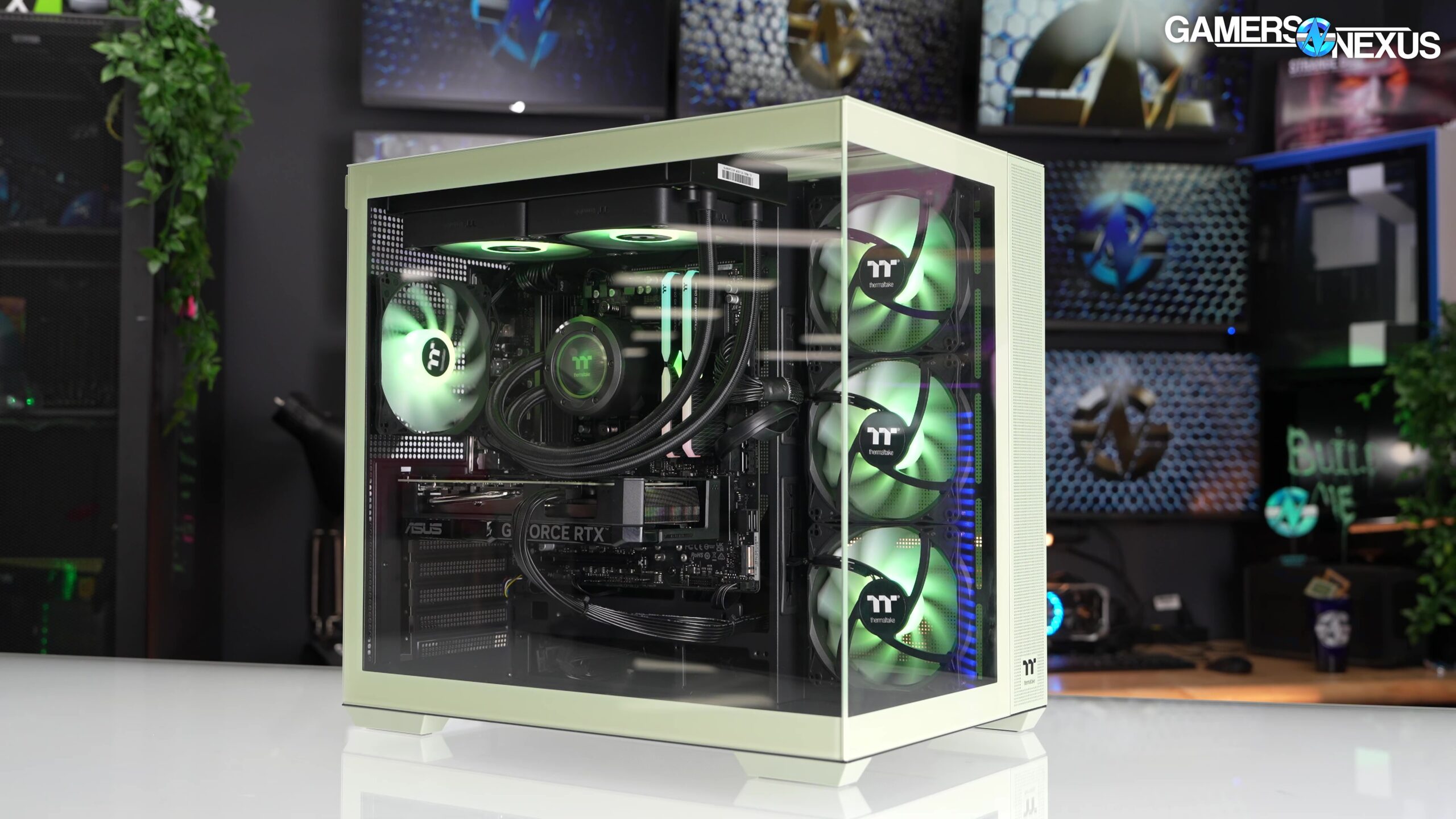

A desktop can look ready to game while hiding the one limitation that matters most: some systems have a dedicated graphics card, while others rely entirely on integrated graphics. That difference shapes which games you can play, how smoothly they run, and how long the computer will remain useful.
Our Best pre built pc picks range from compact office-friendly towers to liquid-cooled gaming desktops with newer graphics hardware. The Velztorm Pilum Z2 is the single best pick for demanding gaming, while the other nine cover more focused needs, including 1080p play, all-in-one convenience, quiet everyday computing, and lower-spec starter systems.
| # | Product | Award | Graphics | Memory and storage | Best for |
|---|---|---|---|---|---|
| 1 | Velztorm Pilum Z2 | Best overall | RTX 5060 | 32GB, 1TB PCIe SSD | High-refresh gaming and creative work |
| 2 | NOVATECH Titan RTX 5060 | Best tower gaming PC | RTX 5060 | 32GB, 1TB M.2 SSD | 1440p gaming |
| 3 | HP Pavilion TG01 | Best established brand | RTX 3060 | 8GB, 256GB SSD | Gaming and general home use |
| 4 | suevery Ryzen 5 RTX 3050 | Best 1080p setup | RTX 3050 6GB | 16GB, 512GB NVMe SSD | Mainstream 1080p gaming |
| 5 | suevery 27-inch All-in-One | Best all-in-one | RTX 3050 6GB | 32GB, 1TB NVMe SSD | Gaming and desk simplicity |
| 6 | suevery Ryzen 7 | Best for multitasking | Not specified | 16GB, 512GB NVMe SSD | Productivity and light gaming |
| 7 | suevery Ryzen 5 RX 560 | Best quiet everyday tower | Radeon 4GB | 16GB, 512GB NVMe SSD | Home and entry-level gaming |
| 8 | NOVATECH Phantom 2 | Best warranty coverage | RTX 3050 listed, RX 580 in features | 16GB, 512GB M.2 SSD | Buyers who want a warranty |
| 9 | NOVATECH Phantom White | Best white tower | RTX 3050 | 16GB, 512GB M.2 SSD | A white gaming setup |
| 10 | OKAMUS i5 Integrated Graphics | Best starter desktop | Integrated graphics | 8GB, 256GB M.2 SSD | Basic computing and very light gaming |
1. Velztorm Pilum Z2: Best Overall

Pros
- Ryzen 7 5700X gives the system eight cores and 16 threads
- RTX 5060 supports 1080p and 1440p gaming
- 240mm liquid cooler and four ARGB airflow fans
- 32GB RAM and a 1TB PCIe SSD
- 750W 80 Plus Gold power supply
Cons
- Larger and more elaborate than needed for office work
- Liquid cooling adds another component to maintain
- Windows 11 Home rather than Windows 11 Pro
Best for: demanding gamers who also stream, edit video, or run heavy creative software.
The Velztorm Pilum Z2 is the easiest system here to recommend when gaming performance matters more than keeping the machine small and simple. Its Ryzen 7 5700X has eight cores and 16 threads, so it has the processing headroom for high-frame-rate gaming alongside streaming, rendering, or other background work. The RTX 5060 is the strongest graphics option in this group alongside the NOVATECH Titan, and the listing specifically positions it for both 1080p and 1440p play.
The supporting hardware is unusually complete. A 1TB PCIe SSD gives the operating system, applications, and a useful game library room to breathe, while 32GB of DDR4 memory keeps large projects and many open programs comfortable. That is a more convincing long-term configuration than the 8GB systems here, particularly the HP Pavilion TG01, which is held back by its smaller memory allowance even though its RTX 3060 remains capable.
Cooling is another reason this tower sits first. The 240mm all-in-one liquid CPU cooler works with four pre-installed ARGB airflow fans in a mesh-front case. The result should suit sustained processor-heavy workloads better than a basic air-cooled design, although liquid cooling brings more complexity than the straightforward towers from suevery. The case also includes a front USB 3.2 Gen 2 Type-C port, dedicated ARGB controls, tempered glass, and a compact mid-tower layout.
There are caveats. The product is more gaming-focused than office-focused, and the feature list does not describe the full rear port selection or wireless standard in detail. Its Windows 11 Home license also lacks the Pro designation found on the NOVATECH models. Still, it has the best balance of graphics, processor, memory, storage, cooling, and power supply in this roundup. Readers comparing how much graphics hardware a modern gaming desktop really needs should start here.
2. NOVATECH Titan RTX 5060: Best Tower Gaming PC

Pros
- RTX 5060 is suited to 1080p and 1440p gaming
- Ryzen 5 5500 processor
- 32GB DDR4 memory
- 1TB M.2 SSD
- Wi-Fi, Bluetooth, Windows 11 Pro, and a one-year warranty
Cons
- Cooling details are less extensive than the Velztorm's
- The listing gives limited information about the motherboard
- White case may not suit every setup
Best for: gamers who want a strong conventional tower with current graphics hardware and generous storage.
The NOVATECH Titan RTX 5060 takes a more conventional approach than the Velztorm Pilum Z2. It pairs an RTX 5060 with a Ryzen 5 5500, 32GB of DDR4 memory, and a 1TB M.2 SSD. That combination puts the graphics card at the center of the experience, which makes sense for someone building a gaming setup around a 1080p or 1440p display.
The Ryzen 5 5500 has fewer cores than the Velztorm's Ryzen 7 5700X, so the Titan is not the stronger choice for heavy rendering or simultaneous gaming and production work. For ordinary gaming, however, the RTX 5060 is the more important component in many titles. It also gives this system a clear advantage over the RTX 3050 machines from suevery and NOVATECH, particularly if you want room to raise visual settings or move to a higher-resolution display.
Storage and memory are well judged. The 1TB M.2 SSD avoids the cramped feeling of the 256GB drives in the HP and OKAMUS systems, and 32GB RAM gives modern games and multitasking plenty of breathing room. The listing also includes Wi-Fi and Bluetooth, Windows 11 Pro, RGB fans, and a one-year warranty. Those extras make it a more complete package than a bare tower that expects you to add wireless networking or replace the memory immediately.
The weaker point is the lack of detailed cooling information. The listing promises a styled tower with RGB fans, but it does not specify a liquid cooler or provide the same airflow detail as Velztorm. That matters if the computer will run demanding workloads for hours at a time. Choose the Titan over the HP Pavilion TG01 for its newer graphics class and larger memory capacity, but choose the Velztorm if processor-heavy work and cooling are equally important.
3. HP Pavilion TG01: Best Established Brand

Pros
- Six-core, 12-thread Ryzen 5 4600G processor
- RTX 3060 graphics card
- HDMI 2.1 and three DisplayPort outputs
- Extensive front and rear connectivity
- Compact chassis with keyboard and mouse included
Cons
- Only 8GB of RAM
- 256GB SSD fills quickly
- Less storage and memory than similarly positioned towers
Best for: buyers who want a familiar desktop design with useful display outputs and everyday connectivity.
The HP Pavilion TG01 is the most recognizable desktop design in the roundup, and its strengths are practical rather than flashy. The Ryzen 5 4600G provides six cores and 12 threads with boost speeds up to 4.2GHz, while the RTX 3060 gives it a dedicated graphics foundation for 1080p gaming, video editing, and 3D work.
Its display connectivity is particularly useful. HDMI 2.1 and three DisplayPort connections make a multi-monitor setup straightforward, and the front panel has four USB 3.1 Gen 1 Type-A ports plus a combined headphone and microphone jack. Around the back are more USB ports, USB-C, Gigabit Ethernet, audio connections, and wireless antenna ports. That is a better-described port arrangement than most of the smaller-brand towers here.
The main compromise is obvious from the configuration. The 8GB of DDR4 memory is enough to start, but it leaves less room for modern games, browser tabs, streaming software, and background applications than the 16GB or 32GB systems. The 256GB SSD will also require careful housekeeping once Windows, applications, and several large games are installed. The graphics card is stronger than the RTX 3050 in the suevery and NOVATECH Phantom systems, but the memory and storage make the HP feel less ready for a large library.
The compact black chassis should fit more easily on a home or office desk than the 20-inch-tall NOVATECH Phantom towers. It includes Wi-Fi, Bluetooth, Windows 11 Home, a keyboard and mouse, and OMEN Command Center for system monitoring. Buyers who care about the practical differences between a home desktop and a gaming tower will find this a sensible middle ground. It is not the top pick for heavy multitasking, but it is a credible choice for a mixed-use desk where connectivity and a familiar brand matter.
4. suevery Ryzen 5 RTX 3050: Best 1080p Setup

Pros
- Six-core Ryzen 5 processor with boost speeds up to 4.1GHz
- RTX 3050 with 6GB of graphics memory
- 16GB DDR4 3200MHz RAM
- 512GB PCIe NVMe SSD
- Wi-Fi 6 and customizable RGB lighting
Cons
- Graphics performance is below the RTX 3060 and RTX 5060 systems
- USB selection is weighted toward USB 2.0
- Cooling hardware is not specified in detail
Best for: mainstream 1080p gaming, schoolwork, and general desktop use.
The suevery Ryzen 5 RTX 3050 gets the basic gaming formula right. Its six-core, six-thread Ryzen 5 processor reaches 4.1GHz boost, and the dedicated RTX 3050 has 6GB of graphics memory. That is a much more useful starting point for 1080p games than an integrated graphics system such as the OKAMUS i5 Integrated Graphics.
The 16GB of DDR4 3200MHz memory is the sensible capacity for a general gaming desktop. It gives Windows, a game, voice chat, and ordinary background programs more room than the HP Pavilion's 8GB configuration. The 512GB M.2 PCIe NVMe SSD also gives the machine a faster-feeling foundation for booting and loading games, although a large modern library will eventually require expansion or regular cleanup.
Wireless networking is better specified here than on several competing towers. Wi-Fi 6 should help with newer routers and busy household networks, and the case has two USB 3.0 ports plus four USB 2.0 ports. That is enough for common peripherals, though buyers with multiple high-speed external drives should look more closely at the port layout before ordering. Customizable RGB lighting adds the expected gaming look without changing how the machine performs.
The RTX 3050 is the dividing line between this machine and the higher-ranked options. The HP Pavilion TG01 has the stronger RTX 3060, while the NOVATECH Titan and Velztorm use RTX 5060 graphics. Those systems are better suited to demanding settings and higher-resolution gaming. This suevery tower makes more sense for someone staying at 1080p and wanting balanced memory, storage, and graphics without moving into a more elaborate build.
5. suevery 27-inch All-in-One: Best All-in-One

Pros
- 27-inch 2K IPS anti-glare display
- RTX 3050 with 6GB of graphics memory
- 32GB RAM and a 1TB NVMe SSD
- Built-in 5MP adjustable camera
- Keyboard and mouse included
Cons
- Limited upgrade flexibility compared with a tower
- Display and computer cannot be separated
- The large screen needs substantial desk width
Best for: shared workspaces, students, and gamers who want one tidy desktop unit.
The suevery 27-inch All-in-One is the outlier here because the display is part of the computer. That changes the buying decision completely. Instead of choosing a tower and then adding a monitor, keyboard, camera, and mouse, this system includes a 27-inch screen, keyboard, mouse, and a manually adjustable 5MP front camera.
The screen is a 2K IPS panel with an anti-glare surface and a tilt range from minus 5 to 25 degrees. IPS technology is a useful fit for a shared desk because it generally offers consistent viewing across a wider angle than a basic narrow-view panel. The 27-inch size also gives spreadsheets, editing timelines, and games more room than a compact desktop display. Anyone comparing the space and cable trade-offs of an all-in-one setup should pay attention to the desk dimensions before choosing it.
Inside, the 13th-generation Intel Core i5-13400F is listed with speeds up to 4.6GHz, and 32GB of RAM makes this one of the most capable multitasking systems in the group. The 1TB M.2 NVMe SSD is similarly generous. An RTX 3050 6GB provides dedicated graphics for gaming, editing, and other graphics-intensive software, although the RTX 5060 machines are better choices for higher performance.
The integrated design is also its limitation. With a tower, you can replace the display, move the computer to another desk, or upgrade components around the case. Here, the screen and core computer arrive as one unit. The footprint is listed at roughly 24.25 inches long and 7.28 inches wide, so it saves cable clutter but is not a small monitor. Pick it for a clean, complete workspace, not for the flexibility of a conventional tower.
6. suevery Ryzen 7: Best for Multitasking

Pros
- Eight-core, 16-thread Ryzen 7 processor
- Boost speed up to 4.2GHz
- 16GB DDR4 3200MHz memory
- 512GB NVMe SSD
- Wi-Fi 6 and customizable RGB lighting
Cons
- The graphics card is not identified in the supplied features
- Less gaming-focused than the RTX-equipped systems
- USB selection includes only two USB 3.0 ports
Best for: office work, content tasks, heavy multitasking, and buyers who do not need a specified gaming GPU.
The suevery Ryzen 7 is the sensible pick when the workload is broader than gaming. Its processor has eight cores and 16 threads, with a 3.6GHz base clock and boost speeds up to 4.2GHz. That gives it more parallel processing capacity than the six-core Ryzen 5 systems from suevery and HP, which can help when many applications are open at once.
It carries 16GB of DDR4 3200MHz memory and a 512GB M.2 PCIe NVMe SSD. Those are balanced capacities for office applications, browsing, media management, and moderate creative work. Wi-Fi 6 is built in, and the six listed USB ports include two USB 3.0 connections and four USB 2.0 connections. The machine also includes customizable RGB lighting and an optimized cooling design with RGB fans.
The important omission is the graphics card. The features describe a pre-built gaming PC, but they do not identify a dedicated GPU. That makes it difficult to rank this machine against the RTX 3050, RTX 3060, and RTX 5060 systems for gaming. It may still handle lighter games, but readers choosing a system specifically for current graphics-heavy titles should select a model with a clearly stated dedicated card.
That uncertainty does not make it a poor desktop. It simply gives the Ryzen 7 a narrower audience. It is a better fit than the suevery Ryzen 5 RX 560 for CPU-heavy multitasking, but the HP Pavilion TG01 is easier to evaluate for gaming because its RTX 3060 is clearly listed. Choose this tower when processor cores and everyday responsiveness matter more than a documented graphics target.
7. suevery Ryzen 5 RX 560: Best Quiet Everyday Tower

Pros
- Six-core Ryzen 5 processor with boost speeds up to 4.1GHz
- Dedicated Radeon 4GB graphics card
- 16GB DDR4 3200MHz memory
- 512GB M.2 PCIe NVMe SSD
- Wi-Fi 6 and customizable RGB lighting
Cons
- Radeon graphics card is less capable than the RTX-equipped alternatives
- Only two USB 3.0 ports are listed
- The graphics card model is described broadly as Radeon 4GB
Best for: general computing, light gaming, and users who want a quiet-looking tower with dedicated graphics.
The suevery Ryzen 5 RX 560 is a straightforward desktop for someone who wants more than office graphics but does not need the strongest gaming hardware in the roundup. Its Ryzen 5 processor has six cores and six threads, a 3.6GHz base clock, a boost clock up to 4.1GHz, and 32MB of L3 cache. Those details point to a comfortable everyday machine for browsing, productivity, and less demanding games.
The system includes 16GB of DDR4 3200MHz RAM and a 512GB M.2 PCIe NVMe SSD. That combination is more comfortable than the OKAMUS configuration for multitasking and gives applications and games faster storage access. It also has Wi-Fi 6, two USB 3.0 ports, four USB 2.0 ports, and customizable RGB lighting.
The dedicated Radeon card has 4GB of graphics memory, which is an important step above integrated graphics. It is not in the same performance class as the RTX 3050 in the higher-ranked suevery tower, the RTX 3060 in the HP, or the RTX 5060 in the Velztorm and NOVATECH Titan. Buyers should therefore treat this as a light gaming desktop rather than a high-settings gaming rig.
suevery says the chassis uses an optimized cooling design and RGB fans to maintain temperatures while keeping noise low. The supplied information does not identify the exact Radeon model beyond its 4GB capacity, so expectations should stay measured. This is the better choice over the OKAMUS when dedicated graphics and 16GB RAM are priorities, but the RTX 3050 tower is the safer pick for a gaming-first purchase.
8. NOVATECH Phantom 2: Best Warranty Coverage

Pros
- 16GB DDR4 memory
- 512GB M.2 SSD
- Windows 11 Pro
- RGB fans and full tower design
- One-year limited warranty
Cons
- Graphics description is inconsistent
- Older Xeon-based processor platform
- Cooling and upgrade details are limited
Best for: buyers who value included warranty coverage and a conventional gaming tower.
The NOVATECH Phantom 2 has a useful everyday configuration: 16GB of DDR4 RAM, a 512GB M.2 SSD, Wi-Fi and Bluetooth, and Windows 11 Pro. It also comes with a one-year limited warranty, which gives it a clear ownership advantage over products whose supplied information does not specify warranty coverage.
There is a significant data issue with the graphics description. The product title identifies an RTX 3050, but the features describe an AMD RX 580. Those are not interchangeable labels, and the difference matters when judging game performance, software support, and display capabilities. We would not buy this model without confirming which graphics card is actually installed.
The processor is described as an Xeon E3 V6 server-grade i7, with a 3.5GHz speed. That can still be adequate for everyday work and many games when paired with a dedicated GPU, but it is an older platform than the Ryzen 5 5500 in the NOVATECH Titan or the Ryzen 7 5700X in the Velztorm. The 16GB memory and 512GB SSD keep the basic system responsive, but the platform does not stand out for future expansion.
Its 20-inch height, 15-inch length, and 8-inch width make it a substantial tower. RGB fans provide the gaming appearance, and the black case should blend into a conventional setup. The included warranty is the main reason to consider it. If the graphics card is confirmed as an RTX 3050 and warranty support is a priority, it has a role. If the GPU remains unclear, the suevery Ryzen 5 RTX 3050 is the more transparent purchase.
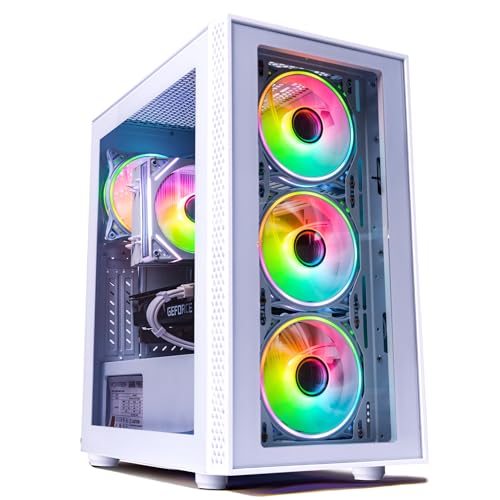
9. NOVATECH Phantom White: Best White Tower
Pros
- White chassis for a coordinated setup
- RTX 3050 listed in the title
- 16GB DDR4 memory
- 512GB M.2 SSD
- Windows Pro and one-year warranty
Cons
- Features identify Windows 10 Pro while the title says Windows 11 Pro
- Exact RTX 3050 brand and size may vary
- Older Xeon E3 1230v6 processor
Best for: buyers building a white gaming setup who are willing to verify the configuration first.
The NOVATECH Phantom White is the white-case counterpart to the Phantom 2, with the same broad hardware shape. The title identifies an RTX 3050, an i7 Xeon processor running at 3.5GHz, 16GB of DDR4 RAM, and a 512GB M.2 SSD. It also lists Wi-Fi, Bluetooth, Windows 11 Pro, and a one-year warranty.
The white finish is the reason to choose this model over the black Phantom 2. For a desk built around white peripherals, a white case can make the system look intentional rather than assembled from mismatched parts. The RGB fans add configurable lighting, while the 16GB memory and 512GB SSD provide a reasonable starting point for everyday use and mainstream gaming.
The listing needs careful checking before purchase. Its features identify the processor as an Xeon E3 1230v6 and say Windows 10 Pro, while the title says Windows 11 Pro. The graphics section says RTX 3050, but also notes that the brand and size may vary. Those inconsistencies do not prove the system is unusable, but they make the exact delivered configuration less certain than the suevery RTX 3050 tower or HP Pavilion TG01.
The 16-inch height, 15-inch length, and 8-inch width give it a full tower footprint similar to Phantom 2. The one-year warranty is helpful, but it does not replace confirming the operating system and graphics card details. Pick this one for the white aesthetic and stated RTX 3050, then verify the configuration. Skip it if predictable component details matter more than matching your case color.
10. OKAMUS i5 Integrated Graphics: Best Starter Desktop

Pros
- i5 processor with speeds up to 3.6GHz
- M.2 SSD for quick booting
- Wi-Fi 6 and Bluetooth 5.3
- Three RGB fans and vertical CPU cooler
- 400W power supply
Cons
- No dedicated graphics card
- Only 8GB of RAM
- 256GB SSD leaves limited room for games
Best for: basic desktop work and very light gaming where a dedicated GPU is not required.
The OKAMUS i5 Integrated Graphics is the clearest example of why the graphics card deserves attention before any other gaming specification. This system uses integrated graphics only, with no dedicated GPU. Its i5 processor can support ordinary work, browsing, streaming, and light applications, but shared system graphics memory limits its usefulness for demanding games.
The M.2 SSD should make Windows startup and application launches feel more responsive than a traditional hard drive. The difficulty is capacity. At 256GB, the drive has limited space after the operating system and applications are installed, so it is not well suited to a large collection of modern games. The 8GB RAM capacity is similarly modest compared with the 16GB and 32GB options elsewhere in this list.
The feature set is otherwise practical. Wi-Fi 6 and Bluetooth 5.3 cover current wireless networking and peripherals, while three RGB fans and a vertical CPU cooler provide airflow inside the matte black case. A 400W power supply is installed, and the listing describes some room for future upgrades. Still, buyers should not assume that every graphics upgrade will be simple without confirmed motherboard, case clearance, and power connector details.
Compared with the suevery Ryzen 5 RX 560, this OKAMUS tower gives up dedicated graphics and half the listed storage. Its advantage is that it is a basic, ready-to-use desktop for a buyer whose needs are mostly schoolwork, browsing, and media. It should not be chosen as a gaming-first system. Readers comparing the compromises in a low-spec desktop build should treat the integrated graphics warning as the deciding factor.
How to choose best pre built pc
The right Best pre built pc is determined by the graphics card first, then by the processor, memory, storage, cooling, and the way the computer will fit into your desk.
Graphics card
A dedicated graphics card is the main dividing line between these computers. The OKAMUS uses integrated graphics only, while the other gaming-focused systems list Radeon, RTX 3050, RTX 3060, or RTX 5060 hardware. For current 1080p gaming, choose a system with a clearly identified dedicated GPU. For 1440p play, the RTX 5060 systems are the more appropriate starting point.
Be cautious when the listing gives conflicting GPU information. NOVATECH Phantom 2 names an RTX 3050 in its title but describes an RX 580 in the features, and Phantom White says the RTX 3050 brand and size may vary. That uncertainty is more important than RGB lighting or case color.
A gaming tower without a clearly identified dedicated graphics card is an office desktop with gaming styling.
Processor
The processor affects game frame consistency, application responsiveness, streaming, and rendering. Six-core Ryzen 5 chips are suitable for general gaming and everyday work, while the eight-core Ryzen 7 5700X and the Velztorm's 16-thread processor provide more room for heavy multitasking. The OKAMUS i5 is better viewed as an entry desktop because its graphics limit the overall gaming experience.
The older Xeon-based processors in the NOVATECH Phantom systems may still handle ordinary tasks, but they are less attractive than newer Ryzen platforms for buyers who expect a long upgrade life. Processor clock speed alone does not tell the whole story. Core count, platform age, and the graphics card must be considered together.
Memory
Memory affects how comfortably a PC handles a game alongside browsers, voice chat, recording software, and creative applications. The 8GB configurations in the OKAMUS and HP Pavilion are workable starting points, but 16GB is a better baseline for a gaming desktop. The 32GB systems from Velztorm, NOVATECH Titan, and the suevery all-in-one are better suited to editing, streaming, and large multitasking sessions.
Memory capacity is separate from graphics memory. The RTX 3050 6GB or Radeon 4GB describes the graphics card's own memory, not the computer's main RAM. A system can have a capable GPU and still feel constrained if its system memory is too limited.
Storage
A 256GB SSD fills quickly once Windows, applications, and a few large games are installed. The 512GB drives in the suevery towers and NOVATECH Phantom models are more comfortable, while the 1TB drives in the Velztorm, NOVATECH Titan, and suevery all-in-one provide the most useful starting space.
NVMe and M.2 describe fast solid-state storage formats used across much of this list. They help boot and load times, but they do not directly increase frame rates. Check whether the system has a spare drive bay or M.2 slot if you expect a growing game library.
Cooling and case design
Cooling matters most when the processor and graphics card will run hard for long periods. Velztorm specifies a 240mm liquid cooler, four airflow fans, a mesh front, and a 750W 80 Plus Gold power supply. The other systems describe fans or optimized cooling less specifically, so their long-session thermal behavior is harder to assess from the supplied information.
Case size matters too. The all-in-one saves cables but combines the display and computer into one unit. The NOVATECH Phantom towers are 20 inches tall, while the Velztorm and HP use different, more compact designs. Measure the desk area and allow room for airflow before ordering.

Frequently asked questions
Is the OKAMUS i5 suitable for modern gaming?
It has integrated graphics only, so it is not the right choice for demanding modern games. It is better suited to everyday computing and very light gaming. Choose a system with a dedicated GPU if gaming is a primary reason for buying the computer.
Which computer is strongest for 1440p gaming?
The Velztorm Pilum Z2 and NOVATECH Titan RTX 5060 have the strongest listed graphics hardware in this roundup. The Velztorm adds a Ryzen 7 5700X, 32GB RAM, liquid cooling, and a 750W power supply, giving it the more complete configuration.
Is 8GB of RAM enough for a gaming desktop?
It can run a basic system, but 8GB leaves less room for games, browsers, chat, and background applications at the same time. The HP Pavilion TG01 and OKAMUS both use 8GB, while 16GB or 32GB systems are more comfortable for regular gaming and multitasking.
Should I choose an all-in-one or a tower?
Choose the suevery 27-inch All-in-One if you want a 27-inch 2K display, built-in camera, keyboard, mouse, and minimal cable clutter. Choose a tower if you want to replace the monitor separately or upgrade the computer more easily later.
Which model has the most storage?
The Velztorm Pilum Z2, NOVATECH Titan RTX 5060, and suevery 27-inch All-in-One each list a 1TB SSD. The 512GB systems offer a reasonable middle ground, while the 256GB drives in the HP and OKAMUS will need more careful storage management.
Are the NOVATECH Phantom models identical?
They are closely related, but they are separate listings with different colors and inconsistent specification details. Phantom 2 identifies an RTX 3050 in its title but describes an RX 580 in the features. Phantom White lists an RTX 3050, while its feature text conflicts on the Windows version and says the graphics brand and size may vary.
The bottom line
The Velztorm Pilum Z2 is the top Best pre built pc for demanding gaming, streaming, and creative work because its RTX 5060, Ryzen 7 5700X, 32GB RAM, 1TB SSD, liquid cooler, and 750W Gold power supply form the most complete package. The NOVATECH Titan RTX 5060 is the better alternative for buyers who want a simpler tower with the same graphics class and Windows 11 Pro.
For a more modest 1080p system, choose the suevery Ryzen 5 RTX 3050. The suevery 27-inch All-in-One is the standout for a tidy shared desk, while the HP Pavilion TG01 makes sense for buyers who value its established design and broad port selection.
If you are undecided, choose the model with the clearest dedicated graphics card and at least 16GB of RAM.
As an Amazon Associate we earn from qualifying purchases.