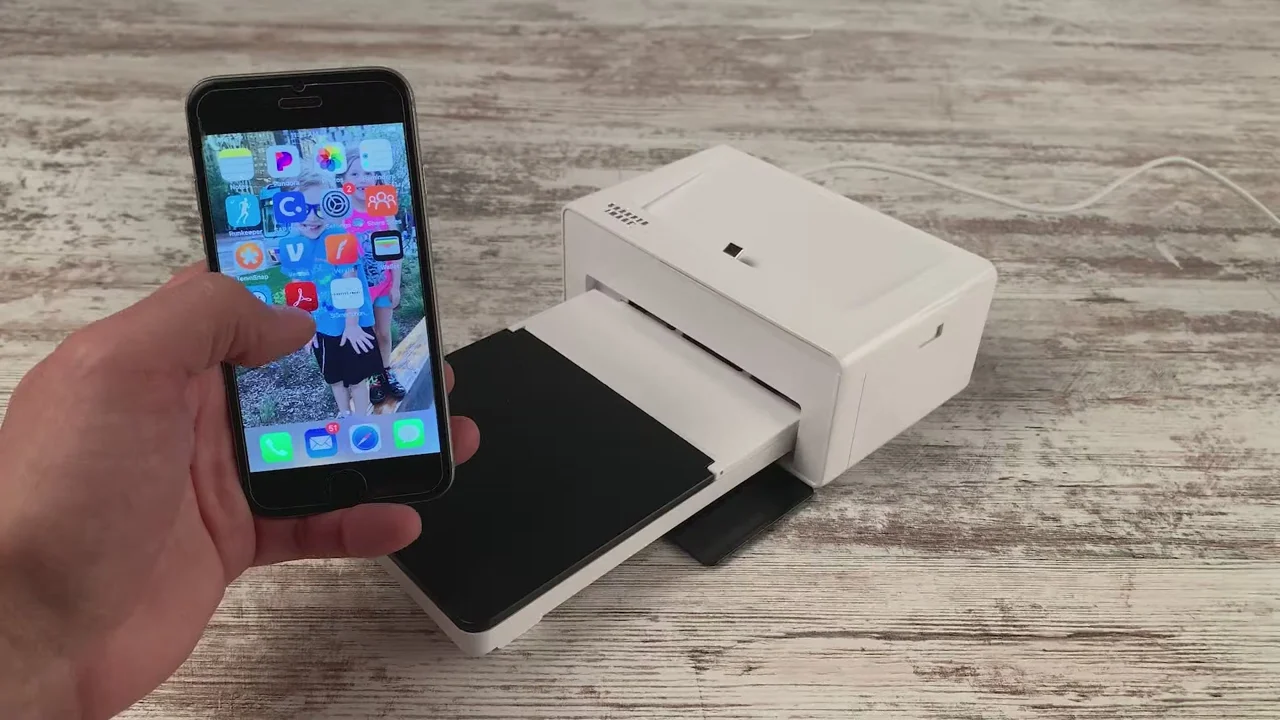

Phone photos are easy to take and surprisingly difficult to enjoy once they are buried in a camera roll. The Best printers for smartphones turn those images into albums, stickers, scrapbook pieces, and gifts without sending files to a computer.
The key choice is not simply portability. A 2x3-inch Zink printer is convenient for journaling and parties, while a 4x6 dye-sublimation model produces a more traditional photograph. App quality, paper type, wireless connection, and battery life matter just as much.
The Liene M100 4x6 Photo Printer is our top pick, with the KODAK Mini 2 Retro, HP Sprocket 2x3, and Fujifilm Instax Mini Link 3 covering the most compelling smaller formats.
Comparison table
| # | Product | Award | Print format | Connection | Best for |
|---|---|---|---|---|---|
| 1 | Liene M100 4x6 Photo Printer | Best overall | 4x6 inches | Wi-Fi hotspot | Full-size home photo prints |
| 2 | Nelko PP01 | Best mini inkjet | 2x3 inches | Bluetooth | Portable color stickers |
| 3 | KODAK Step | Best Zink starter | 2x3 inches | Bluetooth, NFC | Simple peel and stick photos |
| 4 | KODAK Mini 2 Retro | Best protected mini prints | 2x3 inches | Bluetooth | Wallets and keepsakes |
| 5 | Fujifilm Instax Mini Link 3 | Best creative app | Instax Mini | Bluetooth | Social and creative shooting |
| 6 | KODAK Dock Plus | Best desktop 4x6 | 4x6 inches | Bluetooth, dock | Stable home printing |
| 7 | Fujifilm Instax Mini Link 3 Bundle | Best Instax bundle | Instax Mini | Bluetooth 5.1 | Getting started with Instax |
| 8 | Liene Pearl K100 | Best pocket Zink printer | 2x3 inches | Bluetooth 5.2 | Tiny adhesive prints |
| 9 | Liene Pearl N200 Pro | Best creative dye-sub mini | 2x3 inches | Bluetooth | AI edits and party printing |
| 10 | HP Sprocket 2x3 | Best for shared albums | 2x3 inches | Bluetooth 5.3 | Friends printing together |
1. Liene M100 4x6 Photo Printer: Best Overall

Pros
- Produces larger 4x6-inch photographs
- Thermal dye-sublimation output has a laminated surface
- Built-in Wi-Fi hotspot does not need a home network
- Supports up to five simultaneous connections
- Includes 100 sheets and three color cartridges
Cons
- Larger than the pocket-size models
- Requires cartridges as well as photo paper
- Print head may need cleaning if smudges appear
Best for: families and hobbyists who want phone photos in a conventional 4x6 format.
The M100 is the printer we would choose when a phone snapshot needs to feel like a real photograph rather than a tiny memento. Its 4x6-inch output gives faces, landscapes, and group shots enough room to breathe. It is still described as portable, but its roughly 9.84-inch width and 7.48-inch height make it better suited to a shelf, desk, or packing case than a coat pocket.
Liene uses thermal dye-sublimation printing here. The color is applied in layers and finished with a laminated surface that is designed to resist water, scratches, fingerprints, and fading. That finish is a meaningful advantage over the exposed surface of many small sticker printers, particularly for prints that will be handled often or placed in an album. The included package has 100 sheets and three color cartridges, so it is ready for a substantial first session.
Connection is handled through the printer's own Wi-Fi hotspot. That means a phone can connect directly without relying on a home router, and the printer can accept connections from up to five devices at the same time. The Liene app adds square borders, filters, contrast and brightness adjustments, and tools for ID and visa photos. Those controls are useful because a 4x6 print makes cropping mistakes more obvious than a small sticker does.
The tradeoff is size and maintenance. The M100 is less spontaneous than the KODAK Step or Liene Pearl K100, and it needs a cartridge installed correctly before printing. Liene also advises cleaning the print head if smudges appear. For a fuller comparison with conventional home output, see how larger prints fit into everyday photo keeping. Choose the M100 if the photograph itself matters more than having the smallest possible printer.
2. Nelko PP01: Best Mini Inkjet

Pros
- 600 DPI stated print resolution
- Water-resistant, smudge-proof, and tear-resistant adhesive paper
- Pocket-sized design weighs 0.6 pounds
- App includes collages, stickers, text, filters, and AI editing
- Each cartridge is rated for up to 80 full-color photos
Cons
- Uses ink cartridges instead of ink-free Zink paper
- USB charging cable is included, but an adapter is not
- Paper loading and cartridge placement need attention
Best for: students, scrapbookers, and travelers who want detailed 2x3 adhesive prints.
The Nelko PP01 is aimed at the person who wants a printer to live in a bag rather than on a desk. It makes 2x3-inch sticky-backed photos and weighs 0.6 pounds, which keeps it practical for travel journals, planners, school projects, and party favors. The compact format limits how much detail a photograph can show, but it is exactly the right size for small creative projects.
Its distinguishing feature is the use of advanced inkjet printing with a stated 600 DPI resolution. That gives the PP01 a different character from the Zink printers in this list. Fine lines and realistic tones should have a chance to look more controlled, while the adhesive paper is described as water-resistant, smudge-proof, and tear-resistant. A cartridge is rated for up to 80 full-color 2x3 photos.
The Nelko app is unusually feature-heavy for such a small printer. It supports frames, collages, filters, graffiti, borders, stickers, text, and AI image editing. The workflow is straightforward: connect over Bluetooth, edit in the app, load the paper with the smooth side facing down, and print. The stated print time is under 90 seconds, which is acceptable for journaling and individual snapshots but slower than casually passing around instant photos.
There is more routine handling here than with the KODAK Step or Liene Pearl K100. The cartridge must be seated securely, paper recognition can require reloading, and the USB cable does not include a power adapter. Nelko also recommends charging the printer fully and wiping the cartridge head if it sits unused for long periods. Pick it over the KODAK Step when app editing and the stated resolution matter more than ink-free convenience.
3. KODAK Step: Best Zink Starter

Pros
- Uses ink-free Zink 2x3-inch paper
- Sticky-backed prints resist moisture, rips, tears, and smudges
- Bluetooth and NFC connection options
- App supports collages, filters, borders, stickers, and text
- Rechargeable battery is rated for 25 prints per charge
Cons
- Small 2x3-inch print size
- Battery capacity is modest for a group event
- App and compatible devices are required
Best for: first-time buyers who want easy pocket-size prints with no cartridges.
The KODAK Step keeps the point of a phone printer clear. Pick a photo, add some decoration, and peel it from the back when it comes out. Its 2x3-inch prints are small enough for a wallet, planner, or scrapbook, and the printer itself is palm-sized and weighs less than a pound.
Zink technology places embedded dye crystals in the paper, so there are no ink cartridges, ribbons, or toner replacements to install. The finished sheets are designed to resist moisture, rips, tears, and smudges. That makes the Step a better fit for casual handling than a delicate paper print, although the small format remains more suited to stickers and keepsakes than framed photography.
Bluetooth works with iOS and Android devices, and NFC provides another connection route for compatible phones. The KODAK app supplies the creative layer with filters, borders, stickers, text, and collage tools. A built-in rechargeable battery is rated for 25 photos on a full charge. That is enough for personal use, though the HP Sprocket 2x3 is rated for more prints per charge and the Liene Pearl N200 Pro is designed around group printing.
The Step's weakness is that its hardware and app are focused on simple output rather than serious photo control. Its 2x3-inch sheets cannot compete with the Liene M100 or KODAK Dock Plus for a family album. It also needs charging before an outing, and the starter package contains only five sheets. For a straightforward entry into the Best printers for smartphones, this is the model to choose when ink-free operation matters most.
4. KODAK Mini 2 Retro: Best Protected Mini Prints

Pros
- 4PASS dye-sublimation printing
- Clear lamination helps resist fingerprints, water, and fading
- Prints take approximately 55 seconds
- Includes 38 sheets and four cartridges
- Compact 2x3-inch format suits wallets and albums
Cons
- Bluetooth is the only listed wireless connection
- Smaller prints cannot replace 4x6 output
- The printer is less light than some pocket Zink models
Best for: users who want small photos with a smooth, laminated finish.
The KODAK Mini 2 Retro takes the small instant printer idea in a more polished direction. Its credit-card-size photos are still easy to carry and use in planners, wallets, albums, and photo booths, but the surface is intended to feel more like a finished photograph. The printer weighs about 0.56 pounds and is compact enough for a bag.
This model uses genuine 4PASS dye sublimation. It builds the image in three color layers and applies a clear protective lamination layer, with a stated print time of approximately 55 seconds. That process is the reason to choose it over the KODAK Step if fingerprints, water, and fading are concerns. The Mini 2 Retro does require four cartridges, but the package includes 38 sheets and the corresponding cartridge supply.
Setup is deliberately simple. Turn it on, connect a compatible iOS or Android phone over Bluetooth through the KODAK Photo Printer app, and edit, crop, or customize the image before printing. The app is less ambitious than the Nelko PP01's collection of AI tools, but the basic controls are enough for everyday snapshots. It is a printer that encourages quick results rather than prolonged editing.
The Mini 2 Retro does not offer the large output of the Liene M100 and is not as cartridge-free as the Liene Pearl K100. Its weight is also a little higher than some Zink alternatives. Still, the lamination gives it a distinct advantage for photographs that will be touched, stored, or passed around. Choose it when physical durability matters more than the simplest consumables.
5. Fujifilm Instax Mini Link 3: Best Creative App

Pros
- Compact Instax Mini photo format
- Bluetooth smartphone printing
- Small, light body
- Dedicated Fujifilm Instax ecosystem
Cons
- The supplied product data lists few functional details
- Film is a separate consideration with this printer
- Instax output differs from conventional photo paper
Best for: people who want the Instax look and a compact smartphone workflow.
The Fujifilm Instax Mini Link 3 is the most difficult product here to judge from specifications because the supplied listing data identifies the brand but provides no feature description beyond its model name. What is clear is the format and physical design. It prints on Instax Mini media and measures 4.92 inches high, 3.54 inches wide, and 1.47 inches deep.
That makes it a notably compact option for anyone already drawn to the Instax style. Instax prints have a different character from the flat, sticker-focused output of the KODAK Step or Liene Pearl K100. The appeal is the physical instant-photo experience, not a 4x6 replacement or a conventional dye-sublimation finish.
The listed product information also identifies it as a smartphone printer, while the product title names the Clay White version. It is best considered alongside the bundled listing later in this guide, which explicitly includes the Instax Mini Link 3, Instax Mini film with 20 exposures, and a microfiber cleaning cloth. That bundle is more practical for a first purchase if film is not already on hand.
The limitation is simple: the listing does not give us enough verified information to make claims about battery capacity, app tools, connection version, or print speed. Those omissions make the Liene M100 and KODAK Mini 2 Retro easier recommendations for shoppers who want detailed, known specifications. Choose this model for the Instax format itself, and confirm the included media before ordering.
6. KODAK Dock Plus: Best Desktop 4x6
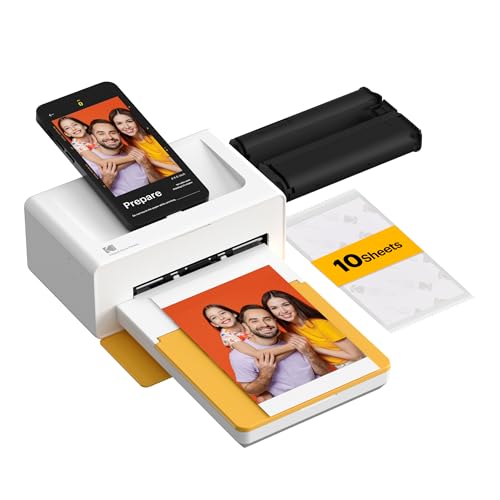
Pros
- Produces larger 4x6-inch prints
- Integrated smartphone docking station
- Dock can charge the phone while printing
- 4PASS output has a protective laminated layer
- Designed for stable desktop use
Cons
- Heavy at about 3.33 pounds
- Requires a power outlet
- Only 10 sheets are included
Best for: home users who want a permanent phone photo printing station.
The KODAK Dock Plus is the opposite of a pocket printer. It belongs on a desk or shelf, where its integrated docking station gives a phone a stable place to sit while a larger photo comes out. The result is a more deliberate home printing experience, useful for family albums, framing, and events where several people need to make 4x6 prints.
Its 4PASS dye-sublimation system creates three color layers and adds a clear protective lamination layer. KODAK states that a print takes approximately 55 seconds and is designed to resist fingerprints, water, and fading. The KODAK Photo Printer app handles Bluetooth connection, cropping, editing, and customization. The dock can also charge a phone during printing, which is a useful touch during a long session.
The size explains the tradeoff. The Dock Plus weighs approximately 3.33 pounds and needs a power outlet for consistent performance. It is not a travel companion like the KODAK Mini 2 Retro, and it lacks the M100's stated Wi-Fi hotspot and support for up to five simultaneous connections. The included 10 sheets are enough to begin, but not enough for a large event.
Still, the Dock Plus offers a stable physical setup that the Liene M100 does not replicate in quite the same way. If you want a dedicated space for handling family photo prints, its desktop design makes sense. Skip it if portability is central to the experience, but choose it for an always-ready home station and larger, laminated photographs.
7. Fujifilm Instax Mini Link 3 Bundle: Best Instax Bundle

Pros
- Includes the Instax Mini Link 3 printer
- Includes Instax Mini film with 20 exposures
- Bluetooth 5.1 connectivity
- App supports text, frames, filters, stickers, and video prints
- Includes a microfiber cleaning cloth
Cons
- Bundled listing is heavier at about 0.97 pounds
- Instax Mini output is smaller than 4x6 photos
- Film-based workflow differs from Zink and dye-sublimation printers
Best for: newcomers who want the Instax printer and film together.
This bundle solves the most obvious problem with buying the standalone Fujifilm Instax Mini Link 3: having a printer is not much use without compatible film. The package includes the Clay White printer, Instax Mini instant film with 20 exposures, and a microfiber cleaning cloth. That makes it the more complete starting point for someone entering the Instax system.
The feature description is much more useful here. The Instax Mini Link app can add text, frames, filters, and stickers, and it can print images pulled from videos. Bluetooth 5.1 handles the phone connection. Fujifilm also lists 3D AR effects through Instax AiR Studio, a collage app for photobooth shooting, remote live viewing through another phone, and LED lights on the printer.
Those tools give the bundle more personality than the KODAK Mini 2 Retro. It is designed for social moments, playful edits, and prints that have an unmistakable Instax identity. The output remains an Instax Mini photo, so shoppers wanting crisp 4x6 prints should move to the Liene M100 or KODAK Dock Plus instead.
The bundle is not automatically the right pick for every buyer. The listed package weighs about 0.97 pounds, and the film format creates an ongoing supply requirement distinct from Zink paper or dye-sub cartridges. It also duplicates the standalone Mini Link 3 in this roundup, so the choice is really between printer only and printer plus film. Choose this version when you want to start printing immediately and care about Fujifilm's creative features.
8. Liene Pearl K100: Best Pocket Zink Printer

Pros
- Very compact body weighs 0.4 pounds
- Bluetooth 5.2 connection
- Uses ink-free Zink technology
- Includes 50 sheets of adhesive paper
- USB Type-C charging
Cons
- Photos are limited to 2x3 inches
- Photos can only be printed through the Liene app
- Cleaning the print head requires a blue calibration card
Best for: travelers who want the lightest practical adhesive photo printer.
The Liene Pearl K100 is built around a simple promise: carry it almost anywhere and turn a phone photo into a sticker. It weighs 0.4 pounds and measures approximately 4.92 inches long, 3.35 inches wide, and 0.98 inches high. That power-bank-like shape is easier to slip into a small bag than the Liene M100 or any desktop 4x6 printer.
It uses Zink technology, with dye crystals embedded in 2x3-inch adhesive paper. There are no ink cartridges, toner, or ribbons to install. The package includes 50 sheets, and the stickers can go onto refrigerators, laptops, lockers, and scrapbook pages. The output is designed for convenience and decoration rather than a large, traditionally finished photograph.
Bluetooth 5.2 connects the printer to iOS and Android smartphones. The sliding cover is intended to make loading simple, even with one hand, and USB Type-C charging avoids the older micro USB connection found on some competing models. The Liene app includes a print-head cleaning feature, which is useful when white lines or spots appear.
That app requirement is the biggest limitation. Photos can only be printed through Liene's app, so it is not the most flexible option for people who want to use a phone's standard share menu. The cleaning process also requires a blue calibration card. Compared with the HP Sprocket 2x3, the K100 is lighter and uses newer USB-C charging, while the HP has a longer stated battery run. Choose the K100 when carrying weight and ink-free convenience come first.
9. Liene Pearl N200 Pro: Best Creative Dye-Sub Mini

Pros
- Dye-sublimation printing in a compact 2x3 format
- Includes 50 sheets and five cartridges
- AI portrait and background-removal tools
- InstaPic mode supports shoot and print use
- Multi-device pairing for group printing
Cons
- Battery is rated for up to 27 stickers per charge
- Heavier than the Liene Pearl K100
- Creative features depend on the Liene app
Best for: parties and creators who want richer app tools with small dye-sub prints.
The Pearl N200 Pro is the most ambitious small printer in Liene's lineup here. It keeps the 2x3-inch adhesive format, but moves from Zink to thermal dye-sublimation printing. That makes it a more interesting choice for users who care about color and finish but still want a sticker that fits into a journal or onto a small surface.
Liene describes the output as sharper and more vibrant than other portable photo printers, though the listing does not provide a numeric resolution. The package includes 50 sheets of adhesive paper and five cartridges. A full charge is rated for up to 27 stickers, which is enough for a small session but falls behind the HP Sprocket 2x3's stated 35 prints per charge.
The app is the N200 Pro's real point of difference. It supports multiple artistic styles, AI portrait changes, background removal, custom borders, watermarks, timestamps, official stickers, and built-in frames. InstaPic Print mode adds a shoot-and-print workflow with built-in CCD camera filters, while multi-device pairing lets several people contribute photos at a gathering.
The extra capability comes with extra complexity. At about 0.75 pounds, it is heavier than the K100, and the battery figure suggests that a busy party may require a recharge. Its creative tools also live inside Liene's app rather than a general phone printing workflow. Readers comparing it with the Fujifilm Instax Mini Link 3 should choose the N200 Pro for digital editing and dye-sub stickers, while the Fujifilm is the more distinctive pick for Instax-style output.
10. HP Sprocket 2x3: Best for Shared Albums
Pros
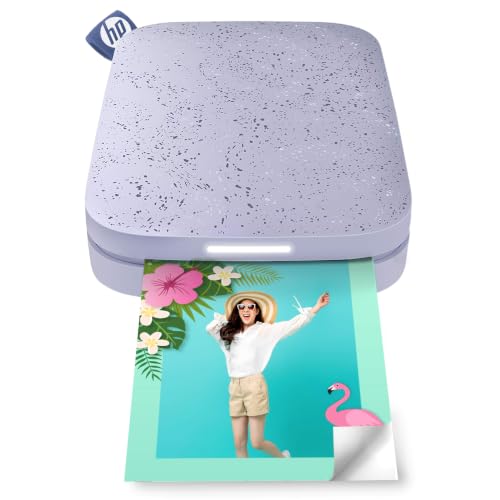
- Pocket-size body weighs about 0.44 pounds
- Zink paper needs no ink cartridges
- Bluetooth 5.3 connection
- App includes filters, frames, stickers, emojis, and shared albums
- Battery is rated for 35 prints per charge
Cons
- Small 2x3-inch output
- Includes only five sheets
- Uses a Micro USB charging cable
Best for: groups that want several phones contributing to one photo album.
The HP Sprocket 2x3 remains a sensible social printer because it is designed around more than one person using it. The HP app supports shared albums, and the printer can be set up at a party so friends can send pictures. A personalized LED light indicates who is printing, which is a small but useful touch when several people are taking turns.
Its Zink system keeps the hardware uncomplicated. The 2x3-inch sticky-backed paper contains the color, so there are no ink cartridges or ribbons to replace. HP says the glossy sheets resist water, smudges, and tears. That makes the Sprocket suitable for decorating notebooks and albums, although the small format is not intended to replace the 4x6 output of the Liene M100.
Bluetooth 5.3 connects compatible iOS and Android devices, while the HP app adds filters, frames, stickers, emojis, and other editing tools. The rechargeable battery is rated for 35 prints per charge, the strongest stated battery figure among the pocket-size Zink models here. At roughly 4.63 inches long, 3.15 inches wide, and 0.98 inches high, it is easy to carry.
The main drawback is the starter supply, which contains only five sheets, and the Micro USB charging cable feels dated beside the Liene Pearl K100's USB Type-C port. The KODAK Step offers NFC as another connection option, while the Sprocket counters with a larger stated battery capacity and shared albums. Pick HP when group participation matters more than the newest charging connector.

How to choose the best printers for smartphones
The right smartphone photo printer depends on the print you want to keep, the connection you can tolerate, and how much editing you plan to do before pressing print.
Print format
A 4x6-inch print is the closest match to a conventional photograph and gives faces, landscapes, and group shots more room. The Liene M100 and KODAK Dock Plus use this larger format. Their output is better suited to frames and albums, but the printers are less convenient to carry.
The 2x3-inch format is easier to use for journals, planners, wallets, labels, and stickers. It is common among the KODAK Step, HP Sprocket, Liene Pearl models, and KODAK Mini 2 Retro. Instax Mini adds a different physical look rather than simply shrinking a standard photo.
Printing technology
Zink printers embed dye crystals in the paper and do not need ink cartridges. That makes the Liene Pearl K100, KODAK Step, and HP Sprocket straightforward for casual use. Dye-sublimation printers apply color in layers and often add a protective laminate, as seen with the Liene M100, KODAK Mini 2 Retro, KODAK Dock Plus, and Liene Pearl N200 Pro.
Inkjet printing, used by the Nelko PP01, relies on cartridges but has a stated 600 DPI resolution. Look beyond the technology name and consider the surface, consumables, maintenance, and print size. A durable laminated 2x3 print and a peelable Zink sticker serve different purposes.
Choose the paper and finish first, then choose the printer that supports them.
Phone connection
Bluetooth is the standard connection for the portable models. Bluetooth 5.2 appears on the Liene Pearl K100, Bluetooth 5.3 appears on the HP Sprocket 2x3, and Bluetooth 5.1 appears on the Fujifilm Instax Mini Link 3 bundle. The KODAK Step adds NFC, while the Liene M100 uses a dedicated Wi-Fi hotspot and can support up to five simultaneous connections.
A direct hotspot can be useful when several phones need to print without joining a home network. Bluetooth is simpler for one phone. Check whether the model requires its own app, because the Liene Pearl K100 specifically prints only through the Liene app.
App controls
Basic apps let you crop and adjust an image. More capable apps add filters, frames, stickers, text, collages, video frames, and shared albums. The Nelko PP01 adds AI image editing, while the Liene Pearl N200 Pro includes AI styling, background removal, watermarks, timestamps, and an InstaPic mode.
Fujifilm's Instax app adds AR effects, remote live viewing, and photobooth features. HP focuses on shared albums and group printing. If your photos usually need little editing, do not overvalue a long feature list. If the printer is part of a party or craft project, app tools can shape the entire experience.
Portability and power
Weight varies substantially. The Liene Pearl K100 is listed at 0.4 pounds, the HP Sprocket 2x3 at about 0.44 pounds, and the KODAK Mini 2 Retro at about 0.56 pounds. The KODAK Dock Plus is approximately 3.33 pounds and needs an outlet, so it is a desktop product rather than a travel printer.
Battery claims also differ. The HP Sprocket is rated for 35 prints per charge, the KODAK Step for 25, and the Liene Pearl N200 Pro for up to 27 stickers. These figures help set expectations for a gathering, but a spare charging cable and enough paper matter just as much.
For readers who need a printer that works beyond snapshots, how wireless phone printing fits into a larger setup is a useful next question.

Frequently asked questions
Are smartphone photo printers compatible with iPhone and Android?
Most models in this roundup list compatibility with both iOS and Android phones. The KODAK Step, Nelko PP01, Liene Pearl K100, Liene Pearl N200 Pro, and HP Sprocket all use phone apps for printing. Always check the app and operating-system requirements before ordering.
Which smartphone printer makes 4x6 photos?
The Liene M100 and KODAK Dock Plus make 4x6-inch prints. The Liene M100 is the more portable design and uses a Wi-Fi hotspot, while the KODAK Dock Plus is a heavier desktop station with an integrated phone dock.
Do Zink printers need ink cartridges?
No. Zink paper contains embedded dye crystals, so printers such as the KODAK Step, HP Sprocket 2x3, and Liene Pearl K100 do not use separate ink cartridges. They still require compatible Zink paper.
Are dye-sublimation prints better than Zink prints?
Neither technology is ideal for every use. Dye-sublimation models can provide a more finished, laminated surface, while Zink printers are simpler because there are no cartridges to install. Choose based on the desired finish, size, and maintenance rather than the technology name alone.
Can multiple phones print to one smartphone photo printer?
Some can. The Liene M100 supports up to five simultaneous connections, and the Liene Pearl N200 Pro lists multi-device pairing. The HP Sprocket 2x3 is also designed for shared albums and party use.
How many photos can a portable printer make on one charge?
It depends on the model. The KODAK Step is rated for 25 prints per charge, the Liene Pearl N200 Pro for up to 27 stickers, and the HP Sprocket 2x3 for 35 prints. The supplied data does not state a battery print count for every printer here.
Can these printers print photos directly from a phone camera roll?
The listed models are designed to print phone photos through their companion apps or wireless connections. Some apps also offer editing before printing. The Liene Pearl K100 specifically requires the Liene app for printing.
The bottom line
The Best printers for smartphones start with the Liene M100 4x6 Photo Printer for anyone who wants full-size, laminated photos from a direct Wi-Fi connection. It is the most capable all-rounder here, though it is too large for true pocket use and needs cartridges.
For smaller prints, the KODAK Mini 2 Retro is the stronger choice when a smooth, protected finish matters, while the HP Sprocket 2x3 makes more sense for group albums and shared printing. The Liene Pearl K100 is the one to carry when a tiny Zink sticker printer is the priority.
If you are undecided, choose 4x6 for albums and framing, or 2x3 Zink for journals, parties, and stickers.
As an Amazon Associate we earn from qualifying purchases.