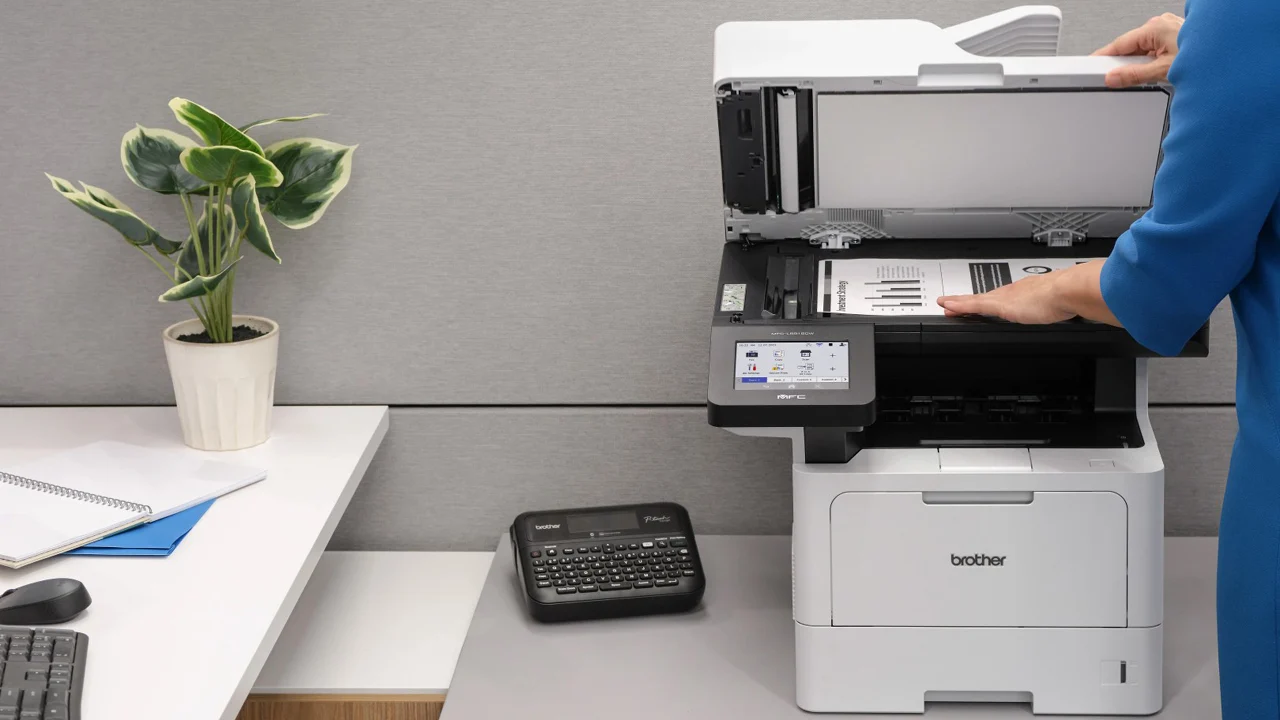

A small office printer has to do more than fit on a shelf. It needs to wake up reliably, handle a stack of documents without constant paper changes, and make scanning or copying feel like part of the workflow rather than a separate chore. The Best best small office printer for most people is not necessarily the smallest model, but the one that matches the office's mix of color pages, forms, reports, and multi-page documents.
The 10 models below cover compact color inkjets, fast monochrome laser printers, and multifunction machines with scanners and automatic document feeders. HP OfficeJet Pro 8139 is our top pick for its combination of color speed, office features, paper capacity, and straightforward controls. The rest range from compact monochrome specialists to simpler home-office all-in-ones.
Comparison table
| # | Product | Award | Type | Print speed | Paper handling | Best for |
|---|---|---|---|---|---|---|
| 1 | HP OfficeJet Pro 8139 | Best overall | Color inkjet all-in-one | Up to 20 ppm black, 10 ppm color | 225-sheet tray, ADF, duplex | Busy home offices |
| 2 | Canon PIXMA TS6520 | Best compact color printer | Color inkjet all-in-one | Not stated | Duplex, scanner, copier | Small desks and hybrid work |
| 3 | Brother DCP-L2640DW | Best monochrome multifunction | Monochrome laser all-in-one | Up to 36 ppm | 50-page ADF, duplex, Ethernet | Document-heavy offices |
| 4 | Brother HL-L2405W | Best simple laser printer | Monochrome laser printer | Up to 30 ppm | 250-sheet tray, manual feed | Fast everyday documents |
| 5 | HP LaserJet Pro 3001dw | Best secure office laser | Monochrome laser printer | Up to 35 ppm | Duplex | Small teams sharing one printer |
| 6 | HP LaserJet Pro MFP 3101sdw | Best team multifunction printer | Monochrome laser all-in-one | Up to 35 ppm | 250-sheet tray, 50-page ADF, duplex | Small teams that scan and copy |
| 7 | Brother Work Smart 1360 | Best color workflow printer | Color inkjet all-in-one | Up to 16 ppm black, 9 ppm color | 150-sheet tray, 20-sheet ADF, duplex | Home offices using cloud apps |
| 8 | HP OfficeJet Pro 8125e | Best color office alternative | Color inkjet all-in-one | Up to 20 ppm black, 10 ppm color | 225-sheet tray, ADF, duplex | Color reports and forms |
| 9 | HP Envy 6155 | Best home-office color printer | Color inkjet all-in-one | Up to 10 ppm black, 7 ppm color | 100-sheet tray, duplex | Light color printing |
| 10 | HP DeskJet 4327 | Best basic all-in-one | Color inkjet all-in-one | Up to 8.5 ppm black, 5.5 ppm color | 60-sheet tray, 35-sheet ADF | Occasional documents |
1. HP OfficeJet Pro 8139: Best Overall

Pros
- Prints up to 20 ppm in black and 10 ppm in color
- 225-sheet input tray reduces paper refills
- Includes scanning, copying, faxing, duplex printing, and an ADF
- 2.7-inch color touchscreen is easy to navigate
Cons
- Uses original HP cartridge chips or circuitry
- Larger and heavier than the smallest color models
- Instant Ink continues as a paid service after the included trial unless canceled
Best for: busy home offices that need color output and full multifunction capability.
The HP OfficeJet Pro 8139 is the office printer here that asks for the fewest compromises. It has the speed to handle reports and correspondence without feeling like a personal printer, while its scanner, copier, fax, automatic document feeder, and automatic two-sided printing cover the jobs that make a small office printer useful in the first place. The 225-sheet input tray is a practical advantage when several people share it or when a long document needs to run unattended.
Its print rate reaches 20 pages per minute for black output and 10 pages per minute for color. That distinction matters in daily use. Black text pages should move along quickly, while color presentations and flyers take longer without turning the printer into a bottleneck. The dual-band Wi-Fi is designed to detect and resolve connection issues, and the HP app supports printing, scanning, copying, and faxing from a phone.
The 2.7-inch color touchscreen gives the 8139 a more usable control surface than the basic LCD panels on simpler printers. HP also includes AI features for cleaning unwanted content from web pages and emails before printing. That is a narrowly useful tool, but it addresses a familiar office annoyance: pages filled with navigation bars, ads, or awkward formatting.
The drawback is not hidden. This printer is intended to work with cartridges using original HP chips or circuitry, and firmware updates maintain those restrictions. Its 17.6-pound body and roughly 18.12-inch width also make it less suitable for a very shallow desk than the Canon PIXMA TS6520. For teams that print only black text, the Brother DCP-L2640DW is faster and more naturally suited to that workload.
Choose the 8139 when color documents, scanning, copying, and a large paper tray all matter. It is the strongest all-round fit for readers comparing the Best best small office printer options, provided they are comfortable with HP's cartridge ecosystem.
2. Canon PIXMA TS6520: Best Compact Color Printer

Pros
- Compact 14.8 by 14 by 6.7-inch design
- Automatic two-sided printing
- Scanner and copier included
- Dual-band 2.4GHz and 5GHz Wi-Fi
- 1.42-inch OLED display shows printer status and ink levels
Cons
- Print speed is not stated in the available product details
- Two-cartridge hybrid ink system is less flexible than a larger cartridge setup
- Designed more for lighter workflows than large shared offices
Best for: hybrid workers who need color printing, scanning, and copying on a tight desk.
The Canon PIXMA TS6520 is the easiest model here to place in a cramped workspace. Its 14.8-inch length, 14-inch width, and 6.7-inch height make it notably less imposing than the office-oriented HP machines. It still includes a scanner and copier, and automatic two-sided printing helps keep routine documents from turning into unnecessarily large stacks.
Canon uses a two-cartridge hybrid ink system, described as producing sharp text and vivid color. The printer supports documents and photos up to 8.5 by 11 inches, with or without borders. That gives it a broader role than a monochrome laser, especially for someone who occasionally needs a visual handout or a color image alongside ordinary office pages.
The small 1.42-inch monochrome OLED display is not a full touchscreen, but it shows ink levels and printer status at a glance. The physical control panel keeps basic operations understandable. Dual-band Wi-Fi supports both 2.4GHz and 5GHz networks, while Canon PRINT, Apple AirPrint, and Mopria provide several ways to send jobs from a phone or tablet.
The limitation is capacity and office pace. The available details do not state a print speed, and the compact design signals a lighter-duty role than the 225-sheet HP OfficeJet Pro 8139 or the 250-sheet Brother laser printers. It also lacks the listed ADF found on several higher-ranked all-in-ones, so multi-page copying and scanning will be more hands-on.
For a desk where every inch matters, the TS6520 is more sensible than a larger office machine. Readers who need a second device for scanning and copying can also compare which compact machines combine printing and document handling before choosing. Pick the Canon for compact color versatility, not for a busy queue of long monochrome reports.
3. Brother DCP-L2640DW: Best Monochrome Multifunction
Pros
- Up to 36 ppm black-and-white printing
- 50-page automatic document feeder
- Automatic duplex printing
- Ethernet, dual-band Wi-Fi, and USB connectivity
- Scans, copies, and prints in one compact multifunction unit
Cons
- Monochrome output only
- 25-pound body is heavy for a compact printer
- Uses Brother TN830 or TN830XL toner
Best for: offices that process frequent black-and-white documents and multi-page scans.
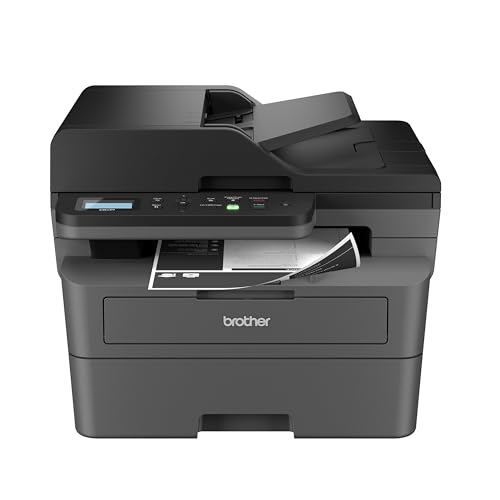
The Brother DCP-L2640DW is the most capable document machine in this group if color is not part of the brief. It combines a laser printer, scanner, and copier with automatic duplex printing, so it can take on reports, forms, and contracts without the slower rhythm common to basic inkjets. The 50-page ADF is especially important because it turns multi-page scanning and copying into a batch job rather than a page-by-page exercise.
Brother rates black-and-white printing at up to 36 pages per minute, with scanning up to 23.6 images per minute in black and 7.9 images per minute in color. Those scanning figures make the difference between a printer that merely has a scanner and one that can support real administrative work. The DCP-L2640DW also offers dual-band wireless, Ethernet, and USB, which gives an office more ways to connect it securely.
The Brother Mobile Connect app extends those controls to a phone. It can print, scan, and manage the printer remotely, while also tracking toner usage. The printer works with Brother TN830 and TN830XL toner. A Refresh EZ Print subscription trial is included, but the underlying advantage here is the laser platform's fit for crisp, repeatable black text.
This is not the right pick for flyers, photos, or color charts. It is also substantially heavier than the 15.1-pound Brother HL-L2405W, even though both share a compact footprint. The HL-L2405W is the better choice when printing is all you need. The DCP-L2640DW earns its place above it when scanning and copying are regular parts of the job.
Choose this Brother when documents are the center of the office. It is a more focused recommendation than the HP OfficeJet Pro 8139, but for black-and-white paperwork and multi-page handling, that focus is exactly the point.
4. Brother HL-L2405W: Best Simple Laser Printer

Pros
- Up to 30 ppm black-and-white printing
- 250-sheet paper tray
- Manual feed slot supports envelopes and specialty paper
- Dual-band Wi-Fi and USB connectivity
- Mobile printing through Brother Mobile Connect
Cons
- No scanner or copier
- Product details specify one-sided print speed, not automatic duplex printing
- Monochrome output only
Best for: a home office that wants fast text printing without multifunction extras.
The Brother HL-L2405W gets the basic printer job right by refusing to be anything else. It is a wireless black-and-white laser printer with a 250-sheet tray, a manual feed slot, and mobile printing. That combination suits invoices, shipping labels, forms, and drafts where clean text and a steady paper supply matter more than color or scanning.
Its rated one-sided speed reaches 30 pages per minute. That is slower than the DCP-L2640DW's 36 ppm, but both are far more document-focused than the color inkjets in this roundup. The 250-sheet tray is also generous for a compact home-office machine. The manual feed slot adds useful flexibility for envelopes and specialty paper without unloading the main tray.
Connection options include dual-band wireless and USB. Brother's Mobile Connect app lets users print from a mobile device, manage the printer, order genuine supplies, and track toner usage. The printer also includes a one-year limited warranty and ongoing online, phone, or live chat support, details that make more sense for a straightforward appliance than a complicated shared system.
The obvious compromise is functionality. There is no scanner, copier, or ADF, so anyone who occasionally needs to digitize a signed form will need another device. The listed speed specifically describes one-sided printing, and the available product details do not confirm automatic duplex printing. The Canon PIXMA TS6520 is a better fit for color and copying, while the DCP-L2640DW is the clear step up for document capture.
The HL-L2405W is a clean recommendation for print-only offices. It is particularly well suited to a desk where a separate scanner already exists or where paperwork is created digitally and only needs to come out sharply and quickly.
5. HP LaserJet Pro 3001dw: Best Secure Office Laser

Pros
- Up to 35 ppm black-and-white printing
- Automatic two-sided printing
- Ethernet, Wi-Fi, and Bluetooth connectivity
- HP Wolf Pro Security with customizable settings
- Supports mobile, PC, Mac, AirPrint, Android, and Chromebook printing
Cons
- No scanner or copier
- Monochrome output only
- Uses cartridges with original HP chips or circuitry
Best for: small teams that need shared wireless printing and stronger device security controls.
The HP LaserJet Pro 3001dw is built around the needs of a small shared office. HP positions it for teams of up to seven people, and the feature set supports that use: black-and-white printing, automatic two-sided output, wireless connectivity, Ethernet, and Bluetooth. It is the kind of printer that can sit in a common area and serve several computers without demanding much attention.
At up to 35 pages per minute, it is nearly as quick as the Brother DCP-L2640DW. The difference is that the Brother adds scanning and copying, while the HP remains print-only. The 3001dw therefore makes more sense when documents are already digital or another scanner is available. It supports printing from mobile devices, PCs, tablets, Macs, Android devices, Chromebooks, and AirPrint-compatible hardware.
Security is the reason to consider this model over the simpler Brother HL-L2405W. HP Wolf Pro Security provides customizable settings intended to protect the printer and information moving through it. Intelligent Wi-Fi also looks for the best connection to keep the machine online and ready to print.
There are two limitations to keep in mind. The available details do not list a paper tray capacity, so this is harder to assess for a high-volume shared queue than the Brother models with stated 250-sheet trays. It also has no scanner or copier, and HP's cartridge-chip restrictions narrow supply compatibility. If a team needs a complete document station, the HP LaserJet Pro MFP 3101sdw is the more suitable HP alternative.
Select the 3001dw when secure, fast printing matters more than scanning. It is less versatile than the top multifunction picks, but its office connectivity and security features give it a clear role.
6. HP LaserJet Pro MFP 3101sdw: Best Team Multifunction Printer

Pros
- Up to 35 ppm black-and-white printing
- 250-sheet input tray
- 50-sheet automatic document feeder
- Automatic two-sided printing
- Prints, scans, and copies
Cons
- Monochrome output only
- Weighs 23.1 pounds
- Uses HP cartridges with original chips or circuitry
Best for: small teams that need shared monochrome printing, scanning, and copying.
The HP LaserJet Pro MFP 3101sdw takes the office-oriented 3001dw and adds the functions a real team often misses first: scanning and copying. Its 250-sheet input tray and 50-sheet ADF are well matched to shared paperwork, and automatic duplex printing keeps routine reports from consuming unnecessary paper. It is a substantial machine, but it is substantial in useful ways.
Printing reaches up to 35 pages per minute in black. That is fast enough for a shared queue and matches the HP LaserJet Pro 3001dw, while the ADF lets several pages move through the scanner in one pass. HP describes the printer as built for professional-quality black-and-white documents and reports, making it a natural fit for forms, meeting documents, and administrative records.
Wireless printing uses HP's Wi-Fi system, which looks for a dependable connection and keeps the printer online. The device also benefits from the general simplicity of monochrome laser printing. Text is the priority, and the machine does not spend space or workflow complexity on color cartridges. For readers deciding between it and the Brother DCP-L2640DW, the choice is close: Brother offers a faster listed print rate and Ethernet, while HP matches the team-focused tray and ADF combination with strong office positioning.
The 23.1-pound weight and 16.5-inch width mean this is not a casual shelf accessory. It needs a stable surface with room around it. HP also restricts it to cartridges using HP chips or circuitry, and periodic firmware updates maintain that policy. Color users should skip it entirely, as should anyone who only prints occasionally and does not need the extra document capacity.
For a small team that wants one shared machine for black-and-white printing, scanning, and copying, the MFP 3101sdw is the more complete HP choice. It is also a strong candidate for offices weighing how much document capacity a shared workgroup really needs.
7. Brother Work Smart 1360: Best Color Workflow Printer

Pros
- Automatic duplex printing
- 20-sheet single-sided ADF
- 150-sheet paper tray
- Prints, copies, and scans
- Direct cloud app connections
Cons
- Slower color speed than the HP OfficeJet Pro models
- ADF is smaller than the 50-sheet laser multifunction feeders
- Uses LC501 series inks
Best for: home offices that print in color and work with cloud documents.
The Brother Work Smart 1360 stands out less for raw speed than for the way it connects everyday office tasks. It prints, copies, and scans, supports automatic duplex printing, and can print from or scan to cloud services including Google Drive, Dropbox, Box, and OneDrive. That makes it a useful bridge between paper documents and a cloud-based workflow.
The 150-sheet tray is enough for a home office or a small personal workstation, though it trails the 225-sheet HP OfficeJet Pro 8139 and the 250-sheet laser models. Its 20-sheet single-sided ADF can feed a short batch of pages, which is much more convenient than placing each sheet on the scanner glass. Black printing reaches 16 pages per minute, while color reaches 9 ppm.
A 1.8-inch color display provides on-device access to cloud connections and basic printer controls. The Brother Mobile Connect app handles printing, copying, scanning, and device management from a mobile device, with Page Gauge tracking ink use. Wireless and USB connections give it a little flexibility if the office setup changes.
The 1360 is not as quick as the HP OfficeJet Pro 8139 for black documents, and its ADF is much smaller than the 50-sheet feeders on the Brother DCP-L2640DW and HP LaserJet Pro MFP 3101sdw. It also uses LC501 series inks, a detail worth checking before committing to a supply system. People who print almost exclusively black text should choose a laser model instead.
This Brother is the better fit for a cloud-first home office that still needs color. It is less imposing than the large laser multifunction printers and more workflow-focused than a basic color printer.
8. HP OfficeJet Pro 8125e: Best Color Office Alternative

Pros
- Up to 20 ppm black and 10 ppm color
- 225-sheet input tray
- Automatic document feeder and duplex printing
- Dual-band Wi-Fi
- HP app supports printing, scanning, and copying
Cons
- No fax feature is listed in the available details
- Uses original HP cartridge chips or circuitry
- Larger than compact home-oriented inkjets
Best for: home offices that need quick color documents and a useful paper reserve.
The HP OfficeJet Pro 8125e is very close to the 8139 in the ways that matter most for a small office. It prints up to 20 pages per minute in black and 10 in color, has a 225-sheet input tray, and includes scanning, copying, automatic two-sided printing, and an ADF. Those features make it a considerably more capable office tool than the HP Envy 6155 or DeskJet 4327.
Its dual-band Wi-Fi is designed to detect and resolve connection issues, while the HP app supports print, scan, and copy tasks from a smartphone, PC, or tablet. HP also includes an AI feature that removes unwanted content and improves the formatting of web pages and emails before printing. That can be useful when office documents begin as browser pages rather than carefully prepared files.
The 8125e has the same listed print rates as the 8139 and a very similar footprint, measuring about 18.11 inches wide, 13.29 inches long, and 9.17 inches high. It weighs about 17.64 pounds. The machine is therefore compact enough for a home office, but it still needs a proper work surface rather than a narrow side table.
The 8139 remains our stronger pick because its listed features include faxing, a 2.7-inch color touchscreen, HP Wolf Essential Security, and more than 45% recycled plastic content. The 8125e is the better choice only when those extras are not important. Like the other HP inkjets here, it is intended to work with cartridges using original HP chips or circuitry.
The 8125e deserves consideration from anyone who wants the core OfficeJet Pro experience without needing every added feature. For a broader look at the features that make a printer work well beside a home desk, the surrounding workflow matters as much as the printer itself.
9. HP Envy 6155: Best Home-Office Color Printer

Pros
- Automatic two-sided printing
- 2.4-inch color touchscreen
- Prints, scans, and copies
- 100-sheet input tray
- HP P3 technology targets vibrant document and photo output
Cons
- Slower than the OfficeJet Pro models
- No ADF is listed
- 100-sheet tray is modest for an office queue
Best for: home users who need attractive color documents and occasional photos.
The HP Envy 6155 is a home-oriented color all-in-one rather than a scaled-down workgroup printer. It prints, scans, and copies, and automatic duplex printing handles routine two-sided documents. The 2.4-inch color touchscreen is larger than the Canon PIXMA TS6520's OLED display, making on-device navigation more visual and easier to follow.
HP rates it at up to 10 pages per minute in black and 7 ppm in color. That is adequate for homework, forms, letters, and occasional office pages, but notably behind the 20 ppm black and 10 ppm color rates of the OfficeJet Pro 8139 and 8125e. The 100-sheet input tray reinforces the distinction. It works for light use, but a shared office will refill it more often.
The Envy's P3 technology is intended to make documents and photos look vibrant, and the printer supports borderless photos according to the listed features. Dual-band Wi-Fi and the HP app keep mobile printing, scanning, copying, and faxing accessible from a phone. HP also says the body uses at least 60% recycled plastic content.
There is no listed ADF, so multi-page scanning and copying require more manual handling. The unusual product dimensions also deserve care when planning a workspace: the listing gives a height of 14.21 inches, a length of 17.05 inches, and a width of 5.35 inches. That narrow width may suit some placements, but the tall shape needs clearance.
The Envy 6155 is the right pick when color appearance and home use matter more than queue speed. Small offices with regular multi-page paperwork should move up to the OfficeJet Pro 8139 or choose a laser multifunction model.
10. HP DeskJet 4327: Best Basic All-in-One

Pros
- Prints, scans, and copies
- 35-sheet automatic document feeder
- Dual-band Wi-Fi and mobile printing
- Made with at least 70% recycled plastics
- AI formatting tools for web pages and emails
Cons
- Slowest listed print speeds in the roundup
- 60-sheet input tray needs frequent attention
- No automatic duplex printing is listed
Best for: occasional color documents, basic scanning, and simple household paperwork.
The HP DeskJet 4327 is aimed at basic printing rather than a demanding office queue. It handles color printing, scanning, and copying, with a 35-sheet ADF for short multi-page jobs. Wireless and mobile printing make it easy to send a document from a phone, while the icon LCD keeps the physical controls uncomplicated.
The listed speed is up to 8.5 pages per minute in black and 5.5 in color. Those are the slowest figures in this roundup, so the 4327 is better suited to a few pages at a time than to a shared stream of reports. Its 60-sheet input tray is also the smallest stated capacity here. That keeps the machine compact, but it means paper refills will be part of ownership.
HP's AI formatting feature is designed to remove unwanted content from web pages and emails, which can help when printing informal documents. The printer is also made with at least 70% recycled plastics and carries ENERGY STAR and EPEAT certifications according to the listed features. A six-month Instant Ink trial is included, with a continuing service after the trial unless canceled.
The 4327 does not list automatic duplex printing, so it is less convenient for two-sided office documents than the Canon PIXMA TS6520, Brother Work Smart 1360, and OfficeJet models. It also lacks the speed and paper capacity that make the Brother HL-L2405W a better monochrome office tool. Anyone printing only occasionally may not need those upgrades, but a busy small office will notice the difference quickly.
Choose the DeskJet 4327 for straightforward color tasks and short scanning batches. It is the least office-focused pick here, but its ADF and compact design give it a useful role for light paperwork.
How to choose best small office printer
The right Best best small office printer depends on the kind of work that fills the paper tray. Start with print technology, then look at speed, paper handling, document capture, connectivity, and the physical space available.
Print technology
Color inkjets such as the HP OfficeJet Pro 8139, Canon PIXMA TS6520, and Brother Work Smart 1360 are the natural fit for presentations, flyers, charts, and occasional photos. Monochrome lasers such as the Brother HL-L2405W and HP LaserJet Pro 3001dw are better aligned with crisp black text and recurring office paperwork. A color printer is not automatically more useful if the office rarely prints color.
Print speed
Speed is measured in pages per minute, but the useful comparison depends on the type of page. The HP OfficeJet Pro 8139 reaches 20 ppm in black and 10 ppm in color, while the Brother DCP-L2640DW reaches 36 ppm in black. A small office printing mostly reports and forms will feel that difference more than an office printing one or two pages at a time.
Paper capacity
A 60-sheet tray on the HP DeskJet 4327 is suitable for light use, while the 225-sheet tray in the OfficeJet Pro models and 250-sheet trays in the Brother laser printers reduce interruptions. Capacity matters most when several people share one printer or when long documents are common. Manual feed slots are useful for envelopes and specialty paper without disturbing the main supply.
A fast printer with a tiny tray still creates slow work when someone has to refill it between every document.
Automatic document feeder
An ADF is essential for scanning or copying multiple pages. The 50-page feeders on the Brother DCP-L2640DW and HP LaserJet Pro MFP 3101sdw are better for substantial batches than the 20-sheet feeder on the Brother Work Smart 1360 or the 35-sheet feeder on the HP DeskJet 4327. If scanning is occasional, a smaller feeder may be enough. If it is part of daily administration, choose the largest practical capacity.
Duplex printing
Automatic duplex printing turns two-sided documents into a normal workflow rather than a manual reloading exercise. It appears on the HP OfficeJet Pro models, Canon PIXMA TS6520, Brother Work Smart 1360, HP Envy 6155, and the listed office laser models that specify duplex output. The Brother HL-L2405W's available details describe one-sided speed but do not confirm automatic duplex printing, so check that requirement carefully.
Desk footprint and connections
Measure the available surface, including room for paper access and opening the scanner. The Canon PIXMA TS6520 is the shortest in height among the listed color all-in-ones, while the laser multifunction printers are heavier and need a sturdier home. Dual-band Wi-Fi helps with flexible placement, while Ethernet is useful when a shared office prefers a wired network connection.
Frequently asked questions
Is a laser or inkjet printer better for a small office?
A monochrome laser printer is usually the better match for offices that mostly produce text documents, forms, and reports. A color inkjet is more suitable when presentations, graphics, flyers, or photos are part of the regular workload. Multifunction requirements can matter just as much as the print technology.
Which printer here is best for scanning multiple pages?
The Brother DCP-L2640DW and HP LaserJet Pro MFP 3101sdw both list 50-page automatic document feeders. They are the strongest options for recurring multi-page scanning and copying. The Brother Work Smart 1360 and HP DeskJet 4327 can handle shorter batches with their smaller ADFs.
Do all of these printers print in color?
No. The Brother DCP-L2640DW, Brother HL-L2405W, HP LaserJet Pro 3001dw, and HP LaserJet Pro MFP 3101sdw are monochrome laser printers. The Canon, Brother Work Smart, HP OfficeJet, HP Envy, and HP DeskJet models are color inkjet printers.
Can these printers connect to a phone?
Each model includes wireless or mobile-printing features in its listed details. HP models use the HP app, Brother models support Brother Mobile Connect, and the Canon PIXMA TS6520 supports Canon PRINT, Apple AirPrint, and Mopria Print Service. The exact setup experience varies by phone and network.
Which model has the largest stated paper tray?
The Brother HL-L2405W and Brother DCP-L2640DW each list a 250-sheet tray. The HP OfficeJet Pro 8139 and HP OfficeJet Pro 8125e list 225-sheet trays, while the Brother Work Smart 1360 lists 150 sheets. The HP DeskJet 4327 has the smallest stated tray at 60 sheets.
Do these printers support automatic two-sided printing?
Automatic duplex printing is listed for the HP OfficeJet Pro 8139, Canon PIXMA TS6520, Brother DCP-L2640DW, HP LaserJet Pro 3001dw, HP LaserJet Pro MFP 3101sdw, Brother Work Smart 1360, HP OfficeJet Pro 8125e, and HP Envy 6155. It is not listed for the HP DeskJet 4327. The Brother HL-L2405W details specify one-sided speed but do not confirm automatic duplex printing.

The bottom line
The Best best small office printer for most home-office users is the HP OfficeJet Pro 8139. Its 225-sheet tray, ADF, duplex printing, color output, 20 ppm black speed, 10 ppm color speed, touchscreen, and full print, scan, copy, and fax functions give it the broadest office role. The main reason to skip it is HP's cartridge-chip restriction or a preference for monochrome laser printing.
For black-and-white paperwork, choose the Brother DCP-L2640DW when scanning and copying matter, or the Brother HL-L2405W when print-only simplicity is enough. The HP LaserJet Pro MFP 3101sdw is another strong team option with a 50-page ADF and 250-sheet tray.
If you are undecided, choose the HP OfficeJet Pro 8139 for mixed office work and the Brother DCP-L2640DW for document-heavy monochrome work.
As an Amazon Associate we earn from qualifying purchases.