
A slow hard drive can make a perfectly usable laptop feel broken. Booting takes too long, applications hesitate, and even simple file transfers become interruptions. Replacing it with a 2.5-inch SATA SSD is one of the most noticeable upgrades available for an older laptop or desktop.
The Best best sata ssd options in this group all use the familiar SATA III interface, but they differ in capacity, rated transfer speeds, endurance claims, software support, and warranty coverage. Samsung's 870 EVO leads the list for its broad compatibility and unusually clear management tools, while the other picks make sense for specific storage needs.
Our top pick is the Samsung 870 EVO 1TB, with capacities and capabilities ranging from the compact PNY CS900 250GB to the 2TB Samsung and Crucial models.
Comparison table
| # | Product | Award | Capacity | Sequential speed | Best for |
|---|---|---|---|---|---|
| 1 | Samsung 870 EVO 1TB | Best overall | 1TB | Up to 560/530 MB/s | Most laptop and desktop upgrades |
| 2 | Samsung 870 EVO 2TB | Best high-capacity pick | 2TB | Up to 560/530 MB/s | Large libraries and heavy workloads |
| 3 | fanxiang S101 1TB | Best TLC alternative | 1TB | Up to 520/520 MB/s | Straightforward everyday upgrades |
| 4 | PNY CS900 250GB | Best compact boot drive | 250GB | Up to 535/500 MB/s | Operating-system replacements |
| 5 | TEAMGROUP T-Force Vulcan Z 1TB | Best for sustained transfers | 1TB | Up to 550/500 MB/s | Games and large file work |
| 6 | Crucial BX500 1TB | Best simple replacement | 1TB | Up to 540 MB/s read | Basic system upgrades |
| 7 | Crucial BX500 2TB | Best capacity upgrade | 2TB | Up to 540 MB/s read | Large desktop storage |
| 8 | PNY CS900 1TB | Best low-power option | 1TB | Up to 535/515 MB/s | Older laptops |
| 9 | KingSpec 1TB | Best feature-rich alternative | 1TB | Up to 550/520 MB/s | Mixed laptop and desktop use |
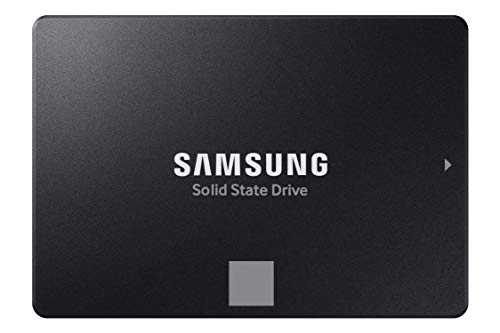
1. Samsung 870 EVO 1TB: Best Overall
Pros
- Reaches the SATA interface's practical performance ceiling
- 600 TBW endurance rating
- Broad host-system compatibility
- Samsung Magician software and migration support
Cons
- Limited to 1TB of capacity
- Its 2.5-inch SATA design cannot match NVMe drive speeds
Best for: anyone upgrading a laptop or desktop who wants a well-supported 1TB SATA drive.
The Samsung 870 EVO 1TB is the easy recommendation when the goal is to replace an old hard drive without adding uncertainty. It is a familiar 2.5-inch drive that fits the standard SATA mounting space, and its behavior is well suited to the kind of upgrade most people actually make: moving an operating system, applications, games, and personal files onto a quieter and more responsive drive.
Samsung rates it for sequential reads up to 560 MB/s and sequential writes up to 530 MB/s. Those figures are close to the practical limit of the SATA interface, so the benefit is not just a high peak number. Large file copies feel brisk, application launches stop waiting on mechanical disk access, and an older computer can feel substantially more responsive after a clean migration. The drive also uses a larger variable buffer to help maintain performance during heavier work.
The 1TB model carries a rating of up to 600 TBW and comes with a five-year limited warranty. Samsung also includes AES 256-bit encryption support, TCG/Opal, and IEEE 1667 features for systems that need hardware-backed security. Its compatibility testing covers chipsets, motherboards, NAS devices, and video recording hardware, while SATA 6 Gb/s support remains compatible with older SATA 3 Gb/s and SATA 1.5 Gb/s connections.
The biggest reason to choose this over the fanxiang S101 1TB or Crucial BX500 1TB is the surrounding support. Samsung Magician can monitor drive health, apply firmware updates, and help manage the drive, and Samsung provides migration software for moving an existing installation. The weakness is capacity. If you have a large game collection or a substantial media library, the Samsung 870 EVO 2TB is the more comfortable fit. This is the one we'd keep for a general-purpose 1TB upgrade where predictable installation and long-term support matter.
2. Samsung 870 EVO 2TB: Best High-Capacity Pick

Pros
- Up to 2, 400 TBW endurance rating
- SATA-limited read and write performance
- AES 256-bit encryption support
- Compatible with older SATA interfaces
Cons
- Still limited by the SATA interface
- More capacity than a basic boot-only upgrade needs
Best for: desktop users and laptop owners who need substantial local storage without changing to an NVMe platform.
The Samsung 870 EVO 2TB is the version to choose when reinstalling an operating system is also an opportunity to stop managing storage space. It has the same compact 2.5-inch form factor as the 1TB model, so it can replace a conventional laptop or desktop drive without requiring a new storage standard. The extra capacity leaves room for applications, photos, games, and project files on one drive.
Its sequential read and write ratings reach 560 MB/s and 530 MB/s. That puts it in the same practical performance class as the 1TB 870 EVO, because both are constrained by the SATA III connection rather than by the capacity printed on the label. The result is a fast SATA upgrade for booting, application loading, and broad file transfers, but not the kind of throughput associated with a PCIe NVMe drive.
The endurance claim is where this model separates itself from most of the list. Samsung rates the 2TB drive for up to 2, 400 TBW, and the drive supports AES 256-bit encryption, TCG/Opal v2.0, and Microsoft eDrive related features. Samsung also lists shock specifications and compatibility with SATA 3 Gb/s and SATA 1.5 Gb/s interfaces. Those details make it a strong option for a workstation, NAS-compatible setup, or desktop that will see frequent writes.
Compared with the Crucial BX500 2TB, the Samsung gives you a more complete software and endurance story. Compared with the Samsung 870 EVO 1TB, it is the obvious choice when the smaller drive would force you to keep a second disk attached. Its weakness is not a defect in the drive, but the platform itself: a 2TB SATA SSD cannot approach NVMe transfer rates. If you are building a newer PC with an open M.2 slot, consider how internal solid-state storage differs from the older SATA format before committing to this form factor. For an existing SATA system, this is the strongest large-capacity pick here.
3. fanxiang S101 1TB: Best TLC Alternative

Pros
- 3D NAND TLC memory
- Rated for up to 520 MB/s reads and writes
- Works with desktops, laptops, and all-in-one PCs
- Lifetime technical support is listed
Cons
- Three-year service period is shorter than Samsung's warranty
- No drive-management software is listed
Best for: a conventional 1TB laptop or desktop refresh where TLC memory and broad operating-system support are priorities.
The fanxiang S101 1TB takes a straightforward approach to the SATA upgrade. It is a 2.5-inch drive with a 7 mm class profile and 3D NAND TLC memory, aimed at replacing an older hard drive in a laptop, desktop, or all-in-one computer. For a machine that spends most of its time launching programs, browsing, and handling documents, the appeal is simple: move away from spinning storage and get a quieter, faster system.
Fanxiang lists read and write speeds up to 520 MB/s. That is below the Samsung 870 EVO's 560 MB/s read and 530 MB/s write ratings, but it remains a sensible level for a SATA III replacement. The difference is most visible in large sequential transfers and less dramatic during ordinary application launches, where the jump from a hard drive matters more than the last few megabytes per second.
The use of 3D NAND TLC is a meaningful detail. TLC stores three bits per cell and is generally a better fit for repeated writing than QLC designs, although the supplied information does not give this drive a TBW endurance figure. The S101 supports Windows, Linux, and Mac OS, and fanxiang lists three years of after-sales service plus lifetime technical support. That combination is useful when upgrading an older computer with an operating system that may not be part of a modern PC builder's routine.
The missing pieces are just as important. There is no supplied TBW figure, dedicated management utility, or migration application listed here. The Samsung 870 EVO 1TB is the safer recommendation for people who want detailed monitoring and a longer stated warranty, while the TEAMGROUP T-Force Vulcan Z 1TB has a slightly higher rated read speed and a stated SLC cache. Pick the S101 when TLC memory, broad compatibility, and a simple upgrade matter more than a polished software ecosystem.
4. PNY CS900 250GB: Best Compact Boot Drive

Pros
- Compact capacity suits an operating-system drive
- Up to 535 MB/s sequential read speed
- Up to 500 MB/s sequential write speed
- Backwards compatible with SATA II
Cons
- 250GB leaves limited room for large applications and media
- No endurance figure is supplied
Best for: reviving an older laptop or desktop when the existing data can remain on another drive.
The PNY CS900 250GB makes sense when the job is narrowly defined. It is not a spacious replacement for a full media drive, but it can serve as a dedicated operating-system and application drive in an older computer. That arrangement can transform startup and application loading while leaving a larger hard drive in place for documents, photos, and archives.
PNY rates this model for sequential reads up to 535 MB/s and sequential writes up to 500 MB/s. Those numbers are competitive for a compact SATA drive and close enough to the larger PNY CS900 1TB that the main difference here is capacity, not the basic interface performance. It also uses very little power compared with a traditional hard drive, which is helpful in an older laptop where battery life is already limited.
The drive uses the standard 2.5-inch SATA format and is backwards compatible with SATA II at 3 Gb/s. That matters because many older machines do not expose a full SATA III connection. The CS900 will not exceed the older interface's ceiling, but it can still make the computer feel much quicker than it did with a mechanical disk.
Capacity is the deciding weakness. A 250GB drive can fill quickly after the operating system, updates, applications, and temporary files are installed. The PNY CS900 1TB is the better all-purpose version, and the Samsung 870 EVO 1TB offers a stronger support package. Choose this model only if you have a second storage location or a strict plan for keeping the boot volume lean. If you are also considering a separate drive for backups or transfers, the storage capacity needed for portable solid-state work can help define the rest of the setup.
5. TEAMGROUP T-Force Vulcan Z 1TB: Best for Sustained Transfers

Pros
- 3D NAND TLC memory
- Built-in SLC cache
- Rated for up to 550 MB/s reads and 500 MB/s writes
- 2.5-inch 7 mm design
Cons
- SLC cache means peak performance is not the whole story
- Three-year warranty is shorter than the Samsung option
Best for: game libraries, large file transfers, and general PC upgrades that benefit from a responsive 1TB drive.
The TEAMGROUP T-Force Vulcan Z 1TB is built around a feature that matters during active file work: an SLC cache. TEAMGROUP pairs that cache with 3D NAND TLC and positions the drive for gaming, PC upgrades, 4K video editing, and fast file transfers. In an everyday computer, that translates to a quick boot drive with a little more attention paid to write behavior than the basic entry-level models receive.
Its listed sequential speeds are up to 550 MB/s read and 500 MB/s write. The read rating is just below the Samsung 870 EVO, while the write rating is lower than Samsung's 530 MB/s figure and similar to the PNY CS900 250GB. The SLC cache can help the drive maintain a stable feeling during many ordinary transfers, but the supplied information does not state how large the cache is or how performance changes after it fills.
The physical format is practical for upgrades. TEAMGROUP lists a standard 2.5-inch, 7 mm design that fits most laptops and desktop PCs using SATA, with no moving parts and resistance to shock and vibration. It also lists lower power consumption and silent operation, both useful in a laptop or a quiet desktop. A three-year warranty is included, with the warranty description referring to a limited warranty or TBW condition.
Compared with the fanxiang S101 1TB, the Vulcan Z offers a slightly higher read ceiling and a more explicit cache design. The Samsung 870 EVO 1TB remains the better choice for software support, stated endurance, and warranty length. The weakness is that the cache headline should not be mistaken for unlimited sustained write speed. Choose the Vulcan Z for a responsive 1TB upgrade with a gaming and transfer focus, especially when its standard form factor is a better fit than a newer M.2 drive.
6. Crucial BX500 1TB: Best Simple Replacement

Pros
- 3D NAND from Micron
- Up to 540 MB/s sequential read speed
- 2.5-inch installation format
- Three-year limited warranty
Cons
- No write-speed figure is supplied in the product information
- No TBW endurance figure is listed
Best for: users replacing a hard drive with a simple 1TB SATA SSD from an established storage brand.
The Crucial BX500 1TB is the uncomplicated option in this group. It is designed to improve a sluggish laptop or desktop without adding unusual installation requirements. The 2.5-inch design uses the same familiar SATA connection found in a wide range of older computers, and the 1TB capacity is large enough for an operating system, applications, and a moderate collection of personal files.
Crucial lists sequential read performance up to 540 MB/s, close to the upper range of SATA III. The supplied information does not provide a corresponding sequential write figure, so it is not possible to compare its write behavior directly with the Samsung, PNY, or TEAMGROUP drives. That omission does not make the drive unsuitable for normal use, but it does make the specification sheet less complete for people planning frequent large transfers.
The drive uses Micron 3D NAND, and Crucial claims faster booting, quicker file loading, and improved system responsiveness compared with a typical hard drive. It also states that the SSD is more energy efficient than a typical hard drive, a trait that can help an older laptop run with less storage-related power draw. A three-year limited warranty is included.
The Samsung 870 EVO 1TB is the more rounded choice because it supplies a higher read and write ceiling, a TBW figure, migration software, and Magician monitoring. The Crucial BX500 1TB is still a sensible pick for a basic replacement where those extras are not central. Its real weakness is the thinner published detail around endurance and write speed. Choose it when the installation is a simple hard-drive swap and the computer will mostly handle routine files, applications, and system tasks.
7. Crucial BX500 2TB: Best Capacity Upgrade

Pros
- 2TB capacity in a standard 2.5-inch format
- Micron 3D NAND
- Up to 540 MB/s sequential read speed
- Three-year limited warranty
Cons
- No write-speed figure is supplied
- No TBW endurance figure is listed
Best for: adding a large, quiet storage volume to a desktop or replacing a laptop's existing 2TB hard drive.
The Crucial BX500 2TB is the capacity-first version of the BX500 idea. It keeps the standard 2.5-inch SATA layout while giving a desktop or compatible laptop enough space for a sizable application library, personal files, and media collection. It is particularly useful when the computer has one main drive bay and adding a second storage device is not practical.
Its rated sequential read speed is up to 540 MB/s, which is close to the limit expected from SATA III. The supplied product details do not state a sequential write rating, so buyers should view this as a general storage and system-upgrade drive rather than a thoroughly documented sustained-write specialist. For booting, launching programs, and reading large files, the listed read performance is the more relevant figure.
Like the 1TB model, it uses Micron 3D NAND and is described as more energy efficient than a typical hard drive. Crucial also claims faster startup and file loading, which are the most noticeable changes when moving an older system from spinning storage. The three-year limited warranty is useful, but no TBW number is provided to define a specific write endurance target.
The Samsung 870 EVO 2TB is the stronger technical choice for heavy workloads because its published endurance figure reaches up to 2, 400 TBW and its sequential write rating is clear. The BX500 2TB is more straightforward, and its large capacity suits users who mainly want a quiet, roomy SATA replacement. Skip it if you regularly write very large projects and need a clearly documented endurance and write-performance profile. For everyone else, it is the practical large-volume option in the Crucial line.
8. PNY CS900 1TB: Best Low-Power Option
Pros
- 1TB capacity for a broad system upgrade
- Up to 535 MB/s sequential read speed
- Up to 515 MB/s sequential write speed
- Backwards compatible with SATA II
- A+ energy-efficiency class is listed
Cons
- No TBW endurance figure is supplied
- No migration or health-management software is listed
Best for: older laptops and desktops where low power use and broad SATA compatibility matter.
The PNY CS900 1TB is the more useful version of the CS900 for most people. Its 1TB capacity avoids the tight space constraints of the 250GB model while keeping the same general purpose: replace a hard drive, speed up startup, and make applications load with less waiting. It uses the familiar 2.5-inch form factor, so it is a realistic upgrade for many older laptops and desktops.
PNY lists sequential reads up to 535 MB/s and writes up to 515 MB/s. That is a balanced specification for SATA III, with a write rating that is slightly higher than the 250GB model's listed 500 MB/s. The drive is also backwards compatible with SATA II at 3 Gb/s, which helps when the computer is old enough that its internal storage controller predates SATA III.
Ultra-low power consumption is one of the product's stated features, and the technical details list an A+ energy-efficiency class. That combination makes the drive appealing for a laptop refresh, although the available information does not provide a battery-life estimate. As with the 250GB CS900, PNY emphasizes faster operating-system boot times and application loading compared with a traditional hard drive.
The fanxiang S101 1TB offers TLC memory and a three-year service promise, while the Samsung 870 EVO 1TB adds a much more developed management and migration package. The PNY's weakness is its limited published endurance information and lack of a listed utility for monitoring the drive. Choose the CS900 1TB when compatibility with an older SATA system, balanced transfer ratings, and low-power operation are more important than advanced software.
9. KingSpec 1TB: Best Feature-Rich Alternative

Pros
- Up to 550 MB/s read and 520 MB/s write speeds
- 3D NAND flash
- Supports TRIM, S.M.A.R.T., and wear leveling
- Compatible with Windows, Linux, Unix, and DOS
- Three-year limited warranty
Cons
- No TBW endurance number is supplied
- No dedicated management application is listed
Best for: users who want a broadly compatible 1TB SATA drive with several storage-management features.
The KingSpec 1TB stands out for the number of storage features it names rather than for one unusual physical design. It is a 2.5-inch SATA III drive using 3D NAND flash, intended for laptops, desktops, and all-in-one computers. Its 1TB capacity makes it a comfortable replacement for a common system drive, and the absence of moving parts means silent operation.
The rated sequential speeds are up to 550 MB/s read and 520 MB/s write. That places it close to the Samsung 870 EVO on paper, with a slightly lower read ceiling and a similar write ceiling. Actual results will depend on the host computer, the SATA controller, the type of transfer, and how full the drive is, but the published figures show a drive aimed at the upper end of ordinary SATA performance.
KingSpec lists wear leveling, garbage collection, over-provisioning, native command queuing, TRIM, and S.M.A.R.T. support. These are useful building blocks for maintaining performance and monitoring drive status over time. The drive is also listed as compatible with Windows 10, Windows 8.1, Windows 8, Windows 7 or later, DOS, Linux, and Unix, and its SATA Rev. 3.0 interface is backwards compatible with SATA Rev. 2.0.
The TEAMGROUP T-Force Vulcan Z 1TB is the better fit for buyers specifically interested in an SLC cache, while the Samsung 870 EVO 1TB has the clearest endurance and software package. KingSpec's weakness is that the product information does not provide a TBW figure or a dedicated management utility, so the feature list is more impressive than the long-term documentation. It is a good alternative for a mixed operating-system setup where compatibility and named maintenance functions carry real weight.
How to choose best sata ssd
The right SATA SSD is less about chasing a single peak number and more about matching capacity, interface limits, memory type, endurance information, and physical fit to the computer being upgraded.
Capacity
Capacity determines whether the drive can be a complete replacement or only a boot volume. A 250GB model such as the PNY CS900 250GB can work for an operating system and core applications, but it leaves little room for games, video, or a large photo library. A 1TB drive is the practical middle ground for most laptops and desktops, while 2TB models such as the Samsung 870 EVO 2TB and Crucial BX500 2TB make more sense when one internal drive needs to hold almost everything.
SATA interface
SATA III is commonly described as 6 Gb/s, but the usable throughput is much lower once overhead is included. That is why many drives in this roundup cluster around 535 to 560 MB/s reads. A SATA SSD can still transform a hard-drive-based computer, but it cannot match the transfer rates of a PCIe NVMe drive. Check the computer's connector, mounting space, and available drive bay before choosing a format.
Sequential read and write speed
Sequential read speed matters for large files and some application-loading tasks. Sequential write speed becomes more important when copying large projects, installing games, or recording media. Ratings such as 560/530 MB/s on the Samsung 870 EVO 1TB are close to the SATA ceiling, while the Crucial BX500 listings provide a read figure but no supplied write figure. Treat peak ratings as a useful comparison point, not a promise for every workload.
NAND type and cache
The fanxiang S101, TEAMGROUP T-Force Vulcan Z, and KingSpec listings identify 3D NAND, with TLC specifically named for the fanxiang and TEAMGROUP drives. TLC is generally better suited to repeated writes than QLC, but a complete endurance judgment also needs a TBW rating or other manufacturer data. An SLC cache can improve short and moderate writes, though sustained performance may change after that cache is filled.
A SATA SSD is already close to its interface limit, so capacity, endurance information, and support often matter more than a small difference in peak speed.
Endurance and support
Endurance figures show how much data a manufacturer expects the drive to handle under its warranty conditions. Samsung provides the clearest numbers here, including up to 600 TBW for the 1TB 870 EVO and up to 2, 400 TBW for the 2TB model. Several alternatives list three-year warranties or service periods but do not provide a TBW number. Software support also matters: Samsung Magician and migration software make installation and monitoring easier than a bare drive with no named utility.
Physical fit and compatibility
Most products here use a 2.5-inch design intended for SATA-equipped laptops, desktops, and all-in-one computers. Confirm that the laptop accepts a 2.5-inch drive and check whether it needs a mounting bracket or spacer. Older SATA II systems can still use these drives, but the interface will limit performance. If the computer has an available M.2 slot, first check the physical differences between M.2 and traditional drive bays so you do not buy the wrong connector.

Frequently asked questions
Is a SATA SSD still a good upgrade for an old laptop?
Yes. Replacing a mechanical hard drive with a SATA SSD usually improves startup, application loading, noise, and general responsiveness. The computer must have a compatible 2.5-inch SATA bay or adapter, and the drive will run at the limit of the laptop's storage controller.
Is 1TB enough for a SATA SSD?
For many laptops and desktops, 1TB is enough for the operating system, applications, and a moderate file collection. Users with large game libraries, video files, or a single-drive desktop should consider a 2TB model instead. A 250GB drive is better treated as a boot and application volume.
Are all 2.5-inch SATA SSDs compatible with laptops?
Not all laptops have the same physical clearance, mounting arrangement, or available cable. The drives in this roundup use a standard 2.5-inch SATA format, but you should verify the laptop's bay size, connector, and thickness requirement before ordering. Older SATA II systems can use SATA III drives, with reduced interface speed.
Does a faster SATA SSD make games load much faster?
Moving from a hard drive to any competent SATA SSD can make game loading feel much quicker. Moving from one SATA SSD to another with a slightly higher peak rating usually produces a smaller difference because the interface is already the main limit. Storage capacity and installation space may matter more than a small sequential-speed gap.
Should a SATA SSD be used for video editing?
A SATA SSD can work well for an operating system, applications, and moderate project files. Large sustained writes may expose differences between models, especially when a cache fills, so a drive with clearer write specifications and endurance information is preferable for heavier editing workloads. The Samsung 870 EVO and TEAMGROUP T-Force Vulcan Z are the more relevant options here.
How long does a SATA SSD last?
There is no single lifespan that applies to every drive. Write volume, workload, temperature, controller behavior, and the manufacturer's endurance rating all matter. Use S.M.A.R.T. monitoring where available, keep backups of important files, and pay attention to the warranty and TBW information supplied for the specific model.
Can a SATA SSD be used as external storage?
Yes, but it requires a compatible 2.5-inch SATA-to-USB enclosure or adapter. External performance will depend on the USB connection and enclosure controller rather than the internal SATA connection alone. For frequent travel, the differences in what makes a portable solid-state drive practical on the road are worth considering before choosing an enclosure-based setup.

The bottom line
The Best best sata ssd choice for most laptop and desktop upgrades is the Samsung 870 EVO 1TB. It combines near-limit SATA performance with a 600 TBW rating, a five-year limited warranty, broad compatibility, encryption support, migration software, and Samsung Magician monitoring. The Samsung 870 EVO 2TB is the better pick when one internal drive needs to hold a large library or a demanding workload.
The TEAMGROUP T-Force Vulcan Z 1TB, fanxiang S101 1TB, and PNY CS900 1TB are sensible alternatives when their particular strengths fit the computer better. The Crucial models make the most sense for simple capacity upgrades, while the PNY 250GB is best kept for a dedicated boot role.
If you are undecided, choose the Samsung 870 EVO 1TB unless your system needs 2TB or your computer has an M.2 slot that makes a different storage format more appropriate.
As an Amazon Associate we earn from qualifying purchases.