

A monitor can look sharp and still make dark scenes feel flat. The difference usually appears in black text, shadow detail, movie scenes, and games with dim environments, where a weak contrast ratio turns subtle shades into a gray haze. The panel type, brightness, resolution, and refresh rate all change how that contrast looks in practice.
Our Best best contrast ratio monitor picks range from compact 22-inch office screens to a 43-inch commercial display. The single best choice for the deepest stated contrast and fastest gaming performance is the Hikers 27-inch 280Hz. The rest cover quieter office use, programming, ultrawide gaming, and large-format presentations.
| # | Product | Award | Contrast | Refresh rate | Best for |
|---|---|---|---|---|---|
| 1 | Hikers 27-inch 280Hz | Best overall | 5000:1 | 280Hz | Competitive gaming |
| 2 | SANSUI 27-inch 240Hz | Best high-contrast gaming | 4000:1 | 240Hz | Immersive gaming |
| 3 | Hikers 27-inch 240Hz | Best for vivid motion | 4000:1 | 240Hz | Fast FHD gaming |
| 4 | KOORUI E2212H | Best compact contrast | 4000:1 | 120Hz | Small desks |
| 5 | BenQ RD320UA | Best for programming | 2000:1 | Not stated | Coding and long workdays |
| 6 | Dell S2725HS | Best adjustable office monitor | 1500:1 | 100Hz | Flexible workstations |
| 7 | KTC H24B9S | Best office and gaming blend | 1500:1 | 144Hz | Mixed use |
| 8 | Z-Edge 34-inch | Best ultrawide | Not stated | 200Hz | Panoramic gaming |
| 9 | HP 327se | Best straightforward IPS | 1300:1 | 100Hz | General office work |
| 10 | ViewSonic CDE43G3 | Best large-format display | 1200:1 | Not stated | Meetings and signage |
1. Hikers 27-inch 280Hz: Best Overall

Pros
- Highest stated contrast ratio in this roundup
- WQHD resolution with very high refresh rate
- HDMI 2.1 VRR support
- Wide color gamut and HDR10
- AI crosshair and night vision features
Cons
- No built-in speakers
- Stand only offers tilt adjustment
- The feature set is aimed at gamers rather than general office use
Best for: competitive players who want strong dark-scene separation and very fast motion.
The Hikers 27-inch 280Hz is the most convincing all-round pick here because it combines the strongest stated contrast ratio with the most capable gaming specification. Its fast VA panel is listed at 5000:1 contrast, which gives dark areas more separation than the 4000:1 panels in the SANSUI 27-inch 240Hz and Hikers 27-inch 240Hz. That difference matters most in dim game maps, night scenes, and menus with dark backgrounds.
The panel runs at 2560 by 1440, so it has a visibly denser image than the FHD screens elsewhere in this roundup. At 27 inches, that resolution gives text and game geometry more definition without requiring the very wide desk footprint of the Z-Edge 34-inch. The stated 280Hz refresh rate is also the highest here, while MPRT 1ms and FreeSync are intended to keep fast movement clean. Two HDMI 2.1 ports and one DisplayPort 1.4 make it unusually well equipped for a monitor in this class, and the HDMI 2.1 connection supports VRR for compatible consoles and graphics hardware.
The color claims are ambitious: 134% sRGB, 99% DCI-P3, 350 nits, and HDR10. Those figures point to a vivid image, although a high contrast ratio and an HDR label do not automatically make a display a full HDR reference screen. The AI picture quality, dynamic blue light, night vision, and crosshair tools are practical gaming extras. Night Vision can be useful when enemies disappear into dark areas, while the crosshair feature is more specialized.
The weak point is the physical setup. The stand supports tilt from -5 to 15 degrees, but there is no stated height, swivel, or pivot adjustment, and the monitor has no speakers. It is a poor fit for someone building an office-first workstation, especially beside a laptop that needs simpler audio and positioning. For a player who wants the clearest combination of contrast, resolution, and speed in this group, though, the Hikers 27-inch 280Hz is the one we'd keep.
2. SANSUI 27-inch 240Hz: Best High-Contrast Gaming

Pros
- 4000:1 stated contrast ratio
- 240Hz refresh rate and MPRT 1ms
- 1500R curve adds immersion
- HDR, FreeSync, and shadow adjustment
- Metal stand and VESA compatibility
Cons
- FHD resolution at 27 inches is less dense than WQHD
- No built-in speakers
- Tilt is the only stated stand adjustment
Best for: gamers who prefer a curved screen with strong blacks and a saturated image.
The SANSUI 27-inch 240Hz has a clear visual personality. It is a curved FHD gaming screen built around a fast VA panel, and the stated 4000:1 contrast ratio gives it the kind of dark-scene depth that IPS displays such as the HP 327se do not normally match on paper. The 1500R curve wraps the edges toward the viewer, which suits racing games, shooters, and cinematic single-player titles.
Motion is its second major strength. The panel reaches 240Hz and lists MPRT 1ms, while FreeSync is included to help synchronize the display with a compatible graphics card. The monitor also offers game modes, a crosshair, and black-level adjustment. That last control is more useful than many gaming overlays because it can raise shadow visibility without forcing the whole picture into a washed-out mode.
The image specification is broad for an FHD model. SANSUI lists 130% sRGB, 95% DCI-P3, 300 nits, and HDR support, alongside anti-glare and anti-flicker features. The HDMI and DisplayPort 1.4 connections give a modern desktop enough flexibility, and VESA 100 by 100 millimeter support makes an arm or wall mount possible. The included cable and metal stand make setup less fussy.
The trade-off is pixel density. FHD spread across 27 inches looks less crisp for small text than the WQHD panel in the Hikers 27-inch 280Hz, and the fixed-height stand is not ideal for a carefully aligned desk. There are no built-in speakers either. Choose this over the Hikers 27-inch 240Hz if the 1500R curve and metal stand appeal more than extra color coverage and similar speed. It is a strong fit for a player who wants contrast to be obvious in every dark game scene.
3. Hikers 27-inch 240Hz: Best for Vivid Motion

Pros
- 4000:1 contrast ratio
- 240Hz refresh rate with FreeSync
- 130% sRGB and 96% DCI-P3 coverage
- HDR10 and 300-nit brightness
- HDMI 2.0 and DisplayPort 1.4 support
Cons
- FHD resolution is modest at 27 inches
- No built-in speakers
- Tilt-only stand adjustment
Best for: fast-action players who want a vivid, curved FHD display.
The Hikers 27-inch 240Hz is a straightforward speed-first monitor with more visual punch than its basic resolution suggests. Its fast VA panel is rated at 4000:1 contrast, matching the SANSUI 27-inch 240Hz and beating the office-focused HP 327se and Dell S2725HS on stated contrast. Dark backgrounds should look more substantial, while the 130% sRGB and 96% DCI-P3 claims point toward a colorful image.
The 240Hz refresh rate is the headline feature for competitive play. FreeSync helps reduce tearing when the frame rate fluctuates, and MPRT 1ms is aimed at reducing visible blur in rapid movement. One HDMI 2.0 port and one DisplayPort 1.4 port can run at up to 240Hz according to the product information. That makes it a better match for a gaming desktop than a basic office laptop, particularly when the system can produce high frame rates.
Hikers also includes HDR10, 300 nits of brightness, low blue light, anti-flicker, and an anti-glare surface. The monitor has preset FPS, RTS, and RPG modes, plus crosshair, night vision, and timer tools. Those extras are not essential, but they are easy to understand and more useful during play than decorative lighting alone. VESA 100 by 100 millimeter support gives owners an escape from the basic tilt stand.
The main limitation is the same one found on the SANSUI: FHD at 27 inches is not as sharp for desktop text as WQHD. The Hikers 27-inch 280Hz is the better technical pick because it adds 2560 by 1440 resolution, HDMI 2.1, and a higher stated contrast ratio. The SANSUI has the more explicitly described 1500R curve and a metal stand. Pick this Hikers model when smooth motion and vivid color matter more than fine text clarity.
4. KOORUI E2212H: Best Compact Contrast

Pros
- 4000:1 VA contrast ratio
- 120Hz refresh rate
- Compact 21.5-inch viewable screen
- VESA 100 by 100 millimeter support
- Flicker-free and low-blue-light features
Cons
- HDMI and VGA only
- No DisplayPort
- Small screen is less suited to wide multitasking
Best for: small desks, dorm rooms, and everyday work that benefits from deep blacks.
The KOORUI E2212H makes a strong case for choosing contrast over size. Its 21.5-inch viewable VA panel uses a 1920 by 1080 resolution and a stated 4000:1 contrast ratio. That is an unusually high contrast figure among compact general-purpose monitors, and it should help dark text, videos, and shaded areas look more distinct than they would on a typical IPS office screen.
The 120Hz refresh rate is also useful outside gaming. Scrolling through long documents, moving windows, and browsing pages should look smoother than on a conventional 60Hz display. Adaptive-Sync is included for reduced tearing, though this is still a compact FHD monitor rather than a serious high-refresh esports screen. Its 99% sRGB coverage and 16.7 million colors give it a sensible foundation for daily work and streaming.
Space is where the E2212H separates itself. The slim bezel and smaller footprint suit a narrow desk, a dorm setup, or a second-screen arrangement. Tilt adjustment runs from -5 to 15 degrees, and VESA 100 by 100 millimeter mounting support allows the supplied stand to be replaced with an arm. The monitor includes HDMI and VGA, which covers current PCs and older office equipment, but USB-C devices need an adapter and DisplayPort is not supported.
That connection limitation matters more than it might seem. The KTC H24B9S has DisplayPort and a faster 144Hz refresh rate, while the Dell S2725HS offers a more versatile ergonomic stand and dual HDMI. The KOORUI wins on compactness and stated contrast, not on connectivity or workspace flexibility. It is the sensible choice for someone who needs a small, dark-scene-friendly screen and does not need DisplayPort.
5. BenQ RD320UA: Best for Programming

Pros
- 32-inch 4K resolution
- 2000:1 stated contrast ratio
- Nano Matte panel reduces reflections
- Coding modes and night protection
- Ergonomic stand and MoonHalo backlight
Cons
- Large and heavy
- Refresh rate is not stated
- Programming features may be unnecessary for gaming
Best for: programmers and writers who spend long hours with dense text.
The BenQ RD320UA approaches contrast from the desk rather than the gaming arena. It is a 32-inch 4K monitor with a stated 2000:1 contrast ratio, but its more important advantage for many users is the way it is designed around text-heavy work. The 3840 by 2160 resolution puts a large amount of workspace on screen, making code windows, documentation, terminals, and browser panes easier to arrange without the coarse feel of a large FHD panel.
Its Nano Matte panel is intended to reduce reflections, which can be more distracting than modest differences in contrast when a window or lamp sits behind the user. BenQ also provides coding modes with dark and light themes, designed to make fonts and code differentiation clearer. Night Hours Protection targets dim-room use, where excessive brightness can make a mostly black editor uncomfortable.
MoonHalo is another unusual feature. The backlight allows customization of color temperature, brightness, and lighting modes behind the display. That does not change the panel's native contrast ratio, but it can make the surrounding workspace feel less harsh during long evening sessions. The ergonomic stand adds flexibility for positioning, a meaningful advantage over the tilt-only stands on the Hikers and SANSUI screens.
This is not the obvious choice for high-refresh gaming because the refresh rate is not stated, and the 34.17-pound listed weight means the desk and monitor arm need to be prepared for it. The BenQ also lacks the extreme contrast claims of the Hikers 27-inch 280Hz and the compact KOORUI E2212H. For people who want a monitor setup that keeps long work sessions comfortable, its matte finish, 4K workspace, and ergonomic design are more compelling than a simple contrast number.
6. Dell S2725HS: Best Adjustable Office Monitor

Pros
- 1500:1 contrast ratio and 99% sRGB coverage
- 100Hz refresh rate
- Height, tilt, swivel, and pivot adjustment
- Dual 5W integrated speakers
- ComfortView Plus eye-care technology
Cons
- FHD resolution at 27 inches is not especially dense
- Lower contrast than the VA gaming picks
- No DisplayPort is listed
Best for: office users who need a highly adjustable 27-inch display.
The Dell S2725HS is the most polished everyday office monitor in this group. Its 27-inch FHD panel lists a 1500:1 contrast ratio and 99% sRGB coverage, so it should produce consistent color for documents, web work, and casual media. It does not reach the VA contrast levels of the KOORUI, Hikers, or SANSUI models, but it has a more balanced desk-oriented design.
The 100Hz refresh rate improves scrolling and general window movement without turning the monitor into a gaming-first product. Dual HDMI connections make switching between two sources simple, and the integrated dual 5W speakers remove the need for small desktop speakers in a meeting or casual viewing setup. Dell also describes improved sound with deeper frequency response and a wider decibel range than the previous generation, though this remains monitor audio rather than a replacement for dedicated speakers.
The stand is the S2725HS's strongest practical feature. Height, tilt, swivel, and pivot adjustment let users raise the screen, rotate it for documents, or turn it toward another person. That flexibility is missing from the HP 327se, whose listed stand feature is tilt adjustment, and from the gaming models here. ComfortView Plus is designed to reduce blue-light emissions without sacrificing color accuracy, and the display carries a TÜV Rheinland Eye Comfort 4 Star description.
The compromise is predictable: this is not the pick for the deepest blacks or the fastest gaming. The KOORUI has a much higher stated contrast ratio, while the KTC H24B9S reaches 144Hz and adds DisplayPort. The Dell is the better recommendation when a screen that can be positioned for different tasks matters more than maximum shadow depth. It belongs on a shared office desk, especially where comfortable posture and built-in audio count.
7. KTC H24B9S: Best Office and Gaming Blend

Pros
- 144Hz refresh rate
- IPS panel with 1500:1 contrast ratio
- 103% sRGB and 96% DCI-P3 coverage
- Delta E below 2 claimed
- DisplayPort and HDMI inputs
Cons
- Tilt-only stand adjustment
- Contrast is lower than the VA models
- No speakers are listed
Best for: users who split time between color-conscious work and gaming.
The KTC H24B9S is the middle ground in this roundup. Its 23.8-inch IPS panel uses 1920 by 1080 resolution, a 1500:1 contrast ratio, and a 144Hz refresh rate. That combination makes it more responsive than the HP 327se and Dell S2725HS while preserving the viewing-angle consistency associated with IPS. It will not produce the inky-looking blacks of the 4000:1 VA screens, but the image should remain stable when viewed from different positions.
Color is the KTC's main reason to exist. The product information lists 103% sRGB, 96% DCI-P3, and Delta E below 2, which suggests a wider and more controlled color range than a basic office panel. Those claims matter for photo work, design previews, and games with bright scenery. The low-blue-light feature is also aimed at extended use, though it does not replace sensible room lighting and breaks.
The connectivity is useful for a mixed desk. One DisplayPort 1.2 and one HDMI 1.4 cover a desktop and a secondary source, and the monitor supports tilt from -5 to 15 degrees. The 144Hz refresh rate is high enough for fluid gaming without requiring the extreme frame rates that make 240Hz and 280Hz screens worthwhile. It is a more natural match for a general-purpose computer than the specialized Hikers displays.
The stand is basic, and the contrast ratio is merely moderate beside the KOORUI E2212H. The Dell S2725HS has a far better stand and built-in speakers, while the KTC counters with a higher refresh rate, DisplayPort, and wider stated color coverage. Choose the KTC when image consistency and color are more important than deep blacks, and when the monitor needs to serve both a workday and an evening gaming session.
8. Z-Edge 34-inch: Best Ultrawide

Pros
- 34-inch 21:9 ultrawide format
- 3440 by 1440 resolution
- 200Hz refresh rate
- 1500R curve and 1ms response claim
- Split-screen PIP and PBP modes
Cons
- Contrast ratio is not stated
- Requires substantial desk width
- Stand adjustability is not detailed
Best for: gamers and multitaskers who want one wide desktop.
The Z-Edge 34-inch is the outlier here because its advantage is width rather than a published contrast figure. The 21:9 panel stretches to 3440 by 1440, giving games a broader field of view and giving workspaces room for several windows side by side. Its 1500R curve helps the edges stay within a comfortable viewing arc, especially when the screen fills a large desk.
Motion is well covered. The monitor lists a 200Hz refresh rate and 1ms response time, while its flicker-free feature is intended to reduce visible flicker. That places it below the Hikers 27-inch 280Hz and the two 240Hz models for raw refresh speed, but the wider image can be more immersive than a smaller 16:9 display. For a graphics card capable of driving 3440 by 1440, the extra horizontal space is the central attraction.
The Z-Edge also supports PIP and PBP split-screen modes. Those features let users display multiple sources or applications at once, which can be useful for a game guide beside a live game, or a laptop beside a desktop. Dynamic breathable lighting adds visual flair, though it does not improve image quality. The product information lists a 13-pound weight, but the broad 34-inch chassis still needs a desk deep and wide enough for comfortable viewing.
This is not the right pick if contrast is the only priority, because the published information does not specify a contrast ratio. The Hikers 27-inch 280Hz offers a stronger stated figure and sharper WQHD detail at a smaller size. The Z-Edge wins when the question is how much desk space a wide screen really needs, or when one expansive panel is preferable to two separate monitors. It is an immersive choice, not a contrast benchmark.
9. HP 327se: Best Straightforward IPS
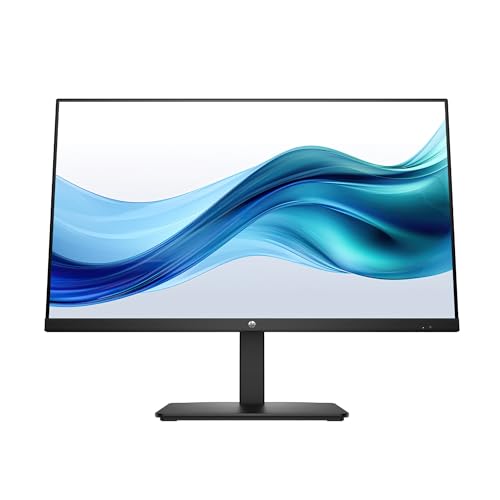
Pros
- IPS panel with 178-degree viewing angles
- 100Hz refresh rate
- HDMI, DisplayPort, and VGA
- Dual 2W built-in speakers
- Eyesafe certification and low-blue-light filter
Cons
- 1300:1 contrast is modest
- Stand adjustment is limited to tilt
- FHD is less dense at 27 inches
Best for: general office use with broad connection support and consistent viewing angles.
The HP 327se is a no-drama office monitor. Its 27-inch IPS panel runs at 1920 by 1080 and lists a 1300:1 contrast ratio, which is lower than every other product here with a stated ratio except the ViewSonic CDE43G3. The benefit is viewing consistency: HP specifies 178-degree horizontal and vertical angles, so colors and brightness should remain more stable when the user is not centered directly in front.
The 100Hz refresh rate is a worthwhile step above standard office motion. Scrolling, dragging windows, and moving through web pages should feel smoother, while the FHD resolution remains easy for common work applications. The three listed video inputs, VGA, HDMI 1.4, and DisplayPort 1.2, are more flexible than the KOORUI's HDMI and VGA-only arrangement. Dual 2W speakers also handle basic meetings and notification audio.
Eye Ease with Eyesafe certification and an always-on low-blue-light filter give the HP a work-focused character. The filter is described as preserving true color, which is more useful than a mode that turns the whole display visibly warmer. The three-sided borderless micro-edge design should also work well in a side-by-side arrangement, even though the stand itself only tilts.
The HP is not the one to buy for dark games or movie watching. The Dell S2725HS has higher stated contrast, 99% sRGB coverage, better stand adjustment, and stronger integrated speakers. The KTC H24B9S is faster and offers broader color claims. HP's case rests on straightforward connectivity, IPS viewing angles, and familiar office ergonomics. It suits a work desk where consistent color and legacy-device support matter more than shadow depth.
10. ViewSonic CDE43G3: Best Large-Format Display

Pros
- Large 43-inch 4K UHD screen
- 500-nit brightness
- Anti-glare surface
- 10W dual speakers
- HDMI, USB-C, VGA, and USB inputs
Cons
- 1200:1 contrast ratio is the lowest stated here
- Much larger than a normal desk monitor
- Built for commercial use rather than high-refresh gaming
Best for: meetings, signage, presentations, and always-on display environments.
The ViewSonic CDE43G3 is technically a monitor-shaped product, but it is aimed at a different job from the other nine. This 43-inch 4K UHD commercial display is designed for meetings, signage, and continuous operation. Its 500-nit brightness and anti-glare clarity are more relevant in a bright conference room than a 27-inch gaming desk, and the large canvas makes presentations readable from farther away.
The stated 1200:1 contrast ratio is the weakest published figure in this roundup. It will not produce the dark-scene depth of the Hikers 27-inch 280Hz, SANSUI 27-inch 240Hz, or KOORUI E2212H. The 4K resolution still provides a detailed image, but the screen's strengths are scale, visibility, and installation flexibility rather than shadow detail.
Connectivity is broad. The listed inputs include HDMI, USB-C, VGA, and USB, which helps it work with newer laptops and older presentation equipment. Dual 10W speakers are better suited to a meeting room than the small speakers in standard monitors. ViewSonic also lists an 8-second warm boot, Android 14 with an upgrade path to Android 16, and compatibility with Crestron, Extron, AMX, and Q-SYS systems.
The 24/7 operating claim reinforces its commercial purpose. It is too large and too specialized for someone shopping for a desk gaming display, and the refresh rate is not stated. The Dell S2725HS is a far more practical office monitor, while the BenQ RD320UA is more appropriate for close-up programming. Pick the ViewSonic only when a large, bright, connected display needs to serve a room rather than a personal workstation.
How to choose best contrast ratio monitor
A contrast ratio matters, but the right monitor also depends on panel type, resolution, brightness, refresh rate, and how the screen will sit in the room.
Native contrast and panel type
Contrast ratio describes the difference between the brightest white and darkest black a panel can show under stated conditions. VA panels generally have an advantage here, which is reflected by the 4000:1 and 5000:1 figures on the Hikers, SANSUI, and KOORUI models. IPS panels such as the HP and KTC tend to offer steadier viewing angles and consistent color, but their stated contrast figures are lower.
Treat the number as a useful comparison point, not a promise of identical real-world performance. Backlight behavior, room lighting, calibration, and screen finish all affect perceived blacks. A high figure is especially useful for movies and dark games, while office users may notice viewing-angle consistency more often.
For dark-scene detail, start with the panel's native contrast, then check brightness and room lighting before trusting the headline number.
Resolution and screen size
Resolution determines how much detail fits on the screen. FHD works well on smaller displays such as the KOORUI E2212H and KTC H24B9S, but 1920 by 1080 spread across 27 inches looks less crisp for text than 2560 by 1440. The Hikers 27-inch 280Hz and Z-Edge 34-inch offer higher resolutions for sharper game geometry and larger workspaces.
Size should match viewing distance. A 43-inch display can be excellent in a meeting room but overwhelming at a normal desk. If you are considering a second screen, how much space a dual-monitor arrangement needs is just as important as the panel's width.
Refresh rate and response
Refresh rate controls how often the screen can update. A 100Hz or 120Hz monitor feels smoother for scrolling than a basic 60Hz model, while 144Hz, 200Hz, 240Hz, and 280Hz are aimed at gaming. The Hikers 27-inch 280Hz leads this group for speed, but a high refresh rate only helps if the computer can produce enough frames.
Response-time claims need context. MPRT 1ms is commonly tied to a blur-reduction mode, while the way a panel transitions between colors can vary. Adaptive-Sync or FreeSync support is useful because it helps the monitor and graphics card stay synchronized when frame rates move up and down.
Brightness and room lighting
Brightness is measured in nits and matters when daylight or overhead lighting hits the screen. The Hikers and SANSUI gaming monitors list 300 nits, the Hikers 27-inch 280Hz lists 350 nits, and the ViewSonic reaches 500 nits. A brighter display is not automatically better in a dark room, where excessive output can make black backgrounds uncomfortable.
Anti-glare coatings can help in bright spaces, while the BenQ RD320UA's Nano Matte panel is designed to reduce reflections. If the screen faces a window, the brightness level a display needs in a bright room deserves attention before the contrast figure.
Stand and connections
A good panel can still be frustrating if it cannot be positioned correctly. The Dell S2725HS supports height, tilt, swivel, and pivot adjustment, while several gaming screens list tilt only. VESA support gives users another route to better positioning, especially on smaller desks.
Check the inputs against the devices you already own. DisplayPort is useful for desktop gaming, HDMI handles consoles and laptops, USB-C can simplify newer laptop setups, and VGA remains relevant for older office hardware. The KOORUI E2212H is the clearest example of why this check matters because it does not support DisplayPort.

Frequently asked questions
What contrast ratio is good for a monitor?
A higher native contrast ratio usually produces deeper blacks and more separation in shadows. The products here range from 1200:1 to 5000:1 in their stated specifications, with VA models generally occupying the higher end. Room lighting and calibration still affect what you see.
Is VA or IPS better for contrast?
VA is usually the stronger choice for native contrast, which is why the VA gaming monitors in this roundup list higher ratios. IPS generally offers more consistent color and brightness from wider viewing angles. Choose based on whether dark-scene depth or off-axis consistency matters more.
Is a high contrast ratio important for gaming?
It is particularly useful in games with dark environments, night maps, or shadow-heavy scenes. A high refresh rate and adaptive synchronization matter just as much for competitive play. The Hikers 27-inch 280Hz combines all three traits more effectively than the office-oriented models.
Does HDR automatically mean better contrast?
No. HDR support can improve compatible content, but the label does not describe the full quality of the backlight or the panel's native black level. Brightness, local dimming, color capability, and contrast all influence the result.
Is 27-inch FHD resolution sharp enough?
It can be perfectly usable for games and ordinary office work, but text is usually sharper at 24 inches or at a higher resolution. The Hikers and SANSUI 27-inch displays prioritize speed and contrast, while the Hikers 27-inch 280Hz adds WQHD resolution for a denser image.
Do built-in speakers affect monitor contrast?
No. Speakers do not change the panel's contrast performance. They can make a monitor more convenient for meetings and casual media, as seen on the Dell S2725HS, HP 327se, and ViewSonic CDE43G3.
Can adjusting brightness improve black levels?
Lowering brightness can make blacks appear less glaring in a dark room, but it does not change the panel's native contrast ratio. Excessive brightness can make dark areas feel washed out, while a poorly lit room can make any monitor seem less impressive. Adjust the display and the surrounding lighting together.

The bottom line
The Best best contrast ratio monitor here is the Hikers 27-inch 280Hz. Its stated 5000:1 contrast ratio, WQHD resolution, 280Hz refresh rate, HDMI 2.1 VRR, and HDR10 make it the most capable choice for gaming and dark scenes. The SANSUI 27-inch 240Hz is the better alternative for someone who prefers a 1500R curve and a more overtly immersive FHD presentation.
For work, the BenQ RD320UA is the more thoughtful pick, with 4K resolution, a Nano Matte panel, coding modes, night protection, and a flexible ergonomic stand. The Dell S2725HS is the practical office choice when height, swivel, pivot, and built-in speakers matter more than maximum contrast.
If you are undecided, choose the Hikers 27-inch 280Hz for gaming, the BenQ RD320UA for programming, and the Dell S2725HS for an adjustable everyday office setup.
As an Amazon Associate we earn from qualifying purchases.